How to resume a download with cURL
Interrupted downloads waste time and bandwidth when a large archive, disk image, or backup already exists partly on disk. Resuming the same file avoids starting again from byte zero after a dropped connection, cancelled terminal session, or short-lived network outage.
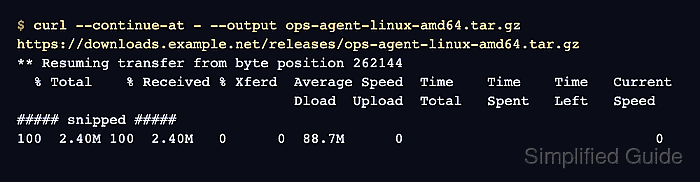
cURL resumes a download with --continue-at - or its short form -C -. The dash tells cURL to read the current local file size and request only the remaining bytes from the server, appending them to the same output file instead of replacing it.
Resume is only safe when the partial local file still belongs to the same remote object and the server accepts byte-range requests. Current cURL documentation also marks --continue-at as incompatible with --range, --no-clobber, and --remove-on-error, so resume jobs need a direct single-file transfer.
Steps to resume a download with cURL:
- Check the partial file size before resuming the transfer.
$ wc -c ops-agent-linux-amd64.tar.gz
262144 ops-agent-linux-amd64.tar.gz
If the original transfer used --output, resume must use the same local filename so cURL can calculate the correct byte offset.
- Check the remote headers and confirm that the server advertises byte-range support for the same file.
$ curl --silent --show-error --head https://downloads.example.net/releases/ops-agent-linux-amd64.tar.gz
HTTP/2 200
Accept-Ranges: bytes
Content-Type: application/gzip
Content-Length: 2787584
ETag: "demo-ops-agent-2787584"
##### snipped #####
The Accept-Ranges: bytes header means the server can continue the transfer from a known byte offset instead of restarting the whole file.
Related: How to show HTTP response headers with cURL
Tool: HTTP Header Checker - Resume the transfer with --continue-at - and the same output filename used for the partial copy.
$ curl --continue-at - --output ops-agent-linux-amd64.tar.gz https://downloads.example.net/releases/ops-agent-linux-amd64.tar.gz
** Resuming transfer from byte position 262144
  % Total    % Received % Xferd  Average Speed  Time    Time    Time   Current
                                 Dload  Upload  Total   Spent   Left   Speed
##### snipped #####
100  2.40M 100  2.40M   0      0  88.7M      0                              0
The --continue-at - form reads the current file size automatically, so there is no need to calculate the resume offset by hand.
If cURL reports Bad download resume, or if the remote file changed since the partial copy was created, delete the partial file and restart from byte zero.
- Compare the completed local byte count with the Content-Length value from the header check before using the file.
$ wc -c ops-agent-linux-amd64.tar.gz
2787584 ops-agent-linux-amd64.tar.gz
Matching byte counts confirm that the resumed file reached the full remote length published by the server.
If the local size does not match the remote length, remove the file and download it again from the start instead of trusting a truncated or mixed result.