How to set Codex approval policy
Codex approval policy controls when a local session stops before it runs a model-generated action. Set it deliberately when repository work needs enough autonomy to run ordinary local commands, but still needs a prompt before Codex crosses the sandbox boundary.
Approval policy is separate from sandbox mode. Use --ask-for-approval for one launch, or save approval_policy in ~/.codex/config.toml when the same prompt behavior should load by default. The current CLI flag values are untrusted, on-request, and never; on-failure can still appear in local help for compatibility, but it is deprecated for new runs.
Pair the policy with a sandbox mode that matches the task. on-request with workspace-write fits normal local editing because Codex can work inside the repository and ask when it needs more reach, while never should stay inside a narrow sandbox or an externally isolated environment.
Steps to set Codex approval policy:
- Review the approval-policy values exposed by the installed Codex CLI.
$ codex --help
##### snipped #####
  -a, --ask-for-approval <APPROVAL_POLICY>
          Configure when the model requires human approval before executing a command

          Possible values:
          - untrusted:  Only run "trusted" commands (e.g. ls, cat, sed) without asking for user
            approval. Will escalate to the user if the model proposes a command that is not in the
            "trusted" set
          - on-failure: DEPRECATED: Run all commands without asking for user approval. Only asks for
            approval if a command fails to execute, in which case it will escalate to the user to
            ask for un-sandboxed execution. Prefer `on-request` for interactive runs or `never` for
            non-interactive runs
          - on-request: The model decides when to ask the user for approval
          - never:      Never ask for user approval Execution failures are immediately returned to
            the model
##### snipped #####
Use untrusted, on-request, or never for new saved configuration. on-failure can still appear in CLI help for compatibility, but current docs mark it as deprecated.
- Create the user config directory when it does not exist.
$ mkdir -p ~/.codex
- Open the Codex config file.
$ vi ~/.codex/config.toml
Use a project-local .codex/config.toml only when the policy should apply to one trusted project instead of every local Codex session.
- Set the saved approval policy.
approval_policy = "on-request"
Use untrusted for stricter command prompting, on-request for normal interactive work, or never for non-interactive runs that must fail instead of waiting for a prompt.
- Pair the approval policy with a sandbox mode.
sandbox_mode = "workspace-write"
never does not remove the sandbox by itself. Full access means combining approval_policy = "never" with sandbox_mode = "danger-full-access", which belongs only in externally isolated environments.
Related: How to set Codex sandbox mode
- Verify the saved config line.
$ grep '^approval_policy' ~/.codex/config.toml
approval_policy = "on-request"
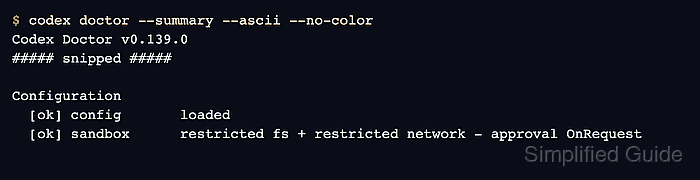
- Check that Codex loads the saved policy.
$ codex doctor --summary --ascii --no-color
Codex Doctor v0.139.0
##### snipped #####

Configuration
  [ok] config       loaded
  [ok] sandbox      restricted fs + restricted network - approval OnRequest
##### snipped #####
Authentication or connectivity notes can appear when login is missing. Resolve them before real work; for the approval-policy check, confirm the Configuration section reports approval OnRequest.
- Start a new Codex session so the saved config loads.
$ codex
Already-running sessions keep their current permissions until they are changed inside the session or restarted.
- Check the active policy from inside the session.
/status
The status panel should show the active approval policy, sandbox mode, writable roots, model, and token usage for the current session.
- Override the policy for one launch when the saved default should stay unchanged.
$ codex --ask-for-approval on-request --sandbox workspace-write
The launch flag wins for that session only and does not edit ~/.codex/config.toml.
- Change the active session policy without restarting when the task changes.
/permissions
The permissions picker updates what Codex can do without asking first for the current session.