How to roll over a Certbot account key
Suspected exposure of a Certbot account key is a credential-rotation problem, not only a certificate-renewal task. The key signs ACME account requests for issuance, renewal, revocation, and contact changes, so future certificate operations need to stop depending on the old account before the maintenance window closes.
ACME defines a same-account key rollover flow, but current Certbot account commands do not expose a native key-change operation. The Certbot replacement path is to register a fresh account, reissue each managed certificate under that account, verify renewal, and keep the old account material isolated only long enough for rollback or deactivation.
Examples use the default production ACME directory, the distro-style /etc/letsencrypt configuration tree, and an Nginx certificate as the reissue example. Use the same authenticator, domain list, --server value, and custom --config-dir settings that the existing certificate uses, because a replacement account must pass domain validation and normal issuance limits again.
Related: Change the Certbot account email
Related: List Certbot certificates
Related: Test Certbot certificate renewal
Steps to replace a Certbot account key with a new account:
- Confirm that Certbot account updates do not include native key rollover.
$ certbot --help update_account
usage:

  certbot update_account --email updated_email@example.com [options]

options:
  -h, --help            show this help message and exit
  -c, --config CONFIG_FILE
                        path to config file (default: /etc/letsencrypt/cli.ini
                        and ~/.config/letsencrypt/cli.ini)

update_account:
  Options for account modification

  -m, --email EMAIL     Email used for registration and recovery contact.
##### snipped #####
If the requirement is a same-account ACME key rollover that preserves the account URL, use an ACME client that implements that flow. The remaining steps replace the account used by Certbot.
- Pause scheduled renewals while the account files and renewal lineages are being changed.
$ sudo systemctl stop certbot.timer
snap installs, containerized Certbot jobs, and cron-based renewals use different schedulers. Pause the scheduler that actually runs certbot renew on this host.
- Record the current account details before changing anything.
$ sudo certbot show_account
Saving debug log to /var/log/letsencrypt/letsencrypt.log
Account details for server https://acme-v02.api.letsencrypt.org/directory:
  Account URL: https://acme-v02.api.letsencrypt.org/acme/acct/123456789
  Account Thumbprint: old-account-thumbprint-example
  Email contact: tls-alerts@example.com
Keep the old account URL and thumbprint in the maintenance record. They are needed if the old account must be deactivated, investigated, or restored for rollback.
- List the certificates that must be reissued under the replacement account.
$ sudo certbot certificates
Saving debug log to /var/log/letsencrypt/letsencrypt.log

- - - - - - - - - - - - - - - - - - - - - - - - - - - - - - - - - - - - - - - -
Found the following certs:
  Certificate Name: host.example.net
    Domains: host.example.net www.host.example.net
    Expiry Date: 2026-09-04 03:51:58+00:00 (VALID: 83 days)
    Certificate Path: /etc/letsencrypt/live/host.example.net/fullchain.pem
    Private Key Path: /etc/letsencrypt/live/host.example.net/privkey.pem
- - - - - - - - - - - - - - - - - - - - - - - - - - - - - - - - - - - - - - - -
Related: List Certbot certificates
- Back up the full Certbot configuration tree.
$ sudo tar --create --gzip --file /root/letsencrypt-account-rollover-backup.tgz --directory /etc letsencrypt
The backup contains certificate private keys and ACME account keys. Store it with the same access controls as the live /etc/letsencrypt tree.
- Move the old production ACME account directory out of the active account path.
$ sudo mv /etc/letsencrypt/accounts/acme-v02.api.letsencrypt.org /root/acme-v02-account-before-rollover
This makes the old account unavailable to normal Certbot commands on the host. Do not run this until the backup exists and the reissue window is approved.
- Register the replacement ACME account.
$ sudo certbot register --non-interactive --email tls-alerts@example.com --agree-tos --no-eff-email
Saving debug log to /var/log/letsencrypt/letsencrypt.log
Account registered.
For a non-default CA or staging account, include the same --server or --staging option used by that account. For external account binding, include the required --eab-kid and --eab-hmac-key values.
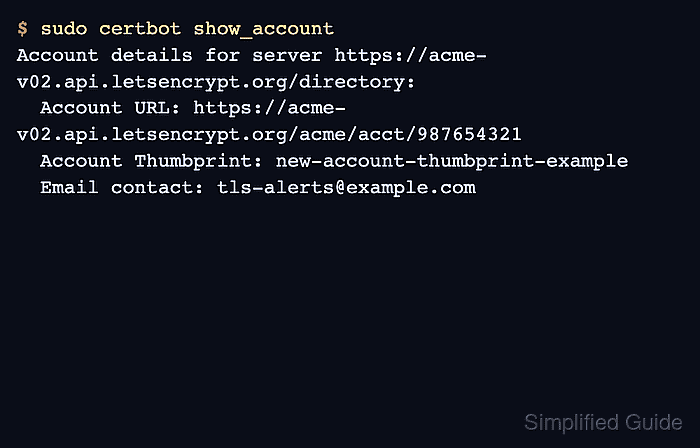
- Confirm that Certbot now shows the replacement account.
$ sudo certbot show_account
Saving debug log to /var/log/letsencrypt/letsencrypt.log
Account details for server https://acme-v02.api.letsencrypt.org/directory:
  Account URL: https://acme-v02.api.letsencrypt.org/acme/acct/987654321
  Account Thumbprint: new-account-thumbprint-example
  Email contact: tls-alerts@example.com
The account URL and thumbprint should differ from the values recorded before the move. If they do not, stop and inspect the account directory before reissuing certificates.
- Reissue each certificate lineage with the same domains and authenticator.
$ sudo certbot certonly --nginx --cert-name host.example.net --domains host.example.net --domains www.host.example.net --force-renewal --non-interactive
Saving debug log to /var/log/letsencrypt/letsencrypt.log
Requesting a certificate for host.example.net and www.host.example.net
Successfully received certificate.
Certificate is saved at: /etc/letsencrypt/live/host.example.net/fullchain.pem
Key is saved at:         /etc/letsencrypt/live/host.example.net/privkey.pem
This certificate expires on 2026-09-15.
Use the plugin and validation method already proven for the site, such as --apache, --webroot with the correct -w path, or the matching DNS plugin. Add --new-key when the certificate private key was also exposed or the lineage was configured to reuse certificate keys.
- Reload services that read the renewed certificate files.
$ sudo systemctl reload nginx
Use the service that terminates TLS for the certificate, such as apache2, nginx, haproxy, or an application-specific reload command.
- Verify that renewal works under the replacement account.
$ sudo certbot renew --dry-run --cert-name host.example.net
Saving debug log to /var/log/letsencrypt/letsencrypt.log
Processing /etc/letsencrypt/renewal/host.example.net.conf
Simulating renewal of an existing certificate for host.example.net and www.host.example.net

Congratulations, all simulated renewals succeeded:
  /etc/letsencrypt/live/host.example.net/fullchain.pem (success)
Related: Test Certbot certificate renewal
- Start scheduled renewals again after every migrated certificate passes the dry run.
$ sudo systemctl start certbot.timer
Run the matching timer, cron, or container scheduler check used on this host before closing the maintenance window.
- Confirm that scheduled renewals are active again.
$ sudo systemctl is-active certbot.timer
active
- Keep the old account backup until the rollback window closes, then handle old-account deactivation separately if required.
If the old account key was compromised, do not simply delete the backup and move on. Deactivate the old account only after the replacement account has issued and dry-run-renewed every certificate that still matters, and revoke certificates separately if any certificate private key was also exposed.
Related: Revoke a Certbot certificate