How to use AWS CLI environment variables
Environment variables let one AWS CLI command use a different profile, Region, credential set, or config file without editing the shared files under ~/.aws. They are especially useful for support shells, CI jobs, and cross-account checks where the wrong default can inspect or change the wrong AWS account.
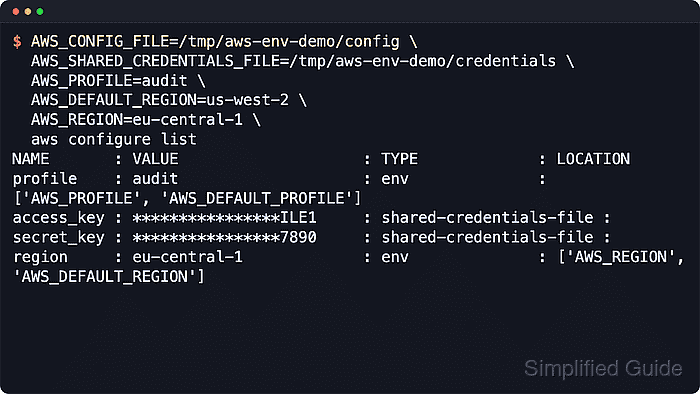
The AWS CLI reads settings from command-line options, environment variables, saved profile files, and credential providers. Current AWS documentation gives command-line options the highest precedence, then environment variables, then profile-backed settings and credential providers. aws configure list is the safest local check because it shows the active source for the profile, access key, secret key, and Region.
Exported variables stay in the current shell and are inherited by child processes. Use a one-command prefix for short overrides, reserve export for a deliberate session-wide selection, and clear profile, Region, and credential variables before returning to normal profile-based work.
Steps to use AWS CLI environment variables:
- Check the active AWS CLI sources before setting overrides.
$ aws configure list
NAME       : VALUE                    : TYPE             : LOCATION
profile    : <not set>                : None             : None
access_key : ****************ABCD     : shared-credentials-file :
secret_key : ****************WXYZ     : shared-credentials-file :
region     : ap-southeast-1           : config-file      : ~/.aws/config
The TYPE column shows whether each value came from a profile file, an environment variable, or no configured source.
- Run one command with a named profile from the environment.
$ AWS_PROFILE=audit aws configure list
NAME       : VALUE                    : TYPE             : LOCATION
profile    : audit                    : env              : ['AWS_PROFILE', 'AWS_DEFAULT_PROFILE']
access_key : ****************E001     : shared-credentials-file :
secret_key : ****************0001     : shared-credentials-file :
region     : eu-west-1                : config-file      : ~/.aws/config
AWS_PROFILE selects a saved profile for that process. Use --profile instead when one service command should ignore an exported shell profile.
- Override the Region for the same profile.
$ AWS_PROFILE=audit AWS_REGION=us-west-2 aws configure list
NAME       : VALUE                    : TYPE             : LOCATION
profile    : audit                    : env              : ['AWS_PROFILE', 'AWS_DEFAULT_PROFILE']
access_key : ****************E001     : shared-credentials-file :
secret_key : ****************0001     : shared-credentials-file :
region     : us-west-2                : env              : ['AWS_REGION', 'AWS_DEFAULT_REGION']
AWS_REGION overrides AWS_DEFAULT_REGION and the saved profile region in AWS CLI v2. Use --region on a service command when only that request should use another Region.
Related: How to set the default Region in AWS CLI - Use raw credential variables for a temporary credential handoff.
$ AWS_PROFILE=audit \
  AWS_ACCESS_KEY_ID=ASIAEXAMPLEENV0001 \
  AWS_SECRET_ACCESS_KEY=<secret-access-key> \
  AWS_SESSION_TOKEN=<session-token> \
  aws configure list
NAME       : VALUE                    : TYPE             : LOCATION
profile    : audit                    : env              : ['AWS_PROFILE', 'AWS_DEFAULT_PROFILE']
access_key : ****************0001     : env              :
secret_key : ****************0001     : env              :
region     : eu-west-1                : config-file      : ~/.aws/config
Raw credential variables override file-backed credentials until they are unset. aws configure list does not display the session token, so temporary credentials still need AWS_SESSION_TOKEN even though only the access key and secret key appear here.
Related: How to assume an IAM role using AWS CLI - Point the command at an alternate config and credentials pair.
$ AWS_CONFIG_FILE=/opt/aws-session/config \
  AWS_SHARED_CREDENTIALS_FILE=/opt/aws-session/credentials \
  AWS_PROFILE=audit \
  aws configure list
NAME       : VALUE                    : TYPE             : LOCATION
profile    : audit                    : env              : ['AWS_PROFILE', 'AWS_DEFAULT_PROFILE']
access_key : ****************E001     : shared-credentials-file :
secret_key : ****************0001     : shared-credentials-file :
region     : eu-west-1                : config-file      : /opt/aws-session/config
Alternate file paths are safer for task-local automation, CI jobs, and customer-specific sessions than overwriting the normal files under ~/.aws.
Related: How to find the AWS CLI config file location
Related: How to find the AWS CLI shared credentials file location - Clear any exported overrides when the shell should return to its normal sources.
$ unset AWS_ACCESS_KEY_ID AWS_SECRET_ACCESS_KEY AWS_SESSION_TOKEN AWS_PROFILE AWS_REGION AWS_DEFAULT_REGION AWS_CONFIG_FILE AWS_SHARED_CREDENTIALS_FILE
One-command prefixes disappear automatically when the command exits. Use unset for values exported into the current shell.
- Confirm the default sources are active again.
$ aws configure list
NAME       : VALUE                    : TYPE             : LOCATION
profile    : <not set>                : None             : None
access_key : ****************ABCD     : shared-credentials-file :
secret_key : ****************WXYZ     : shared-credentials-file :
region     : ap-southeast-1           : config-file      : ~/.aws/config
The values should match the normal default profile or the profile selected by approved shell startup files. If they do not, another exported variable or command wrapper is still overriding the session.