How to hide Apache server signatures
Apache can expose its version, platform, and virtual host name in places that do not help normal visitors but do help routine fingerprinting. Reducing that banner data is a common hardening step because it removes easy clues from response headers and default error pages without changing how the site serves content.
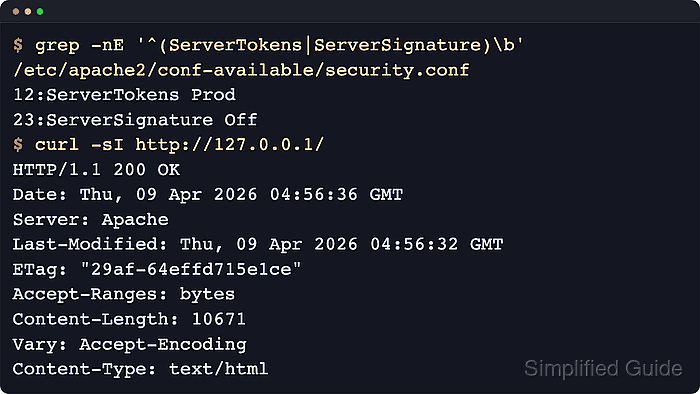
Two directives control what Apache reveals. ServerTokens defines how much detail appears in the Server HTTP response header, while ServerSignature decides whether Apache appends a footer to server-generated pages such as default errors and directory listings. Apache's current documentation also notes that the version detail shown by ServerSignature is controlled by ServerTokens.
Current Debian and Ubuntu packages usually place these directives in the security.conf snippet under /etc/apache2, while RHEL-style packages commonly keep them in httpd.conf or a drop-in under /etc/httpd/conf.d. Test the configuration before you reload it, and check for duplicate directives first because the last active definition wins.
Related: How to locate Apache configuration files
Related: How to test Apache configuration
Related: How to enable or disable Apache modules
Steps to hide Apache server signatures:
- Open a terminal with a user account that can run sudo.
- Change to the enabled Apache snippet directory on Debian or Ubuntu.
$ cd /etc/apache2/conf-enabled
- Check the enabled security snippet for active ServerTokens and ServerSignature settings.
$ grep -nE '^ *Server' security.conf
12:ServerTokens OS
23:ServerSignature On
On Debian and Ubuntu, edit the available copy rather than the enabled symlink. On RHEL-style systems, search /etc/httpd instead.
- Open the available copy of the security snippet.
$ sudoedit ../conf-available/\
security.conf
On RHEL, Rocky Linux, AlmaLinux, CentOS Stream, and Fedora, the matching file is commonly /etc/httpd/conf/httpd.conf or a custom drop-in under /etc/httpd/conf.d.
sudoedit uses $EDITOR and writes the changes as the file is saved.
- Set ServerTokens to Prod and ServerSignature to Off.
ServerTokens Prod
ServerSignature Off
Prod reduces the Server header to Apache, and Off removes the footer that Apache adds to server-generated documents. ServerTokens applies to the entire server, not to individual virtual hosts.
If the same directives are defined in multiple loaded files, Apache uses the last active value it reads.
- Save the file and close the editor.
- Enable the security snippet if the available copy is not already active.
$ sudo a2enconf security
Conf security already enabled
If the enabled security.conf symlink already points to the available file, this command simply confirms that the snippet is active.
- Test the Apache configuration before reloading it.
$ sudo apache2ctl configtest
Syntax OK
A fresh Debian or Ubuntu host can print an AH00558 fully qualified domain name warning before Syntax OK. Fix the warning separately if needed, but Syntax OK still means the configuration parsed successfully.
Use sudo httpd -t or sudo apachectl -t on platforms that do not ship apache2ctl.
Related: How to test Apache configuration
- Reload Apache so it re-reads the updated configuration without a full stop/start cycle.
$ sudo systemctl reload apache2
On RHEL-style packages, the unit name is commonly httpd. When systemd is not managing Apache, use sudo apachectl graceful or the platform-equivalent reload command.
- Confirm that the Server header no longer exposes a version or OS string.
$ curl -sI http://localhost/
HTTP/1.1 200 OK
Server: Apache
##### snipped #####
Content-Type: text/html
Query the public hostname or the same VirtualHost address your clients use when localhost does not hit the site definition you care about.
Tool: HTTP Header Checker
- Confirm that a server-generated error page no longer includes an Apache footer.
$ curl -s http://localhost/does-not-exist
<h1>Not Found</h1>
##### snipped #####
</body></html>
A custom ErrorDocument can return different HTML, but the Apache-generated footer should still be absent when ServerSignature Off is active.