How to configure Apache to log POST request data
When a web form, API endpoint, or webhook fails only for certain payloads, the missing evidence is usually the request body rather than the URL or status code. Standard Apache access logs show the request line, response code, and timing, but they do not record the POST fields that triggered the failure.
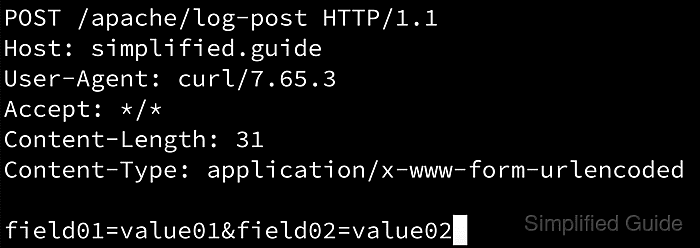
Apache can dump request and response bytes to the error log through mod_dumpio. With DumpIOInput enabled and LogLevel raised for dumpio, Apache writes dumpio_in records that include the request line, headers, and body data after SSL has been decoded.
This is a temporary high-risk debugging change, not a normal logging mode. DumpIOInput and DumpIOOutput are server config directives, so add them in the main server configuration or a global include rather than inside a VirtualHost block. Because the log stream can capture passwords, tokens, cookies, and personal data for every request handled by that Apache instance, keep the window short and remove the directives as soon as you have the sample you need.
Steps to log POST request data in Apache:
- Enable the mod_dumpio module if the server package does not already load it.
$ sudo a2enmod dump_io
On systems without a2enmod, uncomment or add LoadModule dumpio_module modules/mod_dumpio.so in the global Apache configuration tree instead.
- Create a temporary global Apache configuration snippet for the debug window.
$ sudoedit /etc/apache2/conf-available/log-post-debug.conf
On RHEL-style systems, use a file such as /etc/httpd/conf.d/log-post-debug.conf. Use any include file loaded from the main server configuration on Homebrew or source-based builds.
mod_dumpio directives must be loaded at global server scope, not inside a VirtualHost block.
- Add the temporary dumpio directives to that file.
DumpIOInput On
DumpIOOutput Off
LogLevel warn dumpio:trace7
Leaving DumpIOOutput set to Off avoids filling the log with response bodies when you only need the incoming POST data.
These settings log request headers and body data for every request handled by that Apache instance while the snippet is active.
- Enable the temporary configuration file if your packaging requires it.
$ sudo a2enconf log-post-debug
Skip this step on layouts that load /etc/httpd/conf.d or another global include directory automatically.
- Test the Apache configuration syntax before applying the debug change.
$ sudo apache2ctl configtest
Syntax OK
Use sudo httpd -t or sudo apachectl -t on platforms that do not ship apache2ctl.
Related: How to test Apache configuration
- Restart Apache so the module and temporary debug directives are loaded.
$ sudo systemctl restart apache2
Use sudo systemctl restart httpd on RHEL-style packages, or the platform-specific control command that manages your Apache service.
- Send a small POST request to the actual endpoint you are debugging.
$ curl --request POST --data "field01=value01&field02=value02" --silent --output /dev/null --write-out "%{http_code}\n" http://127.0.0.1/
200
Replace http://127.0.0.1/ with the real form handler, API path, or webhook URL when the site does not accept POST requests on the document root.
- Read the error log used by the target site and confirm the payload appears in a dumpio_in entry.
$ sudo grep -F "field01=value01" /var/log/apache2/error.log
[Thu Apr 09 04:08:48.627032 2026] [dumpio:trace7] [pid 107:tid 112] mod_dumpio.c(100): [client 127.0.0.1:59644] mod_dumpio:  dumpio_in (data-HEAP): field01=value01&field02=value02
If the active VirtualHost sets its own ErrorLog file, inspect that file instead of the main server error log.
mod_dumpio also logs the request line and headers, so expect cookies, authorization headers, and other sensitive fields to appear in plain text.
- Remove the temporary configuration snippet after you capture the request body you need.
$ sudo a2disconf log-post-debug
On layouts without a2disconf, delete the temporary include file or comment out the three debug directives.
- Disable mod_dumpio if you enabled it only for this debug session.
$ sudo a2dismod dump_io
Remove or disable the DumpIOInput and DumpIOOutput directives before unloading the module, or the next config test will fail with an Invalid command error.
- Test the Apache configuration again after the cleanup.
$ sudo apache2ctl configtest
Syntax OK
Related: How to test Apache configuration
- Restart Apache to return the server to its normal logging mode.
$ sudo systemctl restart apache2