How to enable OCSP stapling in Apache
OCSP stapling lets Apache send certificate revocation status during the TLS handshake, so clients do not have to contact the certificate authority's OCSP responder separately. That removes an extra lookup from new HTTPS connections and keeps certificate-status checks closer to the web server that is already handling the handshake.
In Apache HTTP Server, mod_ssl retrieves the OCSP response for the active server certificate, stores it in a shared cache, and attaches that cached response when the client requests certificate status. The feature only works when SSLUseStapling is enabled for the relevant TLS virtual host and a global SSLStaplingCache is configured in server context.
On Debian and Ubuntu systems, the apache2 layout uses /etc/apache2, a2enmod, a2enconf, and systemctl for this change. The certificate used by the 443 virtual host must advertise an OCSP responder URL. Apache 2.4.8 and later can load intermediate CA certificates from SSLCertificateFile, so use a full-chain file instead of adding the deprecated SSLCertificateChainFile directive. If the certificate carries the must-staple TLS feature, a missing or stale stapled response can cause supporting clients to reject the handshake.
Related: How to enable or disable Apache modules
Related: How to test Apache configuration
Steps to enable OCSP stapling in Apache:
- Enable the ssl module.
$ sudo a2enmod ssl
Considering dependency mime for ssl:
Module mime already enabled
Considering dependency socache_shmcb for ssl:
Enabling module socache_shmcb.
Enabling module ssl.
See /usr/share/doc/apache2/README.Debian.gz on how to configure SSL and create self-signed certificates.
To activate the new configuration, you need to run:
  service apache2 restart
On current Debian and Ubuntu packages, enabling ssl also enables the required socache_shmcb dependency automatically. On platforms without a2enmod, load both mod_ssl and mod_socache_shmcb with the platform's normal module-loading configuration.
- Create a global stapling cache configuration file.
$ sudo tee /etc/apache2/conf-available/ocsp-stapling.conf >/dev/null <<'EOF'
SSLStaplingCache "shmcb:/run/apache2/stapling_cache(128000)"
EOF
SSLStaplingCache is mandatory for OCSP stapling and must be set in global server context, not inside a <VirtualHost> block.
- Enable the stapling configuration snippet.
$ sudo a2enconf ocsp-stapling
Enabling conf ocsp-stapling.
To activate the new configuration, you need to run:
  service apache2 reload
a2enconf creates the symlink in /etc/apache2/conf-enabled and does not resolve missing module dependencies automatically, so enable ssl first.
- Open the HTTPS virtual host that presents the certificate.
$ sudo vi /etc/apache2/sites-available/host.example.net.conf
Edit the file that contains the <VirtualHost *:443> block for the target site.
- Turn stapling on inside that 443 virtual host and make sure the certificate file includes the intermediate CA certificate.
<VirtualHost *:443>
    ServerName host.example.net
    DocumentRoot /var/www/html

    SSLEngine on
    SSLCertificateFile /etc/apache2/ssl/host.example.net.fullchain.crt
    SSLCertificateKeyFile /etc/apache2/ssl/host.example.net.key

    SSLUseStapling on
</VirtualHost>
On current Apache 2.4, keep the leaf certificate and intermediate CA certificate in the SSLCertificateFile chain file. Do not add a new SSLCertificateChainFile directive for this on modern builds.
- Confirm that the configured certificate advertises an OCSP responder URL.
$ openssl x509 -in /etc/apache2/ssl/host.example.net.fullchain.crt -noout -ocsp_uri
http://ocsp.example-ca.net/
If this command returns no URL, the certificate does not support OCSP lookups and Apache cannot staple a response for it.
- Test the configuration before restarting Apache.
$ sudo apache2ctl configtest
Syntax OK
Do not restart until this returns Syntax OK. Configuration errors can leave the apache2 service stopped or partially reloaded.
Related: How to test Apache configuration
- Restart Apache so the module change, cache definition, and virtual host update are all active together.
$ sudo systemctl restart apache2
If ssl was already enabled and you changed only the stapling config or virtual host, a reload is usually enough. A restart is the safer single path after enabling the module for the first time.
- Verify that Apache is stapling an OCSP response.
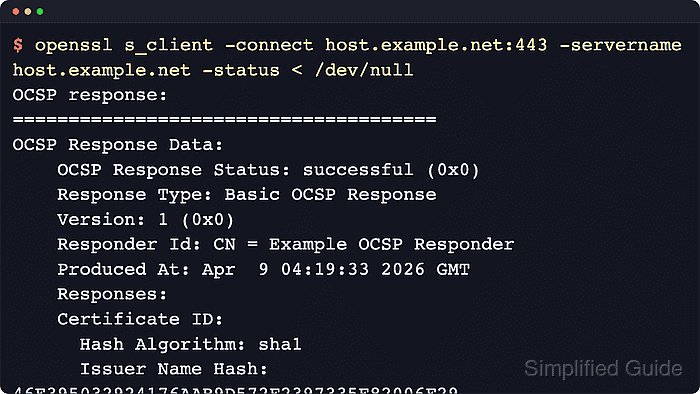
$ openssl s_client -connect host.example.net:443 -servername host.example.net -status < /dev/null
CONNECTED(00000003)
OCSP response:
======================================
OCSP Response Data:
    OCSP Response Status: successful (0x0)
    Response Type: Basic OCSP Response
##### snipped #####
    Cert Status: good
##### snipped #####
Verify return code: 0 (ok)
If the result shows OCSP response: no response sent immediately after the restart, wait a few seconds and try again so Apache has time to fetch the first responder reply. If it still does not staple, the usual causes are a missing intermediate certificate in the SSLCertificateFile chain, blocked outbound HTTP access to the responder, or a certificate that does not publish an OCSP URL.
For certificates with the must-staple TLS feature, do not leave the site in production until this verification step returns a successful OCSP response.
Tool: SSL OCSP Checker