How to enable mod_rewrite in Apache
Enabling mod_rewrite lets Apache rewrite incoming requests before content is served, which is how clean URLs, canonical redirects, and front-controller routing actually work. When the module is missing or disabled, RewriteRule and RewriteCond directives are ignored and applications commonly fall back to broken routes, unexpected 404s, or duplicate URL variants.
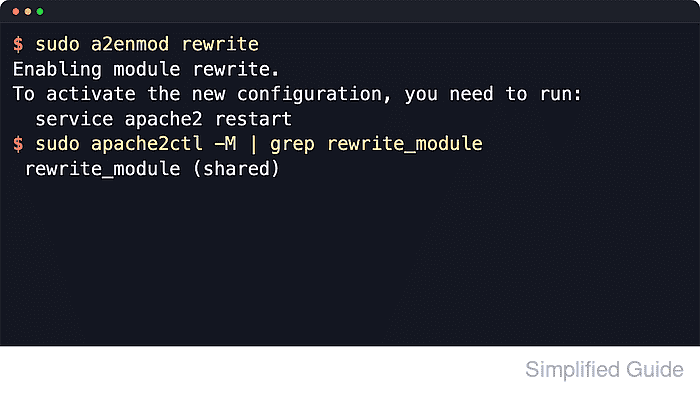
On Debian and Ubuntu, a2enmod enables packaged modules by creating the active symlinks under /etc/apache2/mods-enabled, and apache2ctl can confirm whether rewrite_module is loaded. If rewrite rules live in .htaccess instead of the main site configuration, the matching Directory block also has to permit FileInfo overrides or Apache will skip the distributed file or reject rewrite directives as not allowed in that context.
The steps below assume a packaged Apache install on Ubuntu or Debian with the apache2 service name. Apache documentation still recommends keeping rewrite rules in the main server configuration when possible because .htaccess adds per-request filesystem lookups, but if you need per-directory control you must also keep Options FollowSymLinks enabled for that directory and restart Apache after enabling the module.
Related: How to enable or disable Apache modules
Tool: .htaccess Generator
Steps to enable mod_rewrite in Apache:
- Dump the active virtual host map to identify the site file and document root that should receive the rewrite settings.
$ sudo apache2ctl -S
VirtualHost configuration:
*:80                   host.example.net (/etc/apache2/sites-enabled/000-default.conf:1)
ServerRoot: "/etc/apache2"
Main DocumentRoot: "/var/www/html"
Main ErrorLog: "/var/log/apache2/error.log"
##### snipped #####
The file and line number next to the host usually point to the fastest path back to the correct VirtualHost.
- Check whether rewrite_module is already enabled before changing the module set.
$ sudo a2query -m rewrite
No module matches rewrite
If the query already reports rewrite (enabled by site administrator), keep the module enabled and continue with the override, test, and reload steps.
- Enable mod_rewrite with the packaged helper.
$ sudo a2enmod rewrite
Enabling module rewrite.
To activate the new configuration, you need to run:
  service apache2 restart
a2enmod enables the packaged module by creating the active symlinks under /etc/apache2/mods-enabled.
- Open the matching site file under /etc/apache2/sites-available for editing.
$ sudoedit /etc/apache2/sites-available/000-default.conf
Edit the source file in /sites-available/ rather than the symlink in /sites-enabled/ so future a2ensite or a2dissite changes stay consistent.
- Add or update a Directory block that covers the directory where the .htaccess file will live.
<Directory /var/www/html>
    Options FollowSymLinks
    AllowOverride FileInfo
    Require all granted
</Directory>
Use AllowOverride FileInfo only when the rewrite rules must live in .htaccess. If you can keep the rules directly in the VirtualHost, do that instead and skip distributed overrides.
- Test the Apache configuration before applying the new module and override settings.
$ sudo apache2ctl configtest
AH00558: apache2: Could not reliably determine the server's fully qualified domain name, using 192.0.2.10. Set the 'ServerName' directive globally to suppress this message
Syntax OK
The AH00558 line is a hostname warning, not a syntax failure.
Related: How to test Apache configuration
- Restart the apache2 service so the newly enabled module is loaded into the running server.
$ sudo systemctl restart apache2
After the module is enabled, later rewrite-rule edits can usually be applied with sudo systemctl reload apache2 instead of a full restart.
- Confirm that the loaded module list now includes rewrite_module as a shared module.
$ sudo apache2ctl -M
Loaded Modules:
 core_module (static)
 so_module (static)
 watchdog_module (static)
 http_module (static)
##### snipped #####
 rewrite_module (shared)
##### snipped #####
- Create a temporary directory under the active document root for a rewrite check.
$ sudo mkdir -p /var/www/html/rewrite-test
- Create a temporary .htaccess file with a simple rewrite-driven redirect.
$ sudo tee /var/www/html/rewrite-test/.htaccess >/dev/null <<'EOF'
RewriteEngine On
RewriteRule ^$ / [R=302,L]
EOF
RewriteEngine On is required in each VirtualHost, Directory, or .htaccess context where you want the rules in that context to run.
- Request the test path and confirm the response returns a redirect instead of ignoring the rewrite rule.
$ curl -sI http://127.0.0.1/rewrite-test/
HTTP/1.1 302 Found
Date: Sat, 06 Jun 2026 07:32:17 GMT
Server: Apache/2.4.66 (Ubuntu)
Location: http://127.0.0.1/
Content-Type: text/html; charset=iso-8859-1
If the site only responds on a named virtual host, use that hostname or pass a matching Host header instead of 127.0.0.1.
- Remove the temporary rewrite test directory when the redirect works.
$ sudo rm -rf /var/www/html/rewrite-test
Check the path carefully before running a recursive remove so you do not delete real application content.