How to enable HTTP/2 in Apache
Enabling HTTP/2 in Apache reduces connection overhead and lets one client connection carry many requests at the same time. That usually matters most on pages with many small assets, where fewer parallel TCP or TLS handshakes means faster delivery and less queueing behind older HTTP/1.1 behavior.
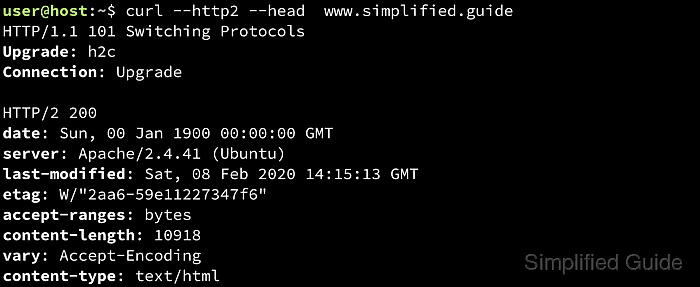
In Apache HTTP Server, HTTP/2 support comes from mod_http2. Browser traffic normally uses h2, which Apache negotiates over TLS with ALPN while still advertising http/1.1 for older clients, whereas h2c is the cleartext form intended for explicit non-browser or internal use cases.
Steps below use the Debian and Ubuntu layout with apache2ctl, a2enmod, and an existing HTTPS virtual host on port 443. HTTP/2 works best with the event or worker MPM, and clients will stay on HTTP/1.1 if the request does not reach the updated TLS virtual host or the server cannot negotiate ALPN.
Related: How to enable or disable Apache modules
Related: How to test Apache configuration
Related: How to manage the Apache web server service
Steps to enable HTTP/2 in Apache:
- Confirm that the installed Apache build is new enough to provide mod_http2.
$ apache2ctl -v
Server version: Apache/2.4.66 (Ubuntu)
Server built:   2026-06-03T15:25:00
mod_http2 is available in Apache 2.4.17 and later. Use httpd -v or apachectl -v on platforms that do not ship apache2ctl.
- Check which multi-processing module Apache is using.
$ sudo apache2ctl -M
Loaded Modules:
 core_module (static)
 so_module (static)
 watchdog_module (static)
 http_module (static)
##### snipped #####
 mpm_event_module (shared)
##### snipped #####
HTTP/2 is supported with prefork, but each connection is effectively limited to one active request at a time there. For normal browser traffic, event or worker is usually the better fit.
- Enable the modules needed for browser-facing HTTP/2 on a Debian or Ubuntu package install.
$ sudo a2enmod ssl http2
Considering dependency mime for ssl:
Module mime already enabled
Considering dependency socache_shmcb for ssl:
Enabling module socache_shmcb.
Enabling module ssl.
See /usr/share/doc/apache2/README.Debian.gz on how to configure SSL and create self-signed certificates.
Enabling module http2.
To activate the new configuration, you need to run:
  service apache2 restart
If the host does not provide a2enmod, load mod_http2 and mod_ssl through the platform's normal LoadModule configuration instead.
- Confirm that the active module set now includes http2, ssl, and a suitable MPM.
$ sudo apache2ctl -M
Loaded Modules:
 core_module (static)
 so_module (static)
 watchdog_module (static)
 http_module (static)
##### snipped #####
 http2_module (shared)
##### snipped #####
 mpm_event_module (shared)
##### snipped #####
 ssl_module (shared)
##### snipped #####
On RHEL-style systems, run sudo httpd -M or sudo apachectl -M instead.
- Open the TLS virtual host that serves the site on port 443.
$ sudo vi /etc/apache2/sites-available/host.example.net.conf
Edit the file that contains the <VirtualHost *:443> block for the target site. On Debian and Ubuntu, active sites are usually symlinked from /etc/apache2/sites-enabled/.
- Add the Protocols directive inside that 443 virtual host.
<VirtualHost *:443>
    ServerName host.example.net
    Protocols h2 http/1.1
    ...
</VirtualHost>
h2 on the TLS virtual host is the common browser-facing configuration. Add h2c only when cleartext HTTP/2 is an intentional requirement for specific clients or internal traffic.
Related: Configuration options for HTTP/2
- Test the configuration before restarting the service.
$ sudo apache2ctl -t
Syntax OK
A syntax check catches bad directives and missing module references before they turn into a failed restart.
Related: How to test Apache configuration
- Restart Apache so the module change and Protocols directive take effect.
$ sudo systemctl restart apache2
Use sudo systemctl restart httpd on most RHEL-style systems.
- Verify that the site negotiates HTTP/2.
$ curl -sS --http2 -I https://host.example.net/
HTTP/2 200
last-modified: Sat, 06 Jun 2026 07:23:16 GMT
etag: "29b0-65390a6a60a43"
accept-ranges: bytes
content-length: 10672
vary: Accept-Encoding
content-type: text/html
date: Sat, 06 Jun 2026 07:23:21 GMT
server: Apache/2.4.66 (Ubuntu)
Use -k only for a self-signed or staging certificate. If the response still shows HTTP/1.1, confirm that the request is reaching the updated 443 virtual host and that the server can negotiate ALPN.