How to configure Apache as a reverse proxy
An Apache reverse proxy lets one public virtual host send selected URL paths to internal HTTP application services. Backend ports stay private while users reach a normal hostname such as proxy.example.net, and the public server remains the place where TLS, logs, access policy, and routing are controlled.
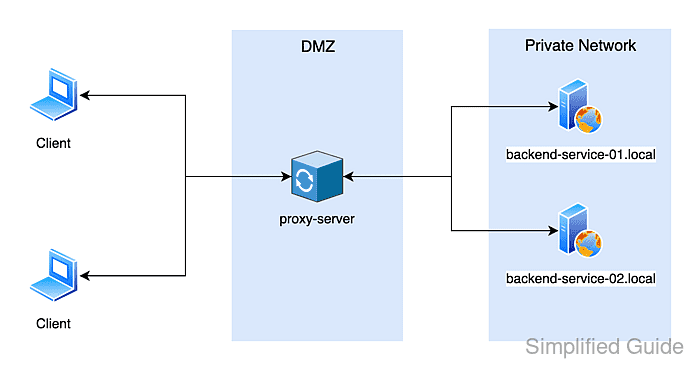
Apache handles HTTP reverse proxying through mod_proxy and mod_proxy_http. ProxyPass maps a public path to a backend URL, and ProxyPassReverse rewrites redirect headers so a backend redirect to its internal host is returned to the browser as a public proxy URL.
On Debian and Ubuntu systems, enable proxy modules with a2enmod, save the virtual host under /etc/apache2/sites-available, enable it with a2ensite, test with apache2ctl -t, and reload apache2. Keep ProxyRequests off for reverse proxy mode, align trailing slashes between public and backend paths, and add cookie rewrite directives only when the backend sets cookies for the wrong domain or path.
Related: Enable or disable Apache modules
Related: Test Apache configuration
Related: Restart Apache service
Tool: Apache Virtual Host Generator
Steps to configure Apache as a reverse proxy:
- Confirm the backend responds from the Apache host.
$ curl -sS http://app.internal.example:8081/
I am app.internal.example
Run this check from the reverse proxy host or another system on the same private network. A backend that works from your laptop may still be unreachable from Apache.
- Enable the mod_proxy and mod_proxy_http modules.
$ sudo a2enmod proxy proxy_http
Enabling module proxy.
Considering dependency proxy for proxy_http:
Module proxy already enabled
Enabling module proxy_http.
To activate the new configuration, you need to run:
  service apache2 restart
Debian and Ubuntu use a2enmod to create module symlinks under /etc/apache2. RHEL-family systems usually load proxy modules from packaged files under /etc/httpd/conf.modules.d instead of using a2enmod.
- Create or edit the virtual host file for the public proxy hostname.
$ sudo vi /etc/apache2/sites-available/proxy.example.net.conf
- Add the reverse proxy mappings to the virtual host.
<VirtualHost *:80>
    ServerName proxy.example.net

    ProxyRequests Off

    ProxyPass        "/app/" "http://app.internal.example:8081/"
    ProxyPassReverse "/app/" "http://app.internal.example:8081/"

    ProxyPass        "/api/" "http://api.example.net:8082/"
    ProxyPassReverse "/api/" "http://api.example.net:8082/"

    ErrorLog /var/log/apache2/proxy.example.net.error.log
    CustomLog /var/log/apache2/proxy.example.net.access.log combined
</VirtualHost>
Directive Purpose ProxyRequests Off Keeps Apache in reverse-proxy mode instead of accepting forward-proxy requests from arbitrary clients. ProxyPass Sends matching public URL paths to the backend URL. ProxyPassReverse Rewrites backend redirect headers back to the public proxy URL. ErrorLog / CustomLog Writes vhost-specific logs for proxy troubleshooting. Add ProxyPreserveHost On only when the backend application must receive proxy.example.net in the HTTP Host header. Apache normally leaves this option Off, which sends the backend host from ProxyPass.
If the backend sets cookies for its internal host or root path, add ProxyPassReverseCookieDomain app.internal.example proxy.example.net or ProxyPassReverseCookiePath / /app/ so browser cookies still match the public URL.
Keep trailing slashes aligned on both sides of each ProxyPass and ProxyPassReverse mapping to avoid broken sub-path routing.
- Enable the new site configuration.
$ sudo a2ensite proxy.example.net.conf
Enabling site proxy.example.net.
To activate the new configuration, you need to run:
  service apache2 reload
Disable 000-default.conf if it would otherwise answer unmatched requests on the same listener.
- Test the Apache configuration syntax.
$ sudo apache2ctl -t
Syntax OK
If AH00558 appears before Syntax OK on a fresh Debian or Ubuntu host, Apache is warning about a missing global ServerName. Fix the warning separately before handoff, but Syntax OK still means the reverse proxy file parsed successfully.
Related: How to test Apache configuration
- Reload the apache2 service to apply the reverse proxy configuration.
$ sudo systemctl reload apache2
The helper output from a2enmod and a2ensite prints service apache2 ... on current Debian and Ubuntu packages, but systemctl reload apache2 is the normal reload command on systemd hosts.
- Request a proxied path through the public Apache hostname.
$ curl -sS http://proxy.example.net/app/
I am app.internal.example
A response from the backend service through proxy.example.net proves Apache is routing that public path to the internal URL.
- Check a backend redirect through the proxy when the application sends redirects.
$ curl -sS -D - -o /dev/null http://proxy.example.net/app/login
HTTP/1.1 302 Found
##### snipped #####
Location: http://proxy.example.net/app/dashboard
##### snipped #####
If the Location header still points to app.internal.example or its backend port, review the matching ProxyPassReverse rule for that path.