How to read and write S3 data with Spark
Object storage is a common boundary between Apache Spark jobs and downstream data lake readers. The S3A connector lets Spark use s3a:// paths for input and output, so a DataFrame job can move between a local smoke test, a scheduled submit, and a shared bucket prefix without changing the DataFrame API.
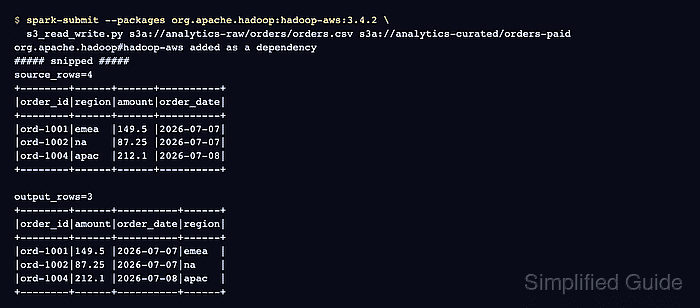
Spark reaches Amazon S3 and S3-compatible storage through Hadoop filesystem libraries on the driver and executor classpaths. The hadoop-aws package version must match the Hadoop runtime bundled with Spark, and credentials should reach the JVM through environment variables, an IAM or runtime identity, or a Hadoop credential provider instead of hardcoded Python values.
A scratch bucket or isolated prefix keeps the first run reversible. The job reads a small CSV object, filters paid orders, writes partitioned Parquet output to a separate S3A prefix, and reads the output back; overwrite mode can replace objects under the output prefix.
Related: How to add packages to a Spark job
Related: How to run PySpark locally
Related: How to read and write Parquet files with Spark
Steps to read and write S3 data with Spark:
- Choose the S3A input path, output prefix, endpoint region, and connector package.
Input CSV: s3a://analytics-raw/orders/orders.csv
Output prefix: s3a://analytics-curated/orders-paid
Endpoint region: us-east-1
S3A package: org.apache.hadoop:hadoop-aws:3.4.2
Use an input object that already exists and an empty or disposable output prefix. Replace 3.4.2 when your Spark distribution bundles a different Hadoop runtime.
- Expose S3 credentials to the Spark driver and executors.
Use environment variables, an IAM or runtime identity, or a Hadoop credential provider. Do not place access keys in the Python script or commit them with Spark configuration.
- Save the read/write job as s3_read_write.py.
- s3_read_write.py
import sys

from pyspark.sql import SparkSession
from pyspark.sql.functions import col
from pyspark.sql.types import DoubleType, StringType, StructField, StructType

if len(sys.argv) != 3:
    raise SystemExit("Usage: s3_read_write.py <source-s3a-csv> <output-s3a-parquet>")

source_path = sys.argv[1]
output_path = sys.argv[2]

spark = (
    SparkSession.builder
    .appName("sg-s3-read-write")
    .config("spark.ui.showConsoleProgress", "false")
    .getOrCreate()
)
spark.sparkContext.setLogLevel("ERROR")

schema = StructType([
    StructField("order_id", StringType(), False),
    StructField("region", StringType(), False),
    StructField("amount", DoubleType(), False),
    StructField("status", StringType(), False),
    StructField("order_date", StringType(), False),
])

orders = (
    spark.read
    .option("header", "true")
    .schema(schema)
    .csv(source_path)
)

paid_orders = (
    orders
    .where(col("status") == "paid")
    .select("order_id", "region", "amount", "order_date")
)

print(f"source_rows={orders.count()}")
paid_orders.orderBy("order_id").show(truncate=False)

(
    paid_orders
    .coalesce(1)
    .write
    .mode("overwrite")
    .partitionBy("region")
    .parquet(output_path)
)

read_back = spark.read.parquet(output_path).orderBy("order_id")

print(f"output_rows={read_back.count()}")
read_back.show(truncate=False)

spark.stop()
The script takes the source and output paths as arguments so the same file can move from local[2] to a cluster submit command later.
- Submit the job with the S3A connector package and Hadoop S3A settings.
$ spark-submit \
  --master local[2] \
  --name sg-s3-read-write \
  --conf spark.ui.showConsoleProgress=false \
  --conf spark.hadoop.fs.s3a.endpoint=https://s3.us-east-1.amazonaws.com \
  --conf spark.hadoop.fs.s3a.endpoint.region=us-east-1 \
  --conf spark.hadoop.fs.s3a.aws.credentials.provider=software.amazon.awssdk.auth.credentials.EnvironmentVariableCredentialsProvider \
  --packages org.apache.hadoop:hadoop-aws:3.4.2 \
  s3_read_write.py \
  s3a://analytics-raw/orders/orders.csv \
  s3a://analytics-curated/orders-paid
org.apache.hadoop#hadoop-aws added as a dependency
##### snipped #####
source_rows=4
+--------+------+------+----------+
|order_id|region|amount|order_date|
+--------+------+------+----------+
|ord-1001|emea  |149.5 |2026-07-07|
|ord-1002|na    |87.25 |2026-07-07|
|ord-1004|apac  |212.1 |2026-07-08|
+--------+------+------+----------+

output_rows=3
+--------+------+----------+------+
|order_id|amount|order_date|region|
+--------+------+----------+------+
|ord-1001|149.5 |2026-07-07|emea  |
|ord-1002|87.25 |2026-07-07|na    |
|ord-1004|212.1 |2026-07-08|apac  |
+--------+------+----------+------+
--packages resolves the connector and its transitive AWS SDK dependencies for this job. For MinIO or another private S3-compatible endpoint, replace the endpoint value and add spark.hadoop.fs.s3a.path.style.access=true; use plain HTTP only in an isolated test endpoint.
- Remove the local Spark job file after the read-back output matches the expected rows.
$ rm s3_read_write.py