How to enable the Spark History Server
The Spark History Server replays event logs from completed Apache Spark applications so job, stage, SQL, and environment pages remain available after the driver exits. It is useful on client nodes and cluster gateways where live application UIs disappear but operators still need to inspect finished work.
The server reads a filesystem-backed event-log directory through spark.history.fs.logDirectory. Applications must write event logs to that same URI before they start, using spark.eventLog.enabled and spark.eventLog.dir, otherwise the server opens with no completed applications to show.
A local file:///tmp/sg-spark-events directory proves the flow on one machine. Shared clusters normally use HDFS or another Hadoop-compatible storage URI so drivers, executors, and the history server can all reach the same event-log files.
Related: How to enable Spark event logging
Related: How to open the Apache Spark web UI
Related: How to view Apache Spark logs
Steps to enable the Spark History Server:
- Choose the event-log URI and history-server port.
History server log directory: file:///tmp/sg-spark-events
History server UI: http://localhost:18080
Event logging property: spark.eventLog.dir=file:///tmp/sg-spark-events
The event-log URI must be readable by the history server and writable by the Spark applications. A local file:// path works only when both processes use the same filesystem.
- Save a small Spark job as sg_history_server_check.py for the completed-application check.
from pyspark.sql import SparkSession

spark = SparkSession.builder.getOrCreate()
spark.sparkContext.setLogLevel("ERROR")

count = spark.range(0, 10).count()
app_id = spark.sparkContext.applicationId
event_log_dir = spark.conf.get("spark.eventLog.dir")

spark.stop()

print(f"history_event_log_dir={event_log_dir}")
print(f"application_id={app_id}")
print(f"range_count={count}")
print("spark_stopped=true")
The script stops Spark cleanly so the event log is closed and ready for replay.
- Create the local event-log directory.
$ mkdir -p /tmp/sg-spark-events
For HDFS or object storage, create the equivalent shared directory with permissions that let Spark applications write logs and let the history server read them.
- Submit the check job with event logging enabled.
$ spark-submit \
  --master local[2] \
  --name sg-history-server-check \
  --conf spark.ui.showConsoleProgress=false \
  --conf spark.eventLog.enabled=true \
  --conf spark.eventLog.dir=file:///tmp/sg-spark-events \
  sg_history_server_check.py
##### snipped #####
history_event_log_dir=file:///tmp/sg-spark-events
application_id=local-1783373514766
range_count=10
spark_stopped=true
For recurring jobs, put spark.eventLog.enabled and spark.eventLog.dir in the loaded spark-defaults.conf file instead of repeating them on every submission.
Related: How to enable Spark event logging - List the event-log directory for the completed application.
$ ls /tmp/sg-spark-events
eventlog_v2_local-1783373514766
The eventlog_v2_ directory contains the application status and event files that the history server replays.
- Create the Spark configuration directory when it is not already present.
$ sudo mkdir -p /etc/spark
- Add the history-server properties.
spark.history.fs.logDirectory file:///tmp/sg-spark-events
spark.history.ui.port 18080
spark.history.fs.update.interval 5s
Save these settings in /etc/spark/history-server.properties. Use the same event-log URI that the Spark applications write. The default history-server port is 18080, and the update interval controls how often the server scans for new or changed event logs.
Related: How to configure Spark defaults - Start the Spark History Server with the properties file.
$ "$SPARK_HOME"/sbin/start-history-server.sh --properties-file /etc/spark/history-server.properties
starting org.apache.spark.deploy.history.HistoryServer, logging to /var/log/spark/spark-history-server.out
Use the sbin directory from the active Spark installation. The daemon log path depends on SPARK_LOG_DIR and the user that starts the server.
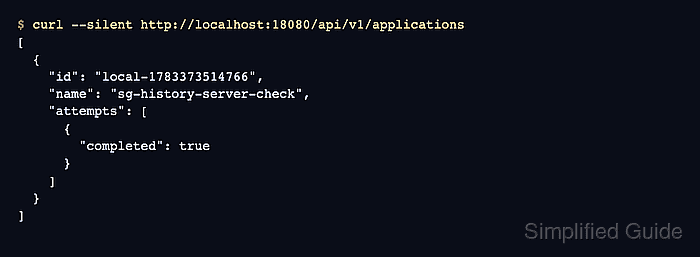
- Query the history-server REST API for completed applications.
$ curl --silent http://localhost:18080/api/v1/applications
[
  {
    "id": "local-1783373514766",
    "name": "sg-history-server-check",
    "attempts": [
      {
        "completed": true
      }
    ]
  }
]
The same completed application should appear in the browser at http://localhost:18080 after the history server scans the event-log directory.
Related: How to open the Apache Spark web UI - Remove the temporary check job after the application appears.
$ rm sg_history_server_check.py
Keep the event-log directory and history-server configuration while completed Spark applications should remain browsable.