Deep links move an iOS app from an outside URL into a specific screen or state, so a UI test should prove the operating-system handoff and the in-app route. XCUITest can open a custom URL scheme against the app under test and assert the route-specific UI that appears afterward.
The direct XCUIApplication.open(_:) path fits app-owned schemes such as myapp://orders/123. It avoids driving Safari or Messages just to pass a URL into the app, which keeps the test focused on the app's routing code instead of another application's controls.
The app needs a registered URL scheme, deterministic test data, and stable accessibility identifiers on the destination screen before the assertion is meaningful. Universal links that depend on associated domains or default-browser routing should use a separate system-handoff check, because a custom scheme test does not prove the web association file or domain ownership.
Related: How to write a first XCUITest UI test
Related: How to use launch arguments in XCUITest
Steps to test a deep link with XCUITest:
- Choose one custom-scheme URL and one route-specific assertion.
URL: myapp://orders/123
Expected screen identifier: order-detail-screen
Expected route value: 123
Use a route backed by local fixtures or test data so the UI result does not depend on production accounts, push notifications, or a real payment or sign-in callback.
- Confirm the app target registers the custom URL scheme.
- Info.plist
<key>CFBundleURLTypes</key>
<array>
  <dict>
    <key>CFBundleURLName</key>
    <string>com.example.myapp</string>
    <key>CFBundleURLSchemes</key>
    <array>
      <string>myapp</string>
    </array>
  </dict>
</array>
The scheme is the part before ://. A URL such as myapp://orders/123 must match the string registered in the app target that the UI test launches.
- Expose stable identifiers on the destination screen.
- OrderDetailView.swift
Text("Order details")
    .accessibilityIdentifier("order-detail-screen")

Text(order.id)
    .accessibilityIdentifier("order-id")
Accessibility identifiers are better than visible titles for route assertions because localized labels and marketing copy can change without changing the screen's automation contract.
- Add a focused UI test that opens the URL in the MyAppUITests target.
- DeepLinkUITests.swift
import XCTest

final class DeepLinkUITests: XCTestCase {
    func testOrderDeepLinkOpensOrderDetail() throws {
        let app = XCUIApplication()
        let deepLink = URL(string: "myapp://orders/123")!

        app.open(deepLink)

        XCTAssertTrue(
            app.wait(for: .runningForeground, timeout: 10),
            "App did not enter the foreground after opening \(deepLink.absoluteString)"
        )

        let screen = app.staticTexts["order-detail-screen"]
        XCTAssertTrue(
            screen.waitForExistence(timeout: 10),
            "Failed to find order-detail-screen after opening \(deepLink.absoluteString)"
        )

        let orderID = app.staticTexts["order-id"]
        XCTAssertTrue(orderID.waitForExistence(timeout: 5))
        XCTAssertEqual(orderID.label, "123")
    }
}
app.open(_:) opens the app with the URL. The assertions prove that the route handler displayed the order detail screen and the expected route value.
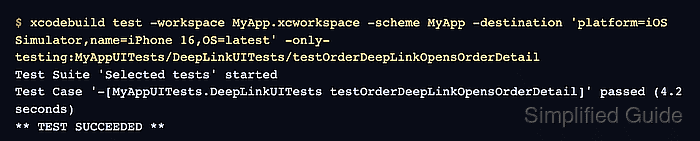
- Run only the deep-link UI test on an iOS Simulator.
$ xcodebuild test \
  -workspace MyApp.xcworkspace \
  -scheme MyApp \
  -destination 'platform=iOS Simulator,name=iPhone 16,OS=latest' \
  -only-testing:MyAppUITests/DeepLinkUITests/testOrderDeepLinkOpensOrderDetail
Test Suite 'Selected tests' started
Test Case '-[MyAppUITests.DeepLinkUITests testOrderDeepLinkOpensOrderDetail]' passed (4.2 seconds)
** TEST SUCCEEDED **
Use the real workspace, scheme, simulator name, and UI test target from the project. Apple documents focused test identifiers as the test target, test class, and test method separated by slashes.
If the app launches but order-detail-screen never appears, treat the result as a routing failure. The URL scheme may be registered correctly while the route parser, fixture data, or destination screen is still wrong.

Mohd Shakir Zakaria is a cloud architect with deep roots in software development and open-source advocacy. Certified in AWS, Red Hat, VMware, ITIL, and Linux, he specializes in designing and managing robust cloud and on-premises infrastructures.


