When a renewal, transfer, ownership, or abuse handoff depends on the registration sponsor, check the registrar before chasing DNS hosting or web hosting records. The registrar is the party that normally controls the domain account, transfer locks, renewal path, and registrar-side support route.
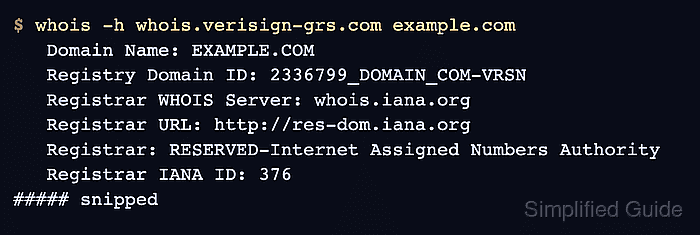
Legacy WHOIS can return a thin IANA record first, so a registrar check works best against the registry WHOIS server for the domain's top-level domain or against a response whose referral has already been followed. For a .com domain, the Verisign registry response exposes the registrar name, registrar WHOIS server, registrar URL, and Registrar IANA ID in one short block.
RDAP is the structured confirmation path when WHOIS fields are sparse, redacted, or needed for a handoff note. In an RDAP response, the registrar appears as an entity with the registrar role, and publicIds can carry the IANA Registrar ID; contact fields can still be blank or redacted.
Tool: WHOIS / RDAP Lookup
Related: How to query a domain with whois
Related: How to query RDAP for a domain
Related: How to check domain privacy with whois
Related: How to read domain status codes from whois
Steps to check a domain registrar with whois:
- Query the registry WHOIS server for the domain.
$ whois -h whois.verisign-grs.com example.com
   Domain Name: EXAMPLE.COM
   Registry Domain ID: 2336799_DOMAIN_COM-VRSN
   Registrar WHOIS Server: whois.iana.org
   Registrar URL: http://res-dom.iana.org
   Updated Date: 2026-01-16T18:26:50Z
   Creation Date: 1995-08-14T04:00:00Z
   Registry Expiry Date: 2026-08-13T04:00:00Z
   Registrar: RESERVED-Internet Assigned Numbers Authority
   Registrar IANA ID: 376
   Registrar Abuse Contact Email:
   Registrar Abuse Contact Phone:
   Domain Status: clientDeleteProhibited https://icann.org/epp#clientDeleteProhibited
   Domain Status: clientTransferProhibited https://icann.org/epp#clientTransferProhibited
   Domain Status: clientUpdateProhibited https://icann.org/epp#clientUpdateProhibited
##### snipped
The example uses the .com registry server. For another TLD, find the correct registry WHOIS server first or follow the referral returned by the first lookup.
Related: How to find a TLD WHOIS server
Related: How to follow a WHOIS referral server - Read the registrar fields as one evidence block.
   Registrar WHOIS Server: whois.iana.org
   Registrar URL: http://res-dom.iana.org
   Registrar: RESERVED-Internet Assigned Numbers Authority
   Registrar IANA ID: 376
Use the IANA ID when registrar brand text, reseller names, or support portals do not match exactly. For example.com, the reserved sponsor is expected; for an ordinary domain, compare the registrar name and ID with the account or transfer record.
- Check the registrar abuse fields when the task is an incident or complaint.
   Registrar Abuse Contact Email:
   Registrar Abuse Contact Phone:
Blank registrar abuse fields mean the registry WHOIS response did not publish a value. Check the registrar WHOIS server, the RDAP response, or the registrar site before concluding there is no public abuse route.
- Confirm the registrar entity with RDAP when the result needs a structured source.
$ curl -fsSL https://rdap.org/domain/example.com | python3 -m json.tool
{
    "objectClassName": "domain",
    "ldhName": "EXAMPLE.COM",
    "entities": [
        {
            "objectClassName": "entity",
            "handle": "376",
            "roles": [
                "registrar"
            ],
            "publicIds": [
                {
                    "type": "IANA Registrar ID",
                    "identifier": "376"
                }
            ],
            "vcardArray": [
                "vcard",
                [
                    [
                        "fn",
                        {},
                        "text",
                        "RESERVED-Internet Assigned Numbers Authority"
                    ]
                ]
            ]
        }
    ]
}
The RDAP response can contain more fields than shown here. Match the registrar role, IANA Registrar ID, and formatted name; do not copy registrant or personal contact fields into shared notes unless they are approved for that audience.
Related: How to query RDAP for a domain
Related: How to sanitize whois contact data - Compare the registrar with the expected account or support path.
Domain: example.com
Registrar: RESERVED-Internet Assigned Numbers Authority
IANA Registrar ID: 376
Source: Verisign WHOIS and RDAP registrar entity
Next action: match the registrar account or support process
A mismatch can mean the domain moved, the wrong domain was queried, a reseller relationship hides the expected brand, or the team is looking at a DNS provider instead of the registrar.
- Verify the registrar check result.
A complete result records the queried domain, source used, registrar name, IANA ID or registrar WHOIS server, any public registrar contact path, and a note that DNS hosting or web hosting was not treated as registrar ownership.

Mohd Shakir Zakaria is a cloud architect with deep roots in software development and open-source advocacy. Certified in AWS, Red Hat, VMware, ITIL, and Linux, he specializes in designing and managing robust cloud and on-premises infrastructures.


