Check a domain expiration date before renewal, transfer, or account-owner follow-up so the next action is tied to the registry record instead of memory or billing assumptions. Capture the registry expiry timestamp, not a date copied from a disclaimer, registrar promotion, or unrelated account notice.
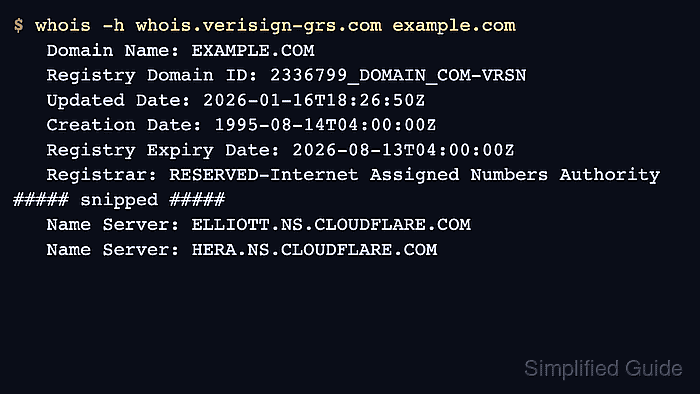
Legacy WHOIS is free-form text. A gTLD record may expose Registry Expiry Date from the registry server, while a default client may stop at an IANA or registrar referral that has no expiration field.
RDAP returns the same lifecycle data as structured JSON and is the authoritative registration-data surface for gTLDs after the WHOIS sunset. Treat both sources as public registration evidence only, because registrar account billing state, auto-renew settings, holds, and grace periods still need account confirmation before a renewal or transfer decision.
Related: How to query a domain with whois
Related: How to read domain status codes from whois
Related: How to save raw whois output
Steps to check a domain expiration date with whois:
- Query the domain with the default WHOIS client.
$ whois example.com
% IANA WHOIS server
% for more information on IANA, visit http://www.iana.org
% This query returned 1 object

domain:       EXAMPLE.COM

organisation: Internet Assigned Numbers Authority

created:      1992-01-01
source:       IANA
If the answer has no expiry label and only points to a registry, registrar, or TLD record, query the referred WHOIS server next.
- Query the registry WHOIS server when the first answer does not include an expiration field.
$ whois -h whois.verisign-grs.com example.com
   Domain Name: EXAMPLE.COM
##### snipped #####
   Registry Expiry Date: 2026-08-13T04:00:00Z
   Registrar: RESERVED-Internet Assigned Numbers Authority
##### snipped #####
Use the server that matches the TLD or referral output. The whois.verisign-grs.com server is for .com and .net registry records, not every domain.
Related: How to find a TLD WHOIS server
Related: How to follow a WHOIS referral server - Read the expiry field from the domain record.
Registry Expiry Date: 2026-08-13T04:00:00Z
Other records may use labels such as Expiration Date, Registry Expiration, Expiry Date, or paid-till depending on the registry.
- Check the status codes beside the date.
Domain Status: clientDeleteProhibited https://icann.org/epp#clientDeleteProhibited
Domain Status: clientTransferProhibited https://icann.org/epp#clientTransferProhibited
Domain Status: clientUpdateProhibited https://icann.org/epp#clientUpdateProhibited
Status codes do not extend registration. Holds, redemption, pending delete, or transfer restrictions can change the renewal or transfer action tied to the expiry date.
- Confirm the expiration event with RDAP when WHOIS is thin or ambiguous.
$ curl -fsSL https://rdap.org/domain/example.com | jq '.events[] | select(.eventAction == "expiration")'
{
  "eventAction": "expiration",
  "eventDate": "2026-08-13T04:00:00Z"
}
Use RDAP as the structured fallback for lifecycle dates, status values, nameservers, and registrar entities.
Related: How to query RDAP for a domain
- Save the WHOIS record when the date supports a renewal ticket or handoff.
$ whois -h whois.verisign-grs.com example.com > example.com.expiry.whois
Related: How to save raw whois output
- Verify the date inside the registrar account before renewal or transfer action.
The success state is the public expiry timestamp, the source that supplied it, any status-code caveat, and a note that registrar-account confirmation is still required.

Mohd Shakir Zakaria is a cloud architect with deep roots in software development and open-source advocacy. Certified in AWS, Red Hat, VMware, ITIL, and Linux, he specializes in designing and managing robust cloud and on-premises infrastructures.


