During a registrar handoff or DNS provider move, a domain can look correct in the registration system while resolvers still follow older nameservers. Compare the registration-side delegation record with the DNS NS answers before changing zone records or troubleshooting the wrong service.
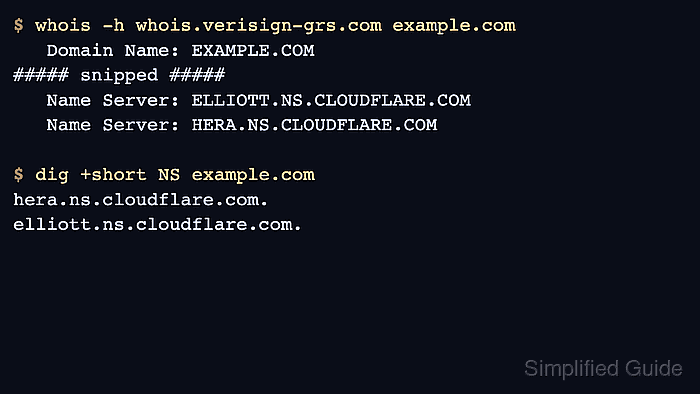
Registration data now usually means RDAP first for gTLDs, with legacy WHOIS still useful when the registry publishes it or when a local tool follows the right referral. The nameserver set in that record shows what the registry has on file, while DNS queries show what resolvers, parent servers, and authoritative servers return for the same zone.
Case, order, and trailing dots do not change a nameserver name. A mismatch is a missing, extra, or different hostname after normalization, and the next check should identify whether the difference sits at the registry, parent delegation, recursive resolver cache, or authoritative DNS server.
Tool: DNS Glue & Delegation Check
Tool: WHOIS / RDAP Lookup
Related: How to check domain nameservers with whois
Related: How to query a domain with whois
Steps to compare DNS and whois records:
- Read the registration-side nameserver set from registry WHOIS or RDAP.
$ whois -h whois.verisign-grs.com example.com
   Domain Name: EXAMPLE.COM
##### snipped #####
   Name Server: ELLIOTT.NS.CLOUDFLARE.COM
   Name Server: HERA.NS.CLOUDFLARE.COM
   DNSSEC: signedDelegation
Plain whois example.com may return only a thin IANA object on some systems. Use RDAP or the TLD registry WHOIS server when the first response does not show domain nameservers.
Related: How to query RDAP for a domain
Related: How to find a TLD WHOIS server - Query DNS for the same zone through a recursive resolver.
$ dig +short NS example.com
hera.ns.cloudflare.com.
elliott.ns.cloudflare.com.
Resolver output may use lowercase names, include trailing dots, and return the names in a different order from the registration record.
- Compare the normalized nameserver sets.
Treat ELLIOTT.NS.CLOUDFLARE.COM and elliott.ns.cloudflare.com. as the same hostname. Only missing, extra, or different hostnames are delegation mismatches.
- Ask the parent zone directly when the resolver answer does not match the registration record.
$ dig +norecurse @a.gtld-servers.net NS example.com
##### snipped #####
;; AUTHORITY SECTION:
example.com.		172800	IN	NS	hera.ns.cloudflare.com.
example.com.		172800	IN	NS	elliott.ns.cloudflare.com.
##### snipped #####
For another TLD, replace a.gtld-servers.net with an authoritative server for that parent zone.
- Check that one delegated nameserver answers for the zone.
$ dig +short SOA example.com @hera.ns.cloudflare.com
elliott.ns.cloudflare.com. dns.cloudflare.com. 2405749864 10000 2400 604800 1800
A matching NS set does not prove the zone is serving records. A timeout, SERVFAIL, or missing SOA from a delegated nameserver points at authoritative DNS rather than registration data.
- Record the layer that explains the comparison.
Matching registration, recursive, parent, and authoritative checks means delegation is aligned. Registration versus parent mismatches point at registrar or registry state, parent versus resolver mismatches point at cache or propagation timing, and matching NS answers with a failed SOA point at the authoritative DNS service.

Mohd Shakir Zakaria is a cloud architect with deep roots in software development and open-source advocacy. Certified in AWS, Red Hat, VMware, ITIL, and Linux, he specializes in designing and managing robust cloud and on-premises infrastructures.


