A self-signed, expired, or privately issued HTTPS certificate can stop wget before any HTTP request is sent. Use an explicit bypass only when the endpoint has already been trusted through another channel and the immediate task is a short diagnostic check or one controlled download.
GNU wget verifies the server certificate and host name by default. The --no-check-certificate switch turns certificate verification failures into warnings for that command, and the check_certificate = off directive gives the same behavior when passed with --execute or placed in a job-local wgetrc file.
Disabling certificate verification removes the HTTPS identity check that protects downloads from a wrong or intercepted server. For internal certificate authorities, prefer adding the correct CA certificate instead of suppressing checks; the examples below use self-signed.badssl.com only to reproduce the warning safely and then return to strict verification.
Steps to ignore SSL certificate errors in wget:
- Reproduce the certificate failure once without any bypass.
$ wget --spider https://self-signed.badssl.com/
Spider mode enabled. Check if remote file exists.
--2026-06-06 02:12:39--  https://self-signed.badssl.com/
Resolving self-signed.badssl.com (self-signed.badssl.com)... 104.154.89.105
Connecting to self-signed.badssl.com (self-signed.badssl.com)|104.154.89.105|:443... connected.
ERROR: The certificate of 'self-signed.badssl.com' is not trusted.
ERROR: The certificate of 'self-signed.badssl.com' doesn't have a known issuer.
The baseline failure confirms that TLS verification is the blocker before you suppress it.
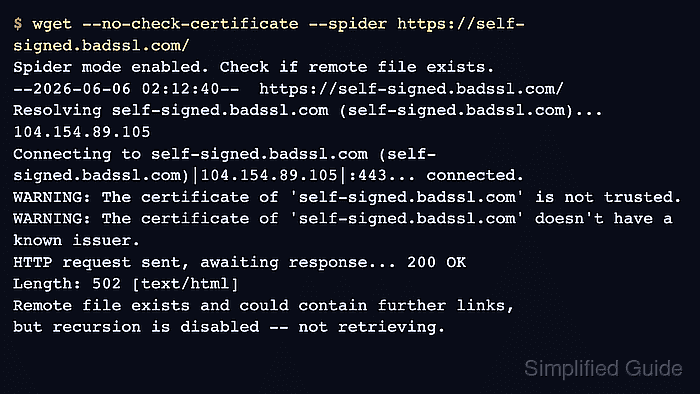
- Retry the same request with --no-check-certificate and confirm the TLS error becomes a warning.
$ wget --no-check-certificate --spider https://self-signed.badssl.com/
Spider mode enabled. Check if remote file exists.
--2026-06-06 02:12:40--  https://self-signed.badssl.com/
Resolving self-signed.badssl.com (self-signed.badssl.com)... 104.154.89.105
Connecting to self-signed.badssl.com (self-signed.badssl.com)|104.154.89.105|:443... connected.
WARNING: The certificate of 'self-signed.badssl.com' is not trusted.
WARNING: The certificate of 'self-signed.badssl.com' doesn't have a known issuer.
HTTP request sent, awaiting response... 200 OK
Length: 502 [text/html]
Remote file exists and could contain further links,
but recursion is disabled -- not retrieving.
Using the flag on one command keeps the unsafe behavior visible and temporary.
- Use the matching wgetrc directive with --execute only when a wrapper or job needs directive syntax instead of the flag.
$ wget --execute "check_certificate = off" --spider https://self-signed.badssl.com/
Spider mode enabled. Check if remote file exists.
--2026-06-06 02:12:42--  https://self-signed.badssl.com/
Resolving self-signed.badssl.com (self-signed.badssl.com)... 104.154.89.105
Connecting to self-signed.badssl.com (self-signed.badssl.com)|104.154.89.105|:443... connected.
WARNING: The certificate of 'self-signed.badssl.com' is not trusted.
WARNING: The certificate of 'self-signed.badssl.com' doesn't have a known issuer.
HTTP request sent, awaiting response... 200 OK
Length: 502 [text/html]
Remote file exists and could contain further links,
but recursion is disabled -- not retrieving.
- Download the page only after you have decided the insecure request is acceptable for this one task.
$ wget --no-check-certificate --output-document=self-signed.badssl.html https://self-signed.badssl.com/
--2026-06-06 02:12:44--  https://self-signed.badssl.com/
Resolving self-signed.badssl.com (self-signed.badssl.com)... 104.154.89.105
Connecting to self-signed.badssl.com (self-signed.badssl.com)|104.154.89.105|:443... connected.
WARNING: The certificate of 'self-signed.badssl.com' is not trusted.
WARNING: The certificate of 'self-signed.badssl.com' doesn't have a known issuer.
HTTP request sent, awaiting response... 200 OK
Length: 502 [text/html]
Saving to: 'self-signed.badssl.html'

     0K                                                       100% 11.4M=0s

2026-06-06 02:12:45 (11.4 MB/s) - 'self-signed.badssl.html' saved [502/502]
Do not use this mode for credentials, private artifacts, or untrusted networks because wget is no longer verifying server identity.
- Remove the downloaded test file when the check is finished.
$ rm self-signed.badssl.html
- Run the plain command again and confirm strict verification is back in place.
$ wget --spider https://self-signed.badssl.com/
Spider mode enabled. Check if remote file exists.
--2026-06-06 02:12:45--  https://self-signed.badssl.com/
Resolving self-signed.badssl.com (self-signed.badssl.com)... 104.154.89.105
Connecting to self-signed.badssl.com (self-signed.badssl.com)|104.154.89.105|:443... connected.
ERROR: The certificate of 'self-signed.badssl.com' is not trusted.
ERROR: The certificate of 'self-signed.badssl.com' doesn't have a known issuer.
After the one-command bypass is gone, later wget commands stop on the certificate again instead of silently trusting it.