Internal package mirrors, staging APIs, and lab download servers often use a private certificate authority instead of the public web PKI. Pointing wget at the correct CA .crt file keeps HTTPS verification enabled and avoids falling back to --no-check-certificate just to make one request work.
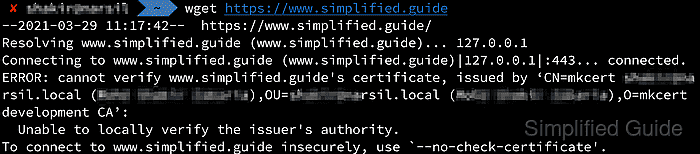
GNU wget uses --ca-certificate to load a CA bundle for one command, and ca_certificate is the matching startup-file directive for repeated use. The CA file must be PEM encoded, and --ca-directory is the better fit only when a hashed certificate directory already exists.
Keep the CA file in an account-private location, confirm its fingerprint before first use, and test the endpoint with an explicit command before saving the same path in ~/.wgetrc. If the server rejects HEAD requests, verify with a small real download instead of --spider.
Steps to configure wget to trust a custom CA CRT file:
- Create a private directory for the custom CA file.
$ install -d -m 700 "$HOME/.local/share/wget/ca"
Use an account-local path when only one job or one account needs the extra CA.
- Copy the CA certificate into that directory with restrictive permissions.
$ install -m 600 ops-download-root-ca.crt "$HOME/.local/share/wget/ca/ops-download-root-ca.crt"
A .crt extension is fine as long as the certificate contents are PEM encoded.
- Inspect the certificate fingerprint and expiry before trusting it for live downloads.
$ openssl x509 -in "$HOME/.local/share/wget/ca/ops-download-root-ca.crt" -noout -subject -issuer -enddate -fingerprint -sha256
subject=CN=Example Operations Download Root CA, O=Example Operations, OU=Artifact Delivery
issuer=CN=Example Operations Download Root CA, O=Example Operations, OU=Artifact Delivery
notAfter=Jun  3 02:14:18 2036 GMT
sha256 Fingerprint=D9:61:7B:E4:95:AB:0C:F3:CE:85:89:11:37:E4:33:3A:DE:78:A6:AC:F4:94:02:A4:BD:CC:CD:0B:B8:72:F7:5E
Match the fingerprint against an out-of-band PKI record before using the file against internal or production endpoints.
- Reproduce the certificate failure once without the custom CA file.
$ wget --spider https://downloads.ops.example.net/packages/agent-2026.03.tar.gz
Spider mode enabled. Check if remote file exists.
--2026-06-06 08:14:20--  https://downloads.ops.example.net/packages/agent-2026.03.tar.gz
Resolving downloads.ops.example.net (downloads.ops.example.net)... 198.51.100.24
Connecting to downloads.ops.example.net (downloads.ops.example.net)|198.51.100.24|:443... connected.
ERROR: The certificate of 'downloads.ops.example.net' is not trusted.
ERROR: The certificate of 'downloads.ops.example.net' doesn't have a known issuer.
A clean baseline failure keeps later DNS, routing, or HTTP problems from being mistaken for a trust-store issue.
- Retry the same request with --ca-certificate and confirm that the endpoint now verifies cleanly.
$ wget --spider --ca-certificate="$HOME/.local/share/wget/ca/ops-download-root-ca.crt" https://downloads.ops.example.net/packages/agent-2026.03.tar.gz
Spider mode enabled. Check if remote file exists.
--2026-06-06 08:14:20--  https://downloads.ops.example.net/packages/agent-2026.03.tar.gz
Loaded CA certificate '/home/deploy/.local/share/wget/ca/ops-download-root-ca.crt'
Resolving downloads.ops.example.net (downloads.ops.example.net)... 198.51.100.24
Connecting to downloads.ops.example.net (downloads.ops.example.net)|198.51.100.24|:443... connected.
HTTP request sent, awaiting response... 200 OK
Length: 1048576 (1.0M) [application/gzip]
Remote file exists.
--spider keeps the proof focused on TLS trust without starting the full transfer.
- Put the tested CA path in a preview startup file before changing the real user profile.
wget-ca-preview.wgetrc
ca_certificate = /home/deploy/.local/share/wget/ca/ops-download-root-ca.crt
The value should be the real absolute path to the CA file for the account that runs wget.
- Load the preview file and confirm that the same request now works without --ca-certificate.
$ wget --config=wget-ca-preview.wgetrc --spider https://downloads.ops.example.net/packages/agent-2026.03.tar.gz
Spider mode enabled. Check if remote file exists.
--2026-06-06 08:14:20--  https://downloads.ops.example.net/packages/agent-2026.03.tar.gz
Loaded CA certificate '/home/deploy/.local/share/wget/ca/ops-download-root-ca.crt'
Resolving downloads.ops.example.net (downloads.ops.example.net)... 198.51.100.24
Connecting to downloads.ops.example.net (downloads.ops.example.net)|198.51.100.24|:443... connected.
HTTP request sent, awaiting response... 200 OK
Length: 1048576 (1.0M) [application/gzip]
Remote file exists.
- Save the same directive in ~/.wgetrc for recurring downloads.
~/.wgetrc
ca_certificate = /home/deploy/.local/share/wget/ca/ops-download-root-ca.crt
Keep only the CA path that the account actually needs instead of turning the profile into a catch-all trust override.
- Run a normal download without --ca-certificate and confirm that the transfer succeeds with the saved profile.
$ wget https://downloads.ops.example.net/packages/agent-2026.03.tar.gz
--2026-06-06 08:14:20--  https://downloads.ops.example.net/packages/agent-2026.03.tar.gz
Loaded CA certificate '/home/deploy/.local/share/wget/ca/ops-download-root-ca.crt'
Resolving downloads.ops.example.net (downloads.ops.example.net)... 198.51.100.24
Connecting to downloads.ops.example.net (downloads.ops.example.net)|198.51.100.24|:443... connected.
HTTP request sent, awaiting response... 200 OK
Length: 1048576 (1.0M) [application/gzip]
Saving to: 'agent-2026.03.tar.gz'

     0K .......... .......... .......... .......... ..........  4%  204M 0s
##### snipped #####
  1000K .......... .......... ....                            100%  439M=0.004s

2026-06-06 08:14:20 (276 MB/s) - 'agent-2026.03.tar.gz' saved [1048576/1048576]
A successful transfer without the flag confirms that the saved ca_certificate setting is active for later wget commands.