Transient failures can break an otherwise valid download long before the remote file is actually unavailable. Explicit retry controls let wget ride through short backend problems, temporary network faults, and brief rate limits without requiring a manual restart.
GNU wget already retries a transfer when the connection drops midway through the current invocation. --tries sets the attempt budget, --waitretry uses linear backoff between failed retrievals, and --retry-on-http-error or --retry-on-host-error extend what wget treats as transient instead of fatal.
Retries still need boundaries. Permanent errors such as a missing file, bad credentials, or a wrong hostname should fail fast, while --tries=0 should be reserved for jobs that are already supervised by an outer timeout or queue. If an earlier run already left a partial file on disk, use -c for that separate resume case instead of assuming it is required for the current retry cycle.
Steps to retry downloads automatically using wget:
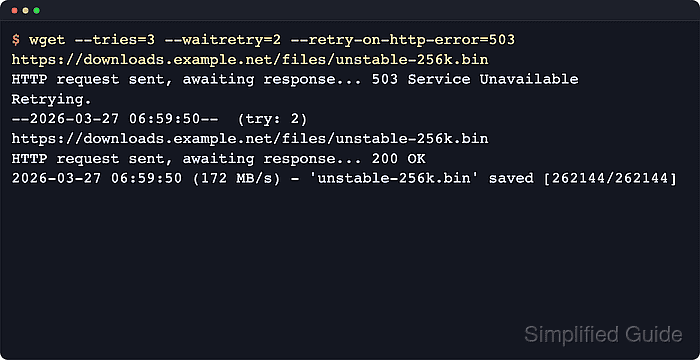
- Retry temporary HTTP 503 failures with an explicit attempt budget and retry delay. The output should show the failed response, Retrying., the next try number, and the final 200 OK response.
$ wget --tries=3 --waitretry=2 --retry-on-http-error=503 https://downloads.example.net/files/unstable-256k.bin
--2026-06-06 02:10:11--  https://downloads.example.net/files/unstable-256k.bin
Resolving downloads.example.net (downloads.example.net)... 203.0.113.50
Connecting to downloads.example.net (downloads.example.net)|203.0.113.50|:443... connected.
HTTP request sent, awaiting response... 503 Service Unavailable
Retrying.

--2026-06-06 02:10:12--  (try: 2)  https://downloads.example.net/files/unstable-256k.bin
Connecting to downloads.example.net (downloads.example.net)|203.0.113.50|:443... connected.
HTTP request sent, awaiting response... 503 Service Unavailable
Retrying.

--2026-06-06 02:10:14--  (try: 3)  https://downloads.example.net/files/unstable-256k.bin
Connecting to downloads.example.net (downloads.example.net)|203.0.113.50|:443... connected.
HTTP request sent, awaiting response... 200 OK
Length: 262144 (256K) [application/octet-stream]
Saving to: 'unstable-256k.bin'

##### snipped
   250K ......                                                100% 11.7M=0.001s

2026-06-06 02:10:14 (445 MB/s) - 'unstable-256k.bin' saved [262144/262144]
--waitretry=2 caps the linear retry backoff at two seconds, so the first two failed retrievals wait one second and then two seconds before the next attempt.
- Broaden the retry list only when the upstream uses specific HTTP codes for short-lived overload or gateway failures.
$ wget --tries=5 --waitretry=10 --retry-on-http-error=429,500,502,503,504 https://downloads.example.net/releases/platform-agent-2026-06-06.tar.xz
GNU Wget documents --retry-on-http-error as a special-case override. Keep the list narrow so permanent client errors still stop the job quickly and overloaded servers are not retried unnecessarily.
- Add host-level retry flags only when DNS or socket failures are expected to clear on their own.
$ wget --tries=5 --waitretry=5 --retry-on-host-error --retry-connrefused https://downloads.example.net/builds/edge-agent-nightly-2026-06-06.tar.gz
These flags can hide real naming, routing, or service-state mistakes, so do not use them as a blanket default for every download.
- Verify that the file recovered successfully before another tool consumes it.
$ ls -lh unstable-256k.bin
-rw-r--r-- 1 user user 256K Jun  6 02:10 unstable-256k.bin
If an older failed run already left a partial file in place, use -c for that separate resume workflow rather than expecting it to change the current retry loop.

Mohd Shakir Zakaria is a cloud architect with deep roots in software development and open-source advocacy. Certified in AWS, Red Hat, VMware, ITIL, and Linux, he specializes in designing and managing robust cloud and on-premises infrastructures.


