A contact page gives visitors a direct path to a real person or team when they are ready to ask a question, request work, confirm business details, or report a problem. When that path is missing or unclear, even a strong website can lose trust because the visitor cannot tell who operates it or how to reach the right contact point.
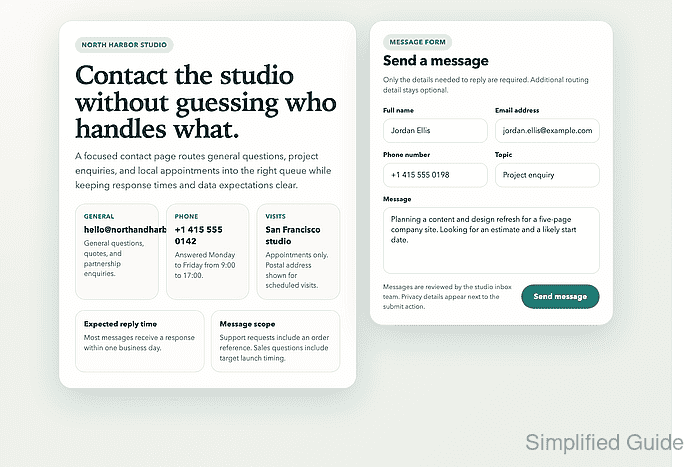
For a webmaster, the page is both content and routing. It needs to show the right contact method, separate general enquiries from requests that belong somewhere else, and deliver messages into a mailbox or support queue that is actually monitored. A short, focused page usually performs better than a long catch-all form that collects extra detail without improving the reply flow.
The page should ask only for the information needed to respond, explain when replies usually arrive, and stay aligned with the site's privacy expectations. When a web form is used, visible labels, appropriate field types such as email and tel, and matching autocomplete values help browsers present better validation and autofill behavior, but the real success check is still an end-to-end submission that lands in the correct inbox.
Steps to create a contact page for a website:
- Define the primary job of the page before choosing its layout.
General enquiries
Sales questions
Customer support
Booking requests
Press or partnership requests
Split the workflow into separate pages only when the site has different teams, response targets, or required details for each request type.
- Place the site identity and main contact route near the top of the page.
Site or business name
One-sentence reason to make contact
Primary email address or contact form
Phone number, address, or office hours only when they are actively monitored
Publishing an unattended phone number, stale address, or unmonitored mailbox weakens trust faster than leaving that detail off the page.
- Keep the form short and ask only for the information needed to reply or route the request.
Name (required)
Email address (required)
Phone number (optional)
Topic (optional)
Message (required)
Use visible labels, mark required fields in text, and prefer email and tel inputs with matching autocomplete values such as name, email, and tel so browsers can assist without guessing.
- Explain what happens after submission before the visitor clicks the submit button.
Messages are reviewed Monday to Friday.
Replies usually arrive within one business day.
Account or billing requests should include an order or invoice reference.
Keep the wording plain, and make sure the page-level explanation matches the site's real response process and privacy handling.
- Add only the lightest spam controls that solve the real abuse pattern.
Server-side rate limiting
Honeypot field
Moderated attachment uploads
CAPTCHA only when automated abuse is already a problem
Heavy friction on a low-volume contact page can block legitimate leads or support requests faster than it stops abuse.
- Link the page from the site's shared navigation so it stays easy to find from any major section.
Header navigation
Footer navigation
About page
Business profile or local listing
Support-heavy sites often reserve the main navigation for a dedicated Support destination and keep the broader contact page in the footer or on the About page.
- Test the published page on desktop and mobile widths and submit a live message before launch.
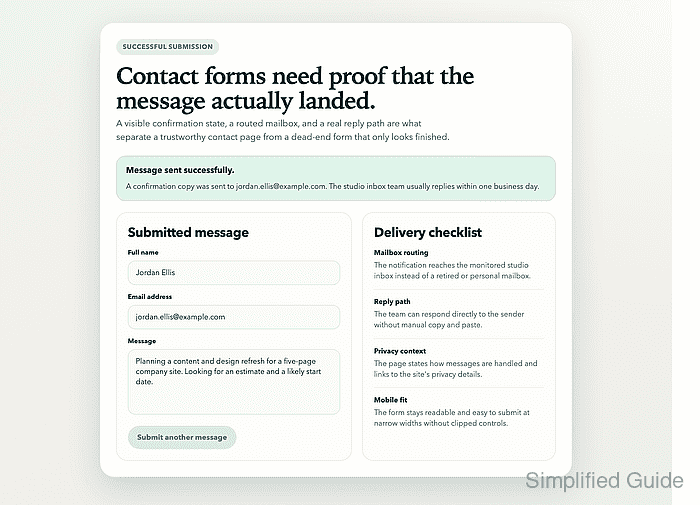
A complete pass checks layout, tap targets, field validation, autofill behavior, success-message wording, mailbox delivery, and the reply path back to the sender.


Mohd Shakir Zakaria is a cloud architect with deep roots in software development and open-source advocacy. Certified in AWS, Red Hat, VMware, ITIL, and Linux, he specializes in designing and managing robust cloud and on-premises infrastructures.


