Path MTU problems usually appear when small packets work but larger transfers, tunnels, backups, or TLS sessions stall. Linux traceroute can test the route with fragmentation disabled and print the smaller packet size reported by the path, which helps separate a route outage from a packet-size bottleneck.
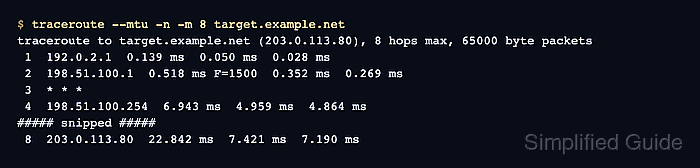
The Linux traceroute implementation supports --mtu for this job. It sends non-fragmented probes and prints an F=NUM annotation when an ICMP fragmentation-needed response reports a lower MTU. tracepath is a useful companion because it is designed around path MTU discovery and summarizes the detected value as pmtu NUM.
Treat the result as directional evidence from the host that runs the probe. Firewalls, routers, VPN gateways, and cloud networks can filter the ICMP messages that carry MTU feedback, so a missing value does not prove there is no MTU problem. Run the check from the affected network path and confirm the boundary with a no-fragment ping when ICMP echo is allowed.
Steps to discover path MTU with traceroute:
- Run an MTU-aware trace to the affected destination.
$ traceroute --mtu -n -m 8 target.example.net
traceroute to target.example.net (203.0.113.80), 8 hops max, 65000 byte packets
 1  192.0.2.1  0.139 ms  0.050 ms  0.028 ms
 2  198.51.100.1  0.518 ms F=1500  0.352 ms  0.269 ms
 3  * * *
 4  198.51.100.254  6.943 ms  4.959 ms  4.864 ms
##### snipped #####
 8  203.0.113.80  22.842 ms  7.421 ms  7.190 ms
--mtu implies non-fragmented probes on Linux traceroute and prints the new MTU once as F=NUM. -n avoids DNS lookups, and -m 8 keeps a first pass short; raise the hop limit when the destination is farther away.
- Read the MTU annotation from the trace output.
2 198.51.100.1 0.518 ms F=1500 0.352 ms 0.269 ms
F=1500 means the path reported a 1500 byte MTU for probes that would otherwise need fragmentation. The router that sends the ICMP message may be one hop before the row where the annotation appears.
- Cross-check the path with tracepath when the trace needs a PMTU summary.
$ tracepath -n -m 8 target.example.net
 1:  192.0.2.1                                            0.139ms
 2:  192.0.2.1                                            0.031ms pmtu 1500
 2:  198.51.100.1                                          0.326ms
 3:  no reply
 4:  198.51.100.254                                        7.216ms
##### snipped #####
     Too many hops: pmtu 1500
     Resume: pmtu 1500
tracepath does not need superuser privileges and prints path MTU changes directly. A Too many hops line only means the chosen -m limit stopped this short sample before the destination.
- Confirm the reported IPv4 payload boundary with a no-fragment ping.
$ ping -c 2 -M do -s 1472 target.example.net
PING target.example.net (203.0.113.80) 1472(1500) bytes of data.
1480 bytes from 203.0.113.80: icmp_seq=1 ttl=63 time=7.63 ms
1480 bytes from 203.0.113.80: icmp_seq=2 ttl=63 time=8.98 ms

--- target.example.net ping statistics ---
2 packets transmitted, 2 received, 0% packet loss, time 1012ms
rtt min/avg/max/mdev = 7.630/8.306/8.983/0.676 ms
For IPv4 ICMP echo, a 1472 byte payload plus 20 bytes of IPv4 header and 8 bytes of ICMP header makes a 1500 byte packet. Use the real destination or service-facing address, not a random internet host, when diagnosing a user symptom.
- Test an oversized no-fragment payload only against an approved target.
$ ping -c 1 -M do -s 2000 target.example.net
PING target.example.net (203.0.113.80) 2000(2028) bytes of data.
ping: sendmsg: Message too long

--- target.example.net ping statistics ---
1 packets transmitted, 0 received, +1 errors, 100% packet loss, time 0ms
Do not use large probe sizes against unrelated systems during an incident. Test the affected host, tunnel endpoint, or service address that the operator owns or is authorized to troubleshoot.
- Record the PMTU evidence before changing tunnel, interface, or MSS settings.
path-mtu: 1500
traceroute-evidence: F=1500
tracepath-evidence: Resume: pmtu 1500
df-ping-check: 1472 byte IPv4 ICMP payload passed; 2000 byte payload failed locally
A lower-than-expected PMTU points to a smaller hop, tunnel overhead, PPPoE, VLAN or carrier encapsulation, or an ICMP filtering problem that prevents normal path MTU discovery. Re-run the same checks from the affected client side after any MTU or MSS change.
Tool: MTU MSS Calculator

Mohd Shakir Zakaria is a cloud architect with deep roots in software development and open-source advocacy. Certified in AWS, Red Hat, VMware, ITIL, and Linux, he specializes in designing and managing robust cloud and on-premises infrastructures.


