Mobile inference moves a trained model from a server-side artifact into code that runs inside an Android app process. For a TFLite flatbuffer, the deployment handoff is the point where the app packages the model asset, feeds tensors in the trained order, and proves the device returns the same result as the desktop smoke test.
Google now brands the runtime as LiteRT, but the deployed file is still a .tflite artifact and existing TensorFlow Lite terminology remains common around the format. Current Android projects use the standalone LiteRT Maven package and the Kotlin CompiledModel API, while the Python validation side can use the ai-edge-litert interpreter package to inspect the same flatbuffer before it enters the app.
Start with a converted model whose input shape, dtype, and preprocessing contract are already accepted. Keep one four-feature float32 row in both the Python smoke test and the Android runner so asset packaging, tensor order, and runtime output can be checked before UI work or accelerator tuning hides a mismatch.
Steps to deploy a TFLite model for Android inference:
- Install the standalone LiteRT Python interpreter in the model-validation environment.
$ python3 -m pip install --upgrade ai-edge-litert
ai-edge-litert 2.1.5 matches the current LiteRT release line used by the Android runtime in this deployment.
- Save a quick LiteRT smoke test as inspect-support-score-litert.py in the same directory as support_score.tflite.
- inspect-support-score-litert.py
import importlib.metadata
import os
from pathlib import Path

devnull_fd = os.open(os.devnull, os.O_WRONLY)
os.dup2(devnull_fd, 2)
os.close(devnull_fd)

import numpy as np
from ai_edge_litert.interpreter import Interpreter

MODEL_PATH = Path("support_score.tflite")
SAMPLE_INPUT = np.array(
    [[0.12, 0.24, 0.18, 0.30]],
    dtype=np.float32,
)

interpreter = Interpreter(model_path=str(MODEL_PATH))
interpreter.allocate_tensors()

input_details = interpreter.get_input_details()[0]
output_details = interpreter.get_output_details()[0]

interpreter.set_tensor(
    input_details["index"],
    SAMPLE_INPUT,
)
interpreter.invoke()
output = interpreter.get_tensor(output_details["index"])
output_text = np.array2string(
    output,
    precision=6,
    suppress_small=False,
)

print(f"ai_edge_litert={importlib.metadata.version('ai-edge-litert')}")
print(f"input_shape={input_details['shape'].tolist()}")
print(f"input_dtype={np.dtype(input_details['dtype']).name}")
print(f"output_shape={output_details['shape'].tolist()}")
print(f"output_dtype={np.dtype(output_details['dtype']).name}")
print(f"sample_output={output_text}")
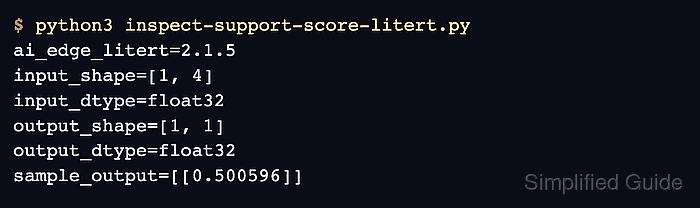
- Run the smoke test and record the tensor contract that the Android app must preserve.
$ python3 inspect-support-score-litert.py
ai_edge_litert=2.1.5
input_shape=[1, 4]
input_dtype=float32
output_shape=[1, 1]
output_dtype=float32
sample_output=[[0.500596]]
The [1, 4] input shape, float32 input dtype, and sample score become the reference for the asset name, preprocessing, and final device log check.
- Create the default Android assets directory in the app module.
$ mkdir -p app/src/main/assets
- Copy the verified flatbuffer into the assets directory.
$ cp support_score.tflite app/src/main/assets/
Keep the deployed filename stable because the Kotlin loader opens the asset by name instead of scanning the APK at runtime.
- Add the LiteRT runtime dependency and keep the app minSdk at 23 or higher.
- app/build.gradle.kts
android {
    defaultConfig {
        minSdk = 23
    }
}

dependencies {
    implementation(
        "com.google.ai.edge.litert:" +
            "litert:2.1.5"
    )
}
If the project already has a higher minSdk or a larger dependencies block, add only the missing LiteRT line instead of replacing the full file.
- Save the model runner in the app Java package.
- SupportScoreRunner.kt
package com.example.mobileinference

import android.content.Context
import com.google.ai.edge.litert.*
import java.io.Closeable

class SupportScoreRunner(context: Context) : Closeable {
    private val env = Environment.create()
    private val model = CompiledModel.create(
        context.assets,
        "support_score.tflite",
        CompiledModel.Options(Accelerator.CPU),
        env,
    )

    fun run(features: FloatArray): Float {
        require(features.size == 4) { "Expected 4 float features." }

        val inputBuffers = model.createInputBuffers()
        val outputBuffers = model.createOutputBuffers()

        inputBuffers[0].writeFloat(features)
        model.run(inputBuffers, outputBuffers)

        return outputBuffers[0].readFloat()[0]
    }

    override fun close() {
        model.close()
        env.close()
    }
}
Accelerator.CPU keeps the first deployment compatible with ordinary devices and emulators. Switch to GPU or NPU only after the CPU path loads the asset and returns the expected tensor result.
- Call the runner from MainActivity without blocking the UI thread.
- MainActivity.kt
package com.example.mobileinference

import android.app.Activity
import android.os.Bundle
import android.util.Log
import java.util.Locale
import kotlin.concurrent.thread

class MainActivity : Activity() {
    override fun onCreate(savedInstanceState: Bundle?) {
        super.onCreate(savedInstanceState)

        thread(name = "support-score-inference") {
            SupportScoreRunner(applicationContext).use { runner ->
                val score = runner.run(
                    floatArrayOf(0.12f, 0.24f, 0.18f, 0.30f)
                )
                val text = "%.6f".format(Locale.US, score)
                Log.i("SupportScore", "score=$text")
            }
        }
    }
}
Do not reorder, rescale, or cast the feature vector after the smoke test unless the model contract changed, because the app can still return a number while scoring the wrong input columns.
- Build and install the debug app on a connected device or emulator.
$ ./gradlew installDebug
> Task :app:installDebug
Installing APK 'app-debug.apk' on 'Pixel_8_API_35(AVD)' for :app:debug
Installed on 1 device.

BUILD SUCCESSFUL in 8s
This requires a working Android SDK, a visible adb target, and the model file under app/src/main/assets before the Gradle task runs.
- Read the app log and confirm the device score matches the Python smoke test for the same sample row.
$ adb logcat -d -s SupportScore:I
--------- beginning of main
I/SupportScore(21453): score=0.500596
The process ID and log banner vary by device, but the score should stay aligned with the smoke-test output for the same four-feature input row.

Mohd Shakir Zakaria is a cloud architect with deep roots in software development and open-source advocacy. Certified in AWS, Red Hat, VMware, ITIL, and Linux, he specializes in designing and managing robust cloud and on-premises infrastructures.


