Mobile and edge inference usually needs a smaller artifact than the directory produced for server-side TensorFlow serving. The tflite_convert command turns an exported SavedModel into a single .tflite flatbuffer that LiteRT and TensorFlow Lite runtimes can load after training and export are finished.
The shell converter keeps the handoff narrow by taking one output file, one SavedModel directory, and the default serving tag and signature unless the export uses custom names. Inspecting the signature first prevents converting the wrong endpoint or discovering an input-shape mismatch only when the target runtime loads the file.
Google AI Edge documentation points advanced conversion work back to tf.lite.TFLiteConverter, especially for quantization, metadata, select TensorFlow ops, and build-pipeline integration. Use the CLI for a plain float SavedModel conversion, then load the produced flatbuffer once before passing it to Android or another edge runtime.
Steps to convert a SavedModel with tflite_convert in TensorFlow:
- Open a terminal in the Python environment that can run tflite_convert and read the exported SavedModel directory.
The sample output was verified with TensorFlow 2.21.0 in an isolated Python environment. Use the same Python environment that exported or validated the SavedModel so saved_model_cli, tflite_convert, and the TensorFlow runtime see the same package set.
Related: How to create a virtual environment for TensorFlow
Related: How to install TensorFlow with pip - List the SavedModel directory.
$ ls support_score_savedmodel
assets
fingerprint.pb
saved_model.pb
variables
Copy or convert the whole directory, not only saved_model.pb, because variables and other export state live beside the graph file.
- Inspect the default serving signature.
$ saved_model_cli show --dir support_score_savedmodel --tag_set serve --signature_def serving_default
The given SavedModel SignatureDef contains the following input(s):
  inputs['keras_tensor'] tensor_info:
      dtype: DT_FLOAT
      shape: (-1, 4)
      name: serving_default_keras_tensor:0
The given SavedModel SignatureDef contains the following output(s):
  outputs['output_0'] tensor_info:
      dtype: DT_FLOAT
      shape: (-1, 1)
      name: StatefulPartitionedCall_1:0
Method name is: tensorflow/serving/predict
tflite_convert defaults to the serve tag set and default serving signature. Add --saved_model_tag_set or --saved_model_signature_key only when the signature output shows custom names.
- Convert the SavedModel directory into a .tflite flatbuffer.
$ tflite_convert --saved_model_dir=support_score_savedmodel --output_file=support_score.tflite
WARNING: All log messages before absl::InitializeLog() is called are written to STDERR
W tf_tfl_flatbuffer_helpers.cc:364] Ignored output_format.
W tf_tfl_flatbuffer_helpers.cc:367] Ignored drop_control_dependency.
The ignored output_format and drop_control_dependency warnings can appear on a successful MLIR-based conversion. A non-zero file and interpreter smoke test confirm the usable artifact.
If conversion fails on unsupported ops, quantization requirements, metadata, or select-op fallback, switch to tf.lite.TFLiteConverter instead of adding unrelated CLI flags.
Related: How to run post-training quantization for TFLite - Check the generated .tflite file.
$ ls -lh support_score.tflite
-rw-r--r-- 1 user user 1.9K Jun 29 04:32 support_score.tflite
The byte count depends on the model layers and weights, but the file must exist and be non-zero before any runtime can load it.
- Save a small interpreter smoke test.
- run_tflite_smoke_test.py
import os
import warnings

os.environ["TF_CPP_MIN_LOG_LEVEL"] = "3"
warnings.filterwarnings("ignore", message=".*tf.lite.Interpreter is deprecated.*")

import numpy as np
import tensorflow as tf

sample = np.array(
    [[0.15, 0.75, 0.35, 0.45], [0.85, 0.25, 0.65, 0.75]],
    dtype=np.float32,
)

interpreter = tf.lite.Interpreter(model_path="support_score.tflite")
input_details = interpreter.get_input_details()[0]
interpreter.resize_tensor_input(input_details["index"], sample.shape)
interpreter.allocate_tensors()

input_details = interpreter.get_input_details()[0]
output_details = interpreter.get_output_details()[0]

interpreter.set_tensor(input_details["index"], sample)
interpreter.invoke()
predictions = interpreter.get_tensor(output_details["index"])

print(f"input_name={input_details['name']}")
print(f"input_shape={input_details['shape_signature'].tolist()}")
print(f"output_name={output_details['name']}")
print(f"output_shape={output_details['shape_signature'].tolist()}")
print(f"prediction_shape={list(predictions.shape)}")
print(f"prediction_range={predictions.min():.6f}..{predictions.max():.6f}")
The input tensor is resized before allocation so a dynamic batch dimension can accept the two-row smoke-test sample.
- Run the smoke test.
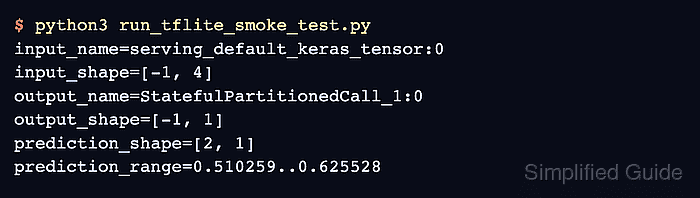
$ python3 run_tflite_smoke_test.py
##### snipped #####
input_name=serving_default_keras_tensor:0
input_shape=[-1, 4]
output_name=StatefulPartitionedCall_1:0
output_shape=[-1, 1]
prediction_shape=[2, 1]
prediction_range=0.510259..0.625528
The tensor names and shapes should match the signature inspected before conversion, and the prediction shape should match the number of sample rows.
- Remove the temporary smoke-test script if it is not part of the build handoff.
$ rm run_tflite_smoke_test.py

Mohd Shakir Zakaria is a cloud architect with deep roots in software development and open-source advocacy. Certified in AWS, Red Hat, VMware, ITIL, and Linux, he specializes in designing and managing robust cloud and on-premises infrastructures.


