Python packages containing compiled code need a build that matches the interpreter and operating system. For TensorFlow, a pip error saying No matching distribution found can mean the requested release has no compatible wheel; selecting a supported Python environment resolves that mismatch on Linux.
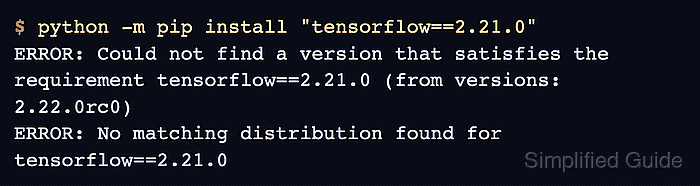
Compatibility belongs to a particular release. A minimum Python version in package metadata does not guarantee wheels for every newer interpreter, and a prerelease can support an interpreter that the stable release does not. A project's pinned TensorFlow version therefore matters as much as its Python version.
A separate virtual environment preserves the original project's packages while testing the required release with another interpreter. The installation can be checked with a CPU tensor operation; CUDA drivers and GPU detection are separate from this package-resolution failure.
Steps to fix the no matching distribution error when installing TensorFlow with pip on Linux:
- Confirm the TensorFlow requirement that fails in the active environment.
$ python -m pip install "tensorflow==2.21.0"
ERROR: Could not find a version that satisfies the requirement tensorflow==2.21.0 (from versions: 2.22.0rc0)
ERROR: No matching distribution found for tensorflow==2.21.0
The requirement here is TensorFlow 2.21.0 on Python 3.14. If your project specifies another version, diagnose that exact requirement. An unpinned tensorflow on Python 3.14 currently installs the 2.22.0rc0 prerelease instead of failing, while Python 3.15 reports (from versions: none) because no release has a wheel for it yet. A message naming a dependency instead of tensorflow concerns that dependency's compatibility. Connection, certificate, or index-access errors earlier in the output need resolution before interpreting the final error as a wheel mismatch.
- Inspect the active Python interpreter.
$ python -c "import platform, struct; print(platform.python_implementation(), platform.python_version(), platform.machine(), struct.calcsize('P') * 8)"
CPython 3.14.10 aarch64 64
The output identifies the implementation, Python version, CPU architecture, and interpreter bitness. Running pip as python -m pip uses this interpreter. A separately installed Python 3.13 does not affect an environment still running Python 3.14.
- Inspect the wheel tags accepted by the failing interpreter.
$ python -m pip debug --verbose
##### snipped #####
Compatible tags: 854
  cp314-cp314-manylinux_2_41_aarch64
##### snipped #####
The cp314 interpreter and ABI tags identify CPython 3.14. The final tag identifies the operating system and CPU architecture. pip needs a wheel with compatible tags, not merely the right package name.
- Compare the requested release's wheels with the interpreter tags on its PyPI download page.
The TensorFlow 2.21.0 files include cp313-cp313 wheels for CPython 3.13 on Linux, tagged manylinux_2_27_aarch64 for ARM64 and manylinux_2_27_x86_64 for x86-64, but no cp314 wheel. That makes Python 3.13 a compatible choice for this release on a system with glibc 2.27 or newer. TensorFlow 2.22.0rc0 has Python 3.14 wheels, so the mismatch is specific to the requested release, and a project willing to pin that prerelease can keep Python 3.14 instead. An unrelated wheel for Windows, another CPU architecture, or another Python version cannot repair it.
- Create a new virtual environment with a Python version that has a wheel for your requirement, replacing python3.13 if your release needs another.
$ python3.13 -m venv tf-compatible
If python3.13 is unavailable, install the python3.13 and python3.13-venv packages on Debian 13 or the python3.13 package on Fedora 44. Ubuntu 26.04 has no Python 3.13 package, so install Miniconda and follow the Conda environment guide for TensorFlow up to its pip upgrade, accepting the channel terms conda create lists if it stops on them, then continue from step 8 in that environment. The directory tf-compatible must be new; the existing environment remains available to the original project. If the release has no wheel for your platform under any Python version, changing Python cannot fix the error.
- Activate the new TensorFlow environment.
$ source tf-compatible/bin/activate
- Upgrade pip inside the new environment.
$ python -m pip install --upgrade pip
TensorFlow's install documentation asks for a recent pip. Upgrading pip does not make a Python 3.13 wheel load into Python 3.14.
- Retry the same TensorFlow requirement in the supported environment.
$ python -m pip install "tensorflow==2.21.0"
Collecting tensorflow==2.21.0
  Downloading tensorflow-2.21.0-cp313-cp313-manylinux_2_27_aarch64.whl.metadata (4.4 kB)
##### snipped #####
The installation also lists TensorFlow's dependencies. No system Python replacement, sudo pip, or certificate-verification bypass is needed.
- Verify that the new environment imports TensorFlow and computes a tensor sum.
$ python -c "import tensorflow as tf; print(tf.__version__); print(tf.reduce_sum(tf.constant([1, 2, 3])))"
2.21.0
tf.Tensor(6, shape=(), dtype=int32)
The version must match the requested release, and the tensor result must be 6. On x86-64 without a GPU, TensorFlow also logs lines about CUDA drivers and CPU instructions, including a cuInit error, and the result is unaffected. A successful install followed by an import exception is a different failure from No matching distribution found.