Modern accelerators can execute dense model math faster and move less memory when TensorFlow uses 16-bit compute, but model weights and sensitive results still need 32-bit range. A Keras dtype policy applies that split to layers created after the policy is set.
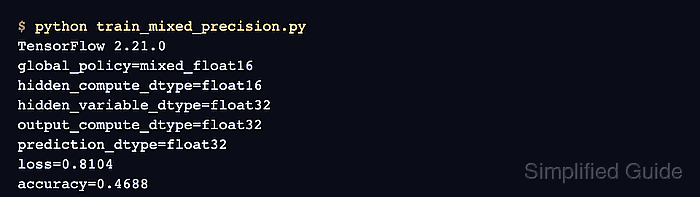
Use mixed_float16 for recent NVIDIA GPUs, where layers compute with float16 and retain variables in float32. Use mixed_bfloat16 on TPU or supported Intel CPU hardware; either policy can run elsewhere for correctness testing, but an unsupported accelerator may make training slower rather than faster.
Keep the final model output in float32 so probabilities and losses do not receive a reduced-precision tensor. The built-in model.fit() path applies dynamic loss scaling for mixed_float16, while a custom GradientTape loop must use LossScaleOptimizer explicitly.
Steps to enable TensorFlow mixed precision:
- Activate the Python environment that runs the TensorFlow training job.
$ source ~/venvs/tf-gpu/bin/activate
(tf-gpu) $
For a Conda project, the corresponding command is conda activate <name>.
Related: How to create a virtual environment for TensorFlow
Related: How to create a Conda environment for TensorFlow - Create mixed_precision_demo.py with the TensorFlow imports and reproducible seed.
- mixed_precision_demo.py
import tensorflow as tf
from tensorflow import keras

tf.keras.utils.set_random_seed(42)
- Enable the mixed_float16 global policy below the seed call.
tf.keras.mixed_precision.set_global_policy("mixed_float16")
The global policy applies to layers created after this call; existing layers retain their original dtype policy.
- Append the input definition, mixed-precision hidden layer, and logits layer below the policy call.
inputs = keras.Input(shape=(4,), name="features")
x = keras.layers.Dense(16, activation="relu", name="hidden")(inputs)
logits = keras.layers.Dense(2, name="logits")(x)
- Append a float32 softmax output and construct the Keras model below the logits definition.
outputs = keras.layers.Activation(
    "softmax",
    dtype="float32",
    name="predictions",
)(logits)
model = keras.Model(inputs, outputs)
The hidden and logits layers inherit mixed_float16. The explicit float32 activation keeps final probabilities at full precision.
- Append the optimizer, synthetic training data, and one-epoch fit below the model definition.
model.compile(
    optimizer="adam",
    loss="sparse_categorical_crossentropy",
)
features = tf.random.normal((32, 4))
labels = tf.cast(tf.reduce_sum(features, axis=1) > 0, tf.int32)
history = model.fit(features, labels, epochs=1, batch_size=8, verbose=0)
Keras automatically uses dynamic loss scaling for mixed_float16 with model.fit(). Custom loops that apply gradients directly need tf.keras.mixed_precision.LossScaleOptimizer.
Related: How to run a custom training loop in TensorFlow - Append fail-capable prediction and dtype checks after the fit call.
predictions = model(features[:2])
tf.debugging.assert_all_finite(predictions, "predictions contain non-finite values")
tf.debugging.assert_near(
    tf.reduce_sum(predictions, axis=1),
    tf.ones(2),
)

policy = tf.keras.mixed_precision.global_policy()
hidden = model.get_layer("hidden")
print(f"global_policy={policy.name}")
print(f"hidden_compute_dtype={hidden.compute_dtype}")
print(f"hidden_variable_dtype={hidden.variable_dtype}")
print(f"output_dtype={predictions.dtype.name}")
print(f"loss={history.history['loss'][-1]:.4f}")
print(f"probability_sums={tf.reduce_sum(predictions, axis=1).numpy()}")
- Confirm the completed program reports mixed-precision dtypes and normalized probabilities.
(tf-gpu) $ python mixed_precision_demo.py
global_policy=mixed_float16
hidden_compute_dtype=float16
hidden_variable_dtype=float32
output_dtype=float32
loss=0.6825
probability_sums=[1. 1.]
A traceback from either assertion means the trained model produced non-finite predictions or invalid probability sums. On GPU hardware, profile representative batches before and after this change rather than assuming the policy improves throughput.
Related: How to profile TensorFlow training in TensorBoard

Mohd Shakir Zakaria is a cloud architect with deep roots in software development and open-source advocacy. Certified in AWS, Red Hat, VMware, ITIL, and Linux, he specializes in designing and managing robust cloud and on-premises infrastructures.


