When a ping result does not explain a reachability problem, an ICMP capture shows whether the echo request, echo reply, or network error message reached the interface you are testing. That packet-level view separates host reachability from firewall policy, routing, and path MTU behavior.
The tcpdump icmp filter matches IPv4 ICMP only. Use icmp6 for IPv6, where echo checks, neighbor discovery, and IPv6 error traffic use a separate protocol decoder.
A successful ping proves the endpoint answered from the caller's point of view, but it does not prove where the packets traveled. Capture on the interface chosen by the route to confirm request and reply sequence numbers, then use a non-echo ICMP filter when the failure is a destination-unreachable, time-exceeded, or fragmentation-needed condition.
Steps to capture ICMP packets with tcpdump:
- Identify the interface that carries traffic to the test host.
$ ip route get 10.10.20.20
10.10.20.20 via 10.10.10.1 dev eth0 src 10.10.10.40 uid 1000
    cache
Use the dev value as the tcpdump interface and the src value as the local address to compare with captured packets.
- Start a bounded IPv4 ICMP capture in one terminal.
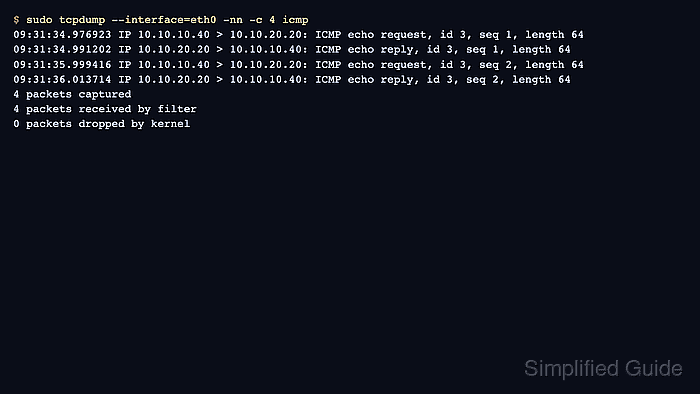
$ sudo tcpdump --interface=eth0 -nn -c 4 icmp
tcpdump: verbose output suppressed, use -v[v]... for full protocol decode
listening on eth0, link-type EN10MB (Ethernet), snapshot length 262144 bytes
- Generate a controlled echo request from another terminal.
$ ping -c 2 10.10.20.20
PING 10.10.20.20 (10.10.20.20) 56(84) bytes of data.
64 bytes from 10.10.20.20: icmp_seq=1 ttl=56 time=14.2 ms
64 bytes from 10.10.20.20: icmp_seq=2 ttl=56 time=14.0 ms

--- 10.10.20.20 ping statistics ---
2 packets transmitted, 2 received, 0% packet loss, time 1002ms
rtt min/avg/max/mdev = 14.020/14.101/14.183/0.081 ms
- Confirm requests and replies in the tcpdump terminal.
tcpdump: verbose output suppressed, use -v[v]... for full protocol decode
listening on eth0, link-type EN10MB (Ethernet), snapshot length 262144 bytes
09:31:34.976923 IP 10.10.10.40 > 10.10.20.20: ICMP echo request, id 3, seq 1, length 64
09:31:34.991202 IP 10.10.20.20 > 10.10.10.40: ICMP echo reply, id 3, seq 1, length 64
09:31:35.999416 IP 10.10.10.40 > 10.10.20.20: ICMP echo request, id 3, seq 2, length 64
09:31:36.013714 IP 10.10.20.20 > 10.10.10.40: ICMP echo reply, id 3, seq 2, length 64
4 packets captured
4 packets received by filter
0 packets dropped by kernel
Matching request and reply sequence numbers prove that echo traffic crossed this interface in both directions. Requests without replies point toward the remote host, return path, or filtering after the capture point.
- Capture ICMP errors when echo replies are not the problem.
$ sudo tcpdump --interface=eth0 -nn -c 1 'icmp and icmp[icmptype] != icmp-echo and icmp[icmptype] != icmp-echoreply'
tcpdump: verbose output suppressed, use -v[v]... for full protocol decode
listening on eth0, link-type EN10MB (Ethernet), snapshot length 262144 bytes
09:33:20.008177 IP 10.10.10.1 > 10.10.10.40: ICMP 10.10.20.50 udp port 33435 unreachable, length 68
1 packet captured
1 packet received by filter
0 packets dropped by kernel
The filter excludes echo request and echo reply messages so destination-unreachable, time-exceeded, and fragmentation-needed messages are easier to see.
- Use the IPv6 ICMP filter when the test target is IPv6.
$ sudo tcpdump --interface=eth0 -nn -c 2 icmp6
tcpdump: verbose output suppressed, use -v[v]... for full protocol decode
listening on eth0, link-type EN10MB (Ethernet), snapshot length 262144 bytes
09:35:42.331002 IP6 fd00:10:10::40 > fd00:10:20::20: ICMP6, echo request, id 7, seq 1, length 64
09:35:42.345912 IP6 fd00:10:20::20 > fd00:10:10::40: ICMP6, echo reply, id 7, seq 1, length 64
2 packets captured
2 packets received by filter
0 packets dropped by kernel

Mohd Shakir Zakaria is a cloud architect with deep roots in software development and open-source advocacy. Certified in AWS, Red Hat, VMware, ITIL, and Linux, he specializes in designing and managing robust cloud and on-premises infrastructures.


