Symfony Messenger moves work such as email delivery, report generation, and webhook calls from the request path into handlers that a worker can run later. A queue setup gives Messenger a transport, routes a message class to that transport, and leaves the worker responsible for processing the message outside the original request.
Doctrine Messenger uses the Doctrine database connection many Symfony applications already have, so it avoids a separate Redis or RabbitMQ broker for a local smoke test. The same async transport name can later point at another supported DSN when the application moves to a dedicated broker.
A suitable starting project already has symfony/messenger, a message class, and a handler. The sample message class is App\Message\GenerateReport, the transport is async, and the proof is a queue count that drops from one to zero after messenger:consume handles the message.
Steps to configure a Symfony Messenger queue:
- Install the Doctrine transport bridge when the project does not already include it.
$ composer require symfony/doctrine-messenger
The doctrine://default DSN uses the active Doctrine connection. Use the matching bridge package instead when the queue backend is Redis, AMQP, Beanstalkd, or another supported transport.
- Set the Messenger transport DSN in the environment file used by the application.
# .env.local
MESSENGER_TRANSPORT_DSN=doctrine://default?auto_setup=false
Configure DATABASE_URL first when doctrine://default has no database connection to use.
Related: How to configure a Doctrine database in Symfony - Define the async transport and a failed-message transport in /config/packages/messenger.yaml.
framework: messenger: failure_transport: failed transports: async: dsn: '%env(MESSENGER_TRANSPORT_DSN)%' retry_strategy: max_retries: 3 multiplier: 2 failed: 'doctrine://default?queue_name=failed' - Route the application message class to the async transport.
framework:
    messenger:
        routing:
            App\Message\GenerateReport: async
Messages without a matching routing rule are handled synchronously when they are dispatched.
Related: How to handle a Symfony Messenger message - Clear the Symfony cache after changing Messenger configuration or adding the test command and handler.
$ php bin/console cache:clear

 // Clearing the cache for the dev environment with debug true

 [OK] Cache for the "dev" environment (debug=true) was successfully cleared.
Related: How to clear Symfony cache
- Confirm the active Messenger configuration includes the async transport and message route.
$ php bin/console debug:config framework messenger Current configuration for "framework.messenger" =============================================== failure_transport: failed transports: async: dsn: '%env(MESSENGER_TRANSPORT_DSN)%' ##### snipped ##### routing: App\Message\GenerateReport: - async ##### snipped ##### - Confirm Symfony can find a handler for the routed message class.
$ php bin/console debug:messenger Messenger ========= messenger.bus.default --------------------- The following messages can be dispatched: ------------------------------------------------------------------------ App\Message\GenerateReport handled by App\MessageHandler\GenerateReportHandler ##### snipped ##### - Prepare the Doctrine transport storage.
$ php bin/console messenger:setup-transports

 [OK] The "async" transport was set up successfully.

 [OK] The "failed" transport was set up successfully.
With auto_setup=false, the table is not created implicitly when the first message is sent. Run setup or a database migration during deployment before workers start.
- Dispatch one message through the application path that uses the routed message class.
$ php bin/console app:queue-report quarterly
Queued report "quarterly".
The sample command dispatches App\Message\GenerateReport through MessageBusInterface. Use the controller, command, or service that dispatches the message in your application.
Related: How to create a Symfony console command
Related: How to handle a Symfony Messenger message - Check that the message is waiting in the async transport.
$ php bin/console messenger:stats async
 ----------- -------
  Transport   Count
 ----------- -------
  async       1
 ----------- -------
- Run one worker pass for the async transport.
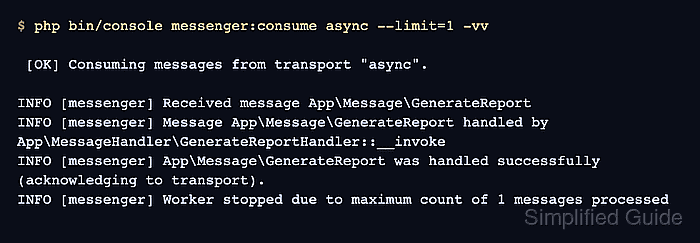
$ php bin/console messenger:consume async --limit=1 -vv

 [OK] Consuming messages from transport "async".

INFO [messenger] Received message App\Message\GenerateReport
INFO [messenger] Message App\Message\GenerateReport handled by App\MessageHandler\GenerateReportHandler::__invoke
INFO [messenger] App\Message\GenerateReport was handled successfully (acknowledging to transport).
INFO [messenger] Worker stopped due to maximum count of 1 messages processed
Remove --limit=1 for a long-running worker. Use a process manager such as systemd or Supervisor for production workers so they restart after deploys or failures.
- Verify the async transport is empty after the worker handles the message.
$ php bin/console messenger:stats async
 ----------- -------
  Transport   Count
 ----------- -------
  async       0
 ----------- -------
- Check the handler side effect when using the sample handler.
$ cat var/report.log
handled quarterly
For a real handler, verify the domain effect the handler owns, such as a sent email record, generated file, API call, or updated database row.

Mohd Shakir Zakaria is a cloud architect with deep roots in software development and open-source advocacy. Certified in AWS, Red Hat, VMware, ITIL, and Linux, he specializes in designing and managing robust cloud and on-premises infrastructures.


