A database transaction gives a Symfony application one boundary for several Doctrine writes that must succeed or fail together. It matters when a command, controller, or message handler changes more than one row and partial data would leave the application in the wrong state.
Doctrine ORM wraps a normal flush() in a transaction, but explicit boundaries are needed when the unit of work mixes DBAL statements, repository calls, and application checks. The Connection::transactional() helper starts the transaction, commits after the callback returns, and rolls back if an exception leaves the callback.
For local proof, a disposable audit table makes commit and rollback behavior visible from a terminal. Replace the demo inserts with application writes before keeping the transaction pattern in a service or message handler.
Steps to run a Doctrine transaction in Symfony:
- Open a terminal in the Symfony project root that contains bin/console.
- Confirm that Doctrine DBAL can query the configured database.
$ php bin/console dbal:run-sql 'SELECT 1 AS transaction_probe'
 -------------------
  transaction_probe
 -------------------
  1
 -------------------
Use a development database because the demo creates and drops the transaction_audit table.
Related: How to configure a Doctrine database in Symfony - Create the transaction demo command under src/Command.
- TransactionDemoCommand.php
<?php

namespace App\Command;

use Doctrine\DBAL\Connection;
use RuntimeException;
use Symfony\Component\Console\Attribute\AsCommand;
use Symfony\Component\Console\Command\Command;
use Symfony\Component\Console\Input\InputArgument;
use Symfony\Component\Console\Input\InputInterface;
use Symfony\Component\Console\Output\OutputInterface;

#[AsCommand(name: 'app:transaction-demo')]
final class TransactionDemoCommand extends Command
{
    public function __construct(private readonly Connection $connection)
    {
        parent::__construct();
    }

    protected function configure(): void
    {
        $this->addArgument('mode', InputArgument::OPTIONAL, 'Use fail to test rollback.', 'commit');
    }

    protected function execute(InputInterface $input, OutputInterface $output): int
    {
        $mode = (string) $input->getArgument('mode');

        if (!in_array($mode, ['commit', 'fail'], true)) {
            $output->writeln('Use "commit" or "fail" as the mode.');

            return Command::INVALID;
        }

        $this->connection->executeStatement('CREATE TABLE IF NOT EXISTS transaction_audit (
            label VARCHAR(80) NOT NULL
        )');
        $this->connection->executeStatement('DELETE FROM transaction_audit');

        try {
            $this->connection->transactional(function (Connection $connection) use ($mode): void {
                $connection->executeStatement(
                    'INSERT INTO transaction_audit (label) VALUES (?)',
                    ['order_reserved'],
                );

                if ($mode === 'fail') {
                    throw new RuntimeException('Simulated failure inside the transaction.');
                }

                $connection->executeStatement(
                    'INSERT INTO transaction_audit (label) VALUES (?)',
                    ['email_queued'],
                );
            });

            $output->writeln('Committed transaction.');
        } catch (RuntimeException $exception) {
            $output->writeln('Rolled back transaction: '.$exception->getMessage());
        }

        $count = (int) $this->connection->fetchOne('SELECT COUNT(*) FROM transaction_audit');
        $output->writeln(sprintf('Rows in transaction_audit: %d', $count));

        return Command::SUCCESS;
    }
}
Use EntityManagerInterface with wrapInTransaction() instead when the transaction only wraps ORM entity changes and should flush before commit.
- Clear the dev cache so Symfony rebuilds the command list.
$ php bin/console cache:clear

 // Clearing the cache for the dev environment with debug true

 [OK] Cache for the "dev" environment (debug=true) was successfully cleared.
- Run the rollback branch of the transaction.
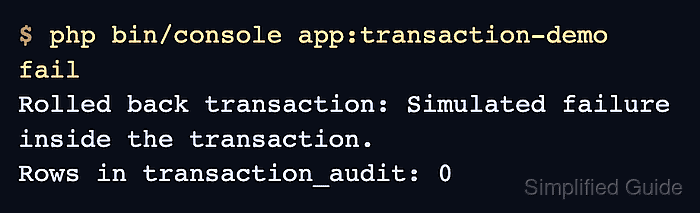
$ php bin/console app:transaction-demo fail
Rolled back transaction: Simulated failure inside the transaction.
Rows in transaction_audit: 0
The first insert is rolled back because the callback throws before the second insert runs.
- Run the commit branch of the transaction.
$ php bin/console app:transaction-demo commit
Committed transaction.
Rows in transaction_audit: 2
- List the rows committed by the transaction.
$ php bin/console dbal:run-sql 'SELECT label FROM transaction_audit'
 ----------------
  label
 ----------------
  order_reserved
  email_queued
 ----------------
Both labels appear only after the callback returns without an exception.
- Drop the demo table after the transaction behavior is proven.
$ php bin/console dbal:run-sql 'DROP TABLE transaction_audit'

 [OK] 0 rows affected.
- Remove the demo command file after copying the transaction block into the real service.
$ rm src/Command/TransactionDemoCommand.php

Mohd Shakir Zakaria is a cloud architect with deep roots in software development and open-source advocacy. Certified in AWS, Red Hat, VMware, ITIL, and Linux, he specializes in designing and managing robust cloud and on-premises infrastructures.


