Suricata service control is the operating boundary between a configured sensor and the engine that captures packets. On systemd-based Linux hosts, the packaged suricata.service unit starts the daemon, restarts it after full configuration changes, and controls whether the sensor returns after reboot.
The packaged Ubuntu unit runs Suricata as a Type=notify service, so systemd can wait for Suricata to report that initialization finished. Test /etc/suricata/suricata.yaml before restarting after configuration or rule-path changes so a parsing error does not replace a running sensor with a failed unit.
Start, restart, and enable the service when the sensor should inspect traffic. Stop or disable it only during a maintenance window or when the host should remain offline as a sensor, because packet inspection stops as soon as the service is no longer running.
Related: How to install Suricata on Ubuntu
Related: How to test Suricata configuration
Related: How to update Suricata rules
Related: How to reload Suricata rules
Steps to manage the Suricata service:
- Check the current Suricata service state.
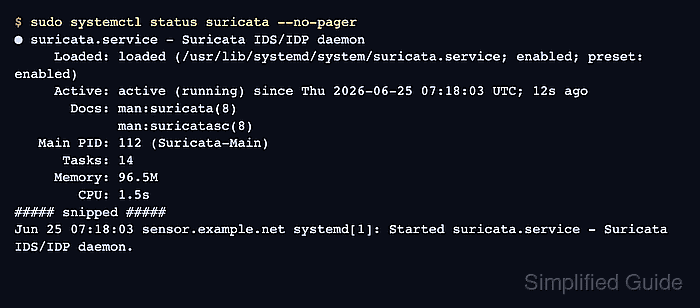
$ sudo systemctl status suricata --no-pager
● suricata.service - Suricata IDS/IDP daemon
     Loaded: loaded (/usr/lib/systemd/system/suricata.service; enabled; preset: enabled)
     Active: active (running) since Thu 2026-06-25 07:18:03 UTC; 12s ago
       Docs: man:suricata(8)
             man:suricatasc(8)
   Main PID: 112 (Suricata-Main)
##### snipped #####
Jun 25 07:18:03 sensor.example.net systemd[1]: Started suricata.service - Suricata IDS/IDP daemon.
Loaded shows the unit file and boot enablement. Active shows whether the daemon is running now.
- Start Suricata when the service is stopped.
$ sudo systemctl start suricata
Starting Suricata on a live interface begins packet inspection immediately. Confirm the capture interface and rule set before starting a production sensor.
- Test the Suricata configuration before a restart after edits.
$ sudo suricata -T -c /etc/suricata/suricata.yaml -v
Notice: suricata: This is Suricata version 8.0.3 RELEASE running in SYSTEM mode
Info: suricata: Running suricata under test mode
Info: detect: 1 rule files processed. 50866 rules successfully loaded, 0 rules failed, 0 rules skipped
Info: threshold-config: Threshold config parsed: 0 rule(s) found
Info: detect: 50871 signatures processed. 1285 are IP-only rules, 4505 are inspecting packet payload, 44845 inspect application layer, 110 are decoder event only
Notice: suricata: Configuration provided was successfully loaded. Exiting.
If the test warns that no rule files match /var/lib/suricata/rules/suricata.rules, update or create the rules before restarting.
Related: How to test Suricata configuration
Related: How to update Suricata rules - Restart Suricata after a full configuration change.
$ sudo systemctl restart suricata
A restart briefly stops packet inspection while systemd stops and starts the daemon. Use a rule reload instead only when the change is limited to rules and the deployment supports live rule reloads.
Related: How to reload Suricata rules - Confirm that Suricata is running after the restart.
$ sudo systemctl is-active suricata
active
- Enable Suricata at boot when the host should start as a sensor.
$ sudo systemctl enable suricata
- Confirm that Suricata is enabled for boot.
$ sudo systemctl is-enabled suricata
enabled
- Review recent service log entries after a start or restart.
$ sudo journalctl -u suricata --since "2 minutes ago" --no-pager
Jun 25 07:17:29 sensor.example.net systemd[1]: Starting suricata.service - Suricata IDS/IDP daemon...
Jun 25 07:17:29 sensor.example.net suricata[65]: i: suricata: This is Suricata version 8.0.3 RELEASE running in SYSTEM mode
Jun 25 07:17:30 sensor.example.net systemd[1]: Started suricata.service - Suricata IDS/IDP daemon.
##### snipped #####
Jun 25 07:17:55 sensor.example.net systemd[1]: Starting suricata.service - Suricata IDS/IDP daemon...
Jun 25 07:17:56 sensor.example.net suricata[112]: i: suricata: This is Suricata version 8.0.3 RELEASE running in SYSTEM mode
Jun 25 07:18:03 sensor.example.net systemd[1]: Started suricata.service - Suricata IDS/IDP daemon.
Repeated restart attempts, rule-load failures, or capture-interface errors in the journal mean the service reached systemd but Suricata did not initialize cleanly.
- Stop Suricata for a maintenance window.
$ sudo systemctl stop suricata
Stopping suricata.service stops packet inspection until the service is started again.
- Confirm that Suricata is stopped.
$ sudo systemctl is-active suricata
inactive
- Disable Suricata when the host should not start the sensor at boot.
$ sudo systemctl disable suricata
Removed '/etc/systemd/system/multi-user.target.wants/suricata.service'.
- Confirm that Suricata is disabled for boot.
$ sudo systemctl is-enabled suricata
disabled

Mohd Shakir Zakaria is a cloud architect with deep roots in software development and open-source advocacy. Certified in AWS, Red Hat, VMware, ITIL, and Linux, he specializes in designing and managing robust cloud and on-premises infrastructures.


