Suricata performance tuning starts with counters from the running sensor, not with a copied high-performance YAML block. Packet drops, TCP stream gaps, memcap pressure, and one overloaded worker thread point to different bottlenecks, so a safe tuning pass changes one capture or detection setting at a time and checks the sensor again under comparable traffic.
On packaged Linux sensors, /etc/suricata/suricata.yaml controls the AF_PACKET capture block, detection profile, pattern matcher selection, and threading settings used by the suricata.service unit. The path can differ when the service was customized, so confirm the active -c argument before editing.
Larger rings, more capture threads, and broader detection groups can reduce packet loss, but they also reserve memory and can move the bottleneck to CPU, NUMA placement, logging, or the ruleset. Keep a copy of the original YAML, preserve rule loading, and compare stats.log before and after the restart before making another change.
Related: How to read Suricata stats logs
Related: How to test Suricata configuration
Related: How to manage the Suricata service
Steps to tune Suricata performance:
- Read the current stats.log block before changing the sensor.
$ sudo cat /var/log/suricata/stats.log
---------------------------------------------------------------------------------------------------
Date: 6/25/2026 -- 07:42:11 (uptime: 0d, 03h 18m 04s)
---------------------------------------------------------------------------------------------------
Counter                                                      | TM Name                   | Value
---------------------------------------------------------------------------------------------------
capture.kernel_packets                                       | W#01-enp1s0               | 18492718
capture.kernel_drops                                         | W#01-enp1s0               | 23864
tcp.reassembly_gap                                           | Detect                    | 181
flow.emerg_mode_entered                                      | FlowManagerThread         | 0
memcap.pressure_max                                          | Total                     | 12
capture.kernel_drops shows packets discarded before user-space inspection. tcp.reassembly_gap can also rise from packet loss, checksum problems, or stream memory pressure. Use the newest complete block as the baseline.
Related: How to read Suricata stats logs - Confirm the configuration file used by the packaged service.
$ sudo systemctl cat suricata
# /usr/lib/systemd/system/suricata.service
[Service]
ExecStart=/usr/bin/suricata -D --af-packet -c /etc/suricata/suricata.yaml --pidfile /var/run/suricata/suricata.pid
##### snipped #####
Edit the file named after -c. A custom service override, container entrypoint, or hand-written startup script may point Suricata at another YAML file.
Related: How to manage the Suricata service - Back up the active Suricata configuration.
$ sudo cp -a /etc/suricata/suricata.yaml /etc/suricata/suricata.yaml.bak
- Open the active Suricata configuration file.
$ sudoedit /etc/suricata/suricata.yaml
- Tune the AF_PACKET block for the monitored interface.
- /etc/suricata/suricata.yaml
af-packet:
  - interface: enp1s0
    threads: auto
    cluster-id: 99
    cluster-type: cluster_flow
    tpacket-v3: yes
    ring-size: 8192
    block-size: 1048576
Replace enp1s0 with the interface named by the service or sensor runbook. cluster_flow keeps packets from the same flow on the same worker, while threads: auto lets Suricata create workers from the available CPU cores.
ring-size is per capture thread. Increasing it reserves memory at startup, so raise it gradually and keep room for flow, stream, detection, and log buffers.
- Tune the detection profile without forcing an unsupported pattern matcher.
- /etc/suricata/suricata.yaml
detect:
  profile: high
  sgh-mpm-context: auto

mpm-algo: auto
mpm-algo: auto uses Hyperscan when the installed build supports it and falls back to another matcher when it does not. detect.profile: high creates larger signature groups than low or medium profiles and can improve matching performance with a modest memory increase. Leave threading.detect-thread-ratio at 1.0 unless packet drops continue while CPU headroom remains.
- Review the effective tuning values that Suricata reads from the YAML file.
$ sudo suricata --dump-config -c /etc/suricata/suricata.yaml
##### snipped #####
af-packet.0.interface = enp1s0
af-packet.0.threads = auto
af-packet.0.cluster-type = cluster_flow
af-packet.0.tpacket-v3 = yes
af-packet.0.ring-size = 8192
af-packet.0.block-size = 1048576
detect.profile = high
detect.sgh-mpm-context = auto
mpm-algo = auto
threading.detect-thread-ratio = 1.0
##### snipped #####
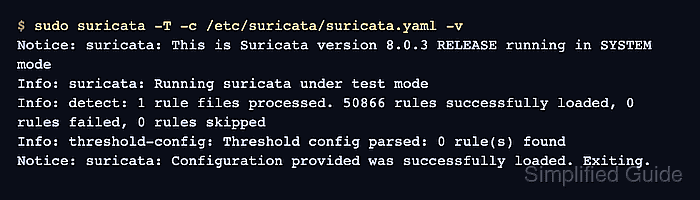
- Test the tuned Suricata configuration before restarting the sensor.
$ sudo suricata -T -c /etc/suricata/suricata.yaml -v
Notice: suricata: This is Suricata version 8.0.3 RELEASE running in SYSTEM mode
Info: suricata: Running suricata under test mode
Info: detect: 1 rule files processed. 50866 rules successfully loaded, 0 rules failed, 0 rules skipped
Info: threshold-config: Threshold config parsed: 0 rule(s) found
Notice: suricata: Configuration provided was successfully loaded. Exiting.
Rule counts and version strings vary by package and ruleset. A clean test must still show that the configured rule files loaded without failures. Use the YAML validator only for parser errors or duplicate-key review; suricata -T remains the required Suricata check.
Related: How to test Suricata configuration
Tool: YAML Validator - Restart Suricata to apply the capture and detection settings.
$ sudo systemctl restart suricata
A restart briefly stops packet inspection. Use a maintenance window when the sensor protects production traffic.
Related: How to manage the Suricata service - Confirm that the service returned to active state.
$ sudo systemctl is-active suricata
active
- Compare the next complete stats.log block under comparable traffic.
$ sudo cat /var/log/suricata/stats.log
---------------------------------------------------------------------------------------------------
Date: 6/25/2026 -- 08:04:29 (uptime: 0d, 00h 14m 53s)
---------------------------------------------------------------------------------------------------
Counter                                                      | TM Name                   | Value
---------------------------------------------------------------------------------------------------
capture.kernel_packets                                       | W#01-enp1s0               | 21184720
capture.kernel_drops                                         | W#01-enp1s0               | 0
tcp.reassembly_gap                                           | Detect                    | 0
flow.emerg_mode_entered                                      | FlowManagerThread         | 0
memcap.pressure_max                                          | Total                     | 8
The tuned block should show fewer drops or gaps for a similar traffic window. If drops still rise, tune one additional factor at a time, such as RSS queue layout, CPU affinity, logging volume, or ruleset cost, and keep the last known-good YAML backup available.

Mohd Shakir Zakaria is a cloud architect with deep roots in software development and open-source advocacy. Certified in AWS, Red Hat, VMware, ITIL, and Linux, he specializes in designing and managing robust cloud and on-premises infrastructures.


