A command that works in a normal shell can fail under sudo when the privileged command search path does not include the same directory. Change secure_path when a trusted root-owned tool directory should become part of sudo's standard command lookup path instead of relying on each operator's shell profile.
The sudoers secure_path Defaults setting replaces the invoking user's PATH for sudo command lookup and for the PATH variable visible inside the privileged environment. It is commonly set in /etc/sudoers or a drop-in under /etc/sudoers.d, and a later matching Defaults entry can override an earlier one.
Add only directories that an unprivileged user cannot modify, keep standard system directories unless policy deliberately removes them, and validate the policy before closing the administrator session. Users covered by the sudoers exempt_group setting are not affected by secure_path, so check that setting when a changed path does not appear for one group.
Related: Fix command not found when using sudo
Related: Preserve environment variables with sudo
Related: Create a sudoers drop-in file
Related: Check sudoers syntax with visudo
Steps to change sudo secure_path:
- Choose the trusted directory that sudo should search by short command name.
The examples add /opt/support/bin for the support-check command. Use a directory that is owned by root or another trusted administrator account.
- Check the directory and target command ownership before adding the path.
$ ls -ld /opt/support/bin /opt/support/bin/support-check
drwxr-xr-x 2 root root 4096 Jun  5 02:05 /opt/support/bin
-rwxr-xr-x 1 root root   46 Jun  5 02:05 /opt/support/bin/support-check
Do not add user-writable directories such as a home directory, project checkout, or language package bin directory to secure_path. A user who can replace a command in that directory may influence what runs as root.
- Check the current path that sudo gives to privileged commands.
$ sudo env
HOME=/root
HOSTNAME=server
LANG=C.UTF-8
LOGNAME=root
PATH=/usr/local/sbin:/usr/local/bin:/usr/sbin:/usr/bin:/sbin:/bin:/snap/bin
SHELL=/bin/bash
SUDO_COMMAND=/usr/bin/env
SUDO_GID=1001
SUDO_HOME=/home/deployer
SUDO_UID=1001
SUDO_USER=deployer
TERM=unknown
USER=root
The current PATH does not include /opt/support/bin, so sudo support-check cannot be found by short name yet.
- Open a dedicated sudoers drop-in with visudo.
$ sudo visudo -f /etc/sudoers.d/secure-path
Keep an existing root shell, console session, or other recovery path open while editing sudoers policy. A syntax error can block new sudo sessions.
Related: How to create a sudoers drop-in file
- Set the new secure_path value in the drop-in.
- /etc/sudoers.d/secure-path
Defaults secure_path="/opt/support/bin:/usr/local/sbin:/usr/local/bin:/usr/sbin:/usr/bin:/sbin:/bin:/snap/bin"
Use a plain Defaults entry only when every sudo user should receive the same path. Use Defaults:deployer for one user or Defaults:%sudo for one Unix group when the path change should be scoped.
Start from the current sudo path, add the trusted directory, and keep locally required entries such as /snap/bin when the host uses them.
- Validate the new drop-in.
$ sudo visudo -cf /etc/sudoers.d/secure-path
/etc/sudoers.d/secure-path: parsed OK
- Parse the complete sudoers policy.
$ sudo visudo -c
/etc/sudoers: parsed OK
Do not stop after checking only the edited file. The full check catches interactions with the main sudoers file and included policy files.
- Confirm sudo now exposes the intended path.
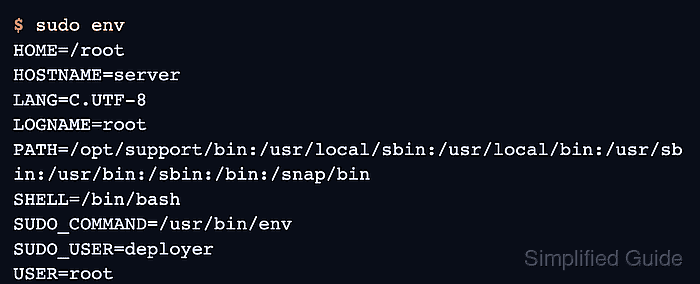
$ sudo env
HOME=/root
HOSTNAME=server
LANG=C.UTF-8
LOGNAME=root
PATH=/opt/support/bin:/usr/local/sbin:/usr/local/bin:/usr/sbin:/usr/bin:/sbin:/bin:/snap/bin
SHELL=/bin/bash
SUDO_COMMAND=/usr/bin/env
SUDO_GID=1001
SUDO_HOME=/home/deployer
SUDO_UID=1001
SUDO_USER=deployer
TERM=unknown
USER=root
If the path did not change, check for a later Defaults secure_path entry, a more specific Defaults rule, a skipped drop-in name, or an exempt_group match for the invoking user.
- Run the target command through sudo by short name.
$ sudo support-check
support-check ok
The change is working when sudo env shows the intended PATH and the command runs without using its absolute path.

Mohd Shakir Zakaria is a cloud architect with deep roots in software development and open-source advocacy. Certified in AWS, Red Hat, VMware, ITIL, and Linux, he specializes in designing and managing robust cloud and on-premises infrastructures.


