Newer OpenSSH clients can stop before login when an older server offers only the ssh-rsa host key signature. The no matching host key type found error is a negotiation failure, not a password, private-key, or known_hosts problem. Fix it by allowing the legacy host key algorithm only for the affected host while the server is upgraded to offer Ed25519, ECDSA, or RSA SHA-2 host keys.
HostKeyAlgorithms controls the server host key algorithms accepted by the client. A value that starts with + appends a legacy name to the client default instead of replacing modern defaults. A Host-specific block in ~/.ssh/config keeps the exception tied to one alias and avoids weakening every SSH connection from the client.
Treat ssh-rsa as a temporary compatibility exception because it uses RSA with SHA-1 signatures. If the connection later fails during public-key authentication with a mutual signature error, the same server may also need PubkeyAcceptedAlgorithms +ssh-rsa in the same Host block, but the better fix is to update the server firmware or sshd host keys.
Related: How to log in to an SSH server from Linux
Related: How to regenerate SSH host keys
Tool: SSH Algorithm Policy Checker
Steps to fix SSH no matching host key type found:
- Run the failing SSH command and read the offered host key type.
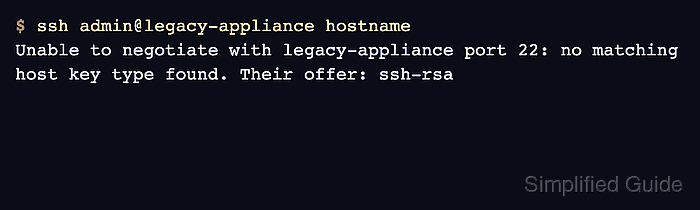
$ ssh admin@legacy-appliance hostname
Unable to negotiate with legacy-appliance port 22: no matching host key type found. Their offer: ssh-rsa
The value after Their offer is the algorithm name to scope in the client exception. Do not treat this as a changed-key warning from known_hosts.
- Test a one-command exception for the affected host key algorithm.
$ ssh -o HostKeyAlgorithms=+ssh-rsa admin@legacy-appliance hostname
legacy-appliance
Use this as a diagnosis step, not as a shell alias or global option. The leading + keeps modern defaults and appends ssh-rsa only for this command.
- Open the per-user OpenSSH client configuration file.
$ nano ~/.ssh/config
Use the user config instead of /etc/ssh/ssh_config unless the exception is intentionally managed for every account on the client.
- Add a narrow Host block for the legacy server.
Host legacy-appliance
    HostName legacy-appliance.example.net
    User admin
    HostKeyAlgorithms +ssh-rsa
Add PubkeyAcceptedAlgorithms +ssh-rsa in this same Host block only if the host key error is gone and public-key authentication later reports no mutual signature algorithm.
- Check the effective client configuration for the alias.
$ ssh -T -G legacy-appliance
host legacy-appliance
user admin
hostname legacy-appliance.example.net
port 22
##### snipped #####
hostkeyalgorithms ssh-ed25519-cert-v01@openssh.com,ecdsa-sha2-nistp256-cert-v01@openssh.com,ecdsa-sha2-nistp384-cert-v01@openssh.com,ecdsa-sha2-nistp521-cert-v01@openssh.com,sk-ssh-ed25519-cert-v01@openssh.com,sk-ecdsa-sha2-nistp256-cert-v01@openssh.com,rsa-sha2-512-cert-v01@openssh.com,rsa-sha2-256-cert-v01@openssh.com,ssh-ed25519,ecdsa-sha2-nistp256,ecdsa-sha2-nistp384,ecdsa-sha2-nistp521,sk-ssh-ed25519@openssh.com,sk-ecdsa-sha2-nistp256@openssh.com,rsa-sha2-512,rsa-sha2-256,ssh-rsa
##### snipped #####
ssh -G prints the resolved client settings and exits before authentication. The hostkeyalgorithms line should still contain modern names before the appended ssh-rsa fallback.
Related: How to show SSH client configuration - Connect through the saved alias.
$ ssh legacy-appliance hostname
legacy-appliance
Accept a new RSA host key only after its fingerprint matches a trusted source. The algorithm exception does not verify that the server identity is safe.
- Remove the exception after the server offers modern host key algorithms.
$ ssh -o HostKeyAlgorithms=-ssh-rsa legacy-appliance hostname
legacy-appliance
If this test succeeds, remove HostKeyAlgorithms +ssh-rsa from the Host block. If the same host key error returns, leave the per-host exception in place and schedule the server-side host key or firmware upgrade.
Related: How to regenerate SSH host keys

Mohd Shakir Zakaria is a cloud architect with deep roots in software development and open-source advocacy. Certified in AWS, Red Hat, VMware, ITIL, and Linux, he specializes in designing and managing robust cloud and on-premises infrastructures.


