A Snort sensor belongs under systemd when the capture command must survive logouts, failures, and reboots. The service unit gives the host a named process to start at boot, restart after a crash, and inspect through systemctl and the journal.
The unit should reuse the same Snort 3 command that already passed configuration, rule, DAQ, interface, and alert logger checks. The service definition uses the source-install layout under /usr/local, a passive interface named enp1s0, and an alert_fast file logger under /var/log/snort.
Validate the unit file before enabling it. systemd-analyze verify catches malformed unit syntax and missing executable paths, while systemctl status and the alert file confirm that Snort stayed running and wrote detection events after startup.
Related: How to monitor a live interface with Snort
Related: How to run Snort in inline mode
Steps to create a Snort systemd service:
- Create the Snort log directory.
$ sudo install -d -m 0755 -o root -g root /var/log/snort
- Validate the Snort configuration and local rule file.
$ sudo snort --warn-all -q -c /usr/local/etc/snort/snort.lua \
    -R /usr/local/etc/snort/rules/local.rules -T
Snort successfully validated the configuration (with 0 warnings).
Related: How to test Snort configuration
- Run the final capture command once outside systemd.
$ sudo snort -q -c /usr/local/etc/snort/snort.lua \
    -R /usr/local/etc/snort/rules/local.rules \
    -i enp1s0 -n 1 -A alert_fast \
    --lua 'alert_fast = { file = true }' \
    -l /var/log/snort
-n 1 stops after one packet so the test does not become a daemon. Remove that limit in the service unit after the interface, permissions, rules, and alert file are known-good.
- Open the new service unit file.
$ sudo vi /etc/systemd/system/snort.service
- Add the Snort service definition.
[Unit]
Description=Snort 3 network intrusion detection sensor
After=network-online.target
Wants=network-online.target

[Service]
Type=simple
ExecStart=/usr/local/bin/snort -q -c /usr/local/etc/snort/snort.lua -R /usr/local/etc/snort/rules/local.rules -i enp1s0 -A alert_fast --lua "alert_fast = { file = true }" -l /var/log/snort
Restart=on-failure
RestartSec=5s

[Install]
WantedBy=multi-user.target
Replace enp1s0 with the real sensor interface. For an inline deployment, replace the passive interface arguments only after the inline pair has passed controlled tests.
Related: How to run Snort in inline mode - Verify the unit syntax.
$ sudo systemd-analyze verify /etc/systemd/system/snort.service
No output means systemd accepted the unit syntax and could resolve /usr/local/bin/snort. The check does not prove that the interface can capture packets.
- Reload the systemd manager configuration.
$ sudo systemctl daemon-reload
- Enable and start the Snort service.
$ sudo systemctl enable --now snort
Created symlink /etc/systemd/system/multi-user.target.wants/snort.service -> /etc/systemd/system/snort.service.
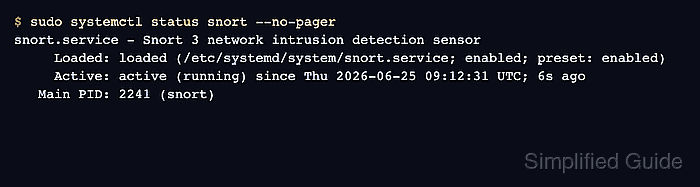
- Check that the service is enabled and running.
$ sudo systemctl status snort --no-pager
snort.service - Snort 3 network intrusion detection sensor
     Loaded: loaded (/etc/systemd/system/snort.service; enabled; preset: enabled)
     Active: active (running) since Thu 2026-06-25 09:12:31 UTC; 6s ago
   Main PID: 2241 (snort)
##### snipped #####
If the state is failed, inspect sudo journalctl -u snort --no-pager before editing the unit again.
- Confirm that Snort writes fast alerts through the service logger.
$ sudo cat /var/log/snort/alert_fast.txt
06/25-09:13:05.941162 [**] [1:1000004:1] "LOCAL live UDP test" [**] [Priority: 0] {UDP} 192.0.2.15:42122 -> 192.0.2.20:31337
An empty file usually means no matching test traffic has reached the sensor yet, or the logger was not configured with alert_fast.file enabled.
Related: How to view Snort alert logs

Mohd Shakir Zakaria is a cloud architect with deep roots in software development and open-source advocacy. Certified in AWS, Red Hat, VMware, ITIL, and Linux, he specializes in designing and managing robust cloud and on-premises infrastructures.


