Snort rule tuning needs a reversible way to quiet one signature after an alert has been reviewed. A disabled rule state keeps the original detection text available while stopping that gid:sid from firing in the active policy.
Snort 3 can load rule-state stubs through the same ips policy that loads rule files. A stub with enable:no names the generator and signature ID, so local policy can override a full rule without editing a community, registered, or local rule file that may be replaced during updates.
Use a rule-state stub when the whole signature should stop alerting. Use suppression instead when only one source or destination should be quieted, and validate the policy plus known matching traffic before applying the change to a long-running sensor.
Related: How to enable a Snort ruleset
Related: How to suppress a Snort signature ID
Related: How to test a Snort rule
Steps to disable a Snort rule state:
- Find the rule line by sid.
$ grep -R 'sid:1000001;' /usr/local/etc/snort/rules
/usr/local/etc/snort/rules/local.rules:alert udp any any -> any 31337 (msg:"LOCAL UDP test"; content:"SNORTTEST"; sid:1000001; rev:1;)
The alert key 1:1000001:1 maps to gid:sid:rev. Use the gid and sid values in the disabled-state stub.
- Confirm that the local Snort build supports the enable rule-state option.
$ snort --help-module enable

enable

Help: stub rule option to enable or disable full rule

Type: ips_option

Usage: detect

Configuration:

enum enable.~enable = 'yes': enable or disable rule in current ips policy or use default defined by ips policy { 'no' | 'yes' | 'inherit' }
- Replay traffic that currently triggers the rule.
$ sudo snort -q -c /usr/local/etc/snort/snort.lua \
  -R /usr/local/etc/snort/rules/local.rules \
  -r udp-test.pcap -k none -A alert_fast
06/25-02:13:50.730925 [**] [1:1000001:1] "LOCAL UDP test" [**] [Priority: 0] {UDP} 127.0.0.1:34065 -> 127.0.0.1:31337
Use a packet capture or controlled packet that already proves the rule can fire. -k none is useful for loopback-generated pcaps with checksum artifacts.
Related: How to test a Snort rule - Open a local disabled-state rule file.
$ sudo vi /usr/local/etc/snort/rules/disabled.rules
- Add a disabled-state stub for the target gid and sid.
alert udp any any -> any 31337 (gid:1; sid:1000001; enable:no;)
The header keeps the stub recognizable beside the original rule. The enable:no option is the state change; the detection options from the full rule stay out of the stub.
- Open the active Snort Lua configuration.
$ sudo vi /usr/local/etc/snort/snort.lua
- Include the normal rule file and disabled-state file in the ips policy.
ips =
{
    variables = default_variables,
    rules = [[
        include /usr/local/etc/snort/rules/local.rules
        include /usr/local/etc/snort/rules/disabled.rules
    ]]
}
If the policy already loads the rule file, add disabled.rules beside that include instead of duplicating the whole ips table.
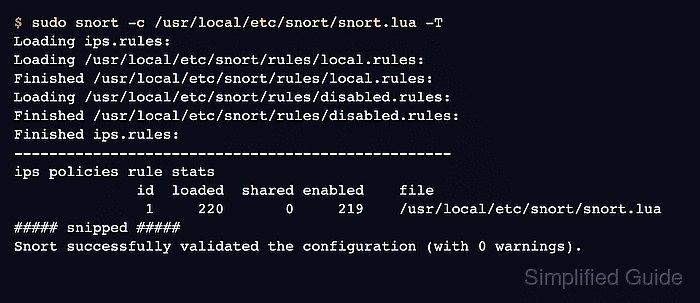
Related: How to enable a Snort ruleset - Validate the policy after adding the disabled-state file.
$ sudo snort -c /usr/local/etc/snort/snort.lua -T
--------------------------------------------------
o")~   Snort++ 3.12.2.0
--------------------------------------------------
Loading ips.rules:
Loading /usr/local/etc/snort/rules/local.rules:
Finished /usr/local/etc/snort/rules/local.rules:
Loading /usr/local/etc/snort/rules/disabled.rules:
Finished /usr/local/etc/snort/rules/disabled.rules:
Finished ips.rules:
--------------------------------------------------
ips policies rule stats
              id  loaded  shared enabled    file
               1     220       0     219    /usr/local/etc/snort/snort.lua
##### snipped #####
Snort successfully validated the configuration (with 0 warnings).
o")~   Snort exiting
A lower enabled count than loaded is expected when disabled-state stubs are active.
Related: How to test Snort configuration - Restart the Snort service after the disabled policy validates.
$ sudo systemctl restart snort
- Replay the same matching traffic with the active policy.
$ sudo snort -q -c /usr/local/etc/snort/snort.lua \
  -r udp-test.pcap -k none -A alert_fast
No alert_fast line for 1:1000001 means the disabled policy did not fire that SID for the same packet capture.

Mohd Shakir Zakaria is a cloud architect with deep roots in software development and open-source advocacy. Certified in AWS, Red Hat, VMware, ITIL, and Linux, he specializes in designing and managing robust cloud and on-premises infrastructures.


