Dense retrieval becomes a memory-planning problem when a query must be compared with thousands of stored text embeddings. Sentence Transformers provides an exact semantic-search path that scans the corpus in bounded chunks while retaining the highest-scoring records across the complete collection.
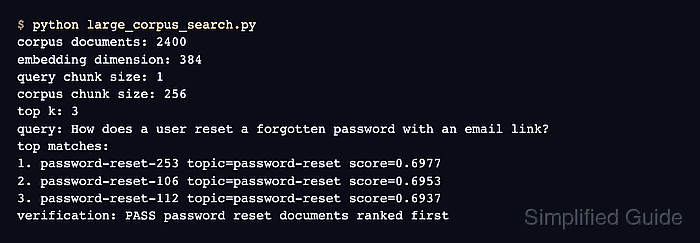
The encode_query() and encode_document() methods preserve the query-versus-document distinction used by retrieval models. Normalizing both embedding sets allows util.dot_score to produce cosine-equivalent rankings without a separate normalization pass.
The sample corpus contains 6,000 support records and uses a corpus_chunk_size of 1,024, so each scoring batch covers only part of the stored embeddings. A mismatched top five raises RuntimeError instead of reporting a successful retrieval.
Steps to run large-corpus semantic search with Sentence Transformers:
- Install Sentence Transformers in the active Python environment.
$ python -m pip install --upgrade sentence-transformers
The first model load downloads files from Hugging Face when they are not already cached. The package plus model cache belong to the active Python environment.
Related: How to install Sentence Transformers with pip - Create large_corpus_search.py with the model setup plus topic definitions.
- large_corpus_search.py
from sentence_transformers import SentenceTransformer, util


model = SentenceTransformer("sentence-transformers/all-MiniLM-L6-v2")

topics = [
    (
        "password-reset",
        "Reset a forgotten password from account settings, open the email link, "
        "and choose a new password.",
    ),
    (
        "invoice-export",
        "Export paid invoices from the billing dashboard as a CSV file for accounting.",
    ),
    (
        "api-token-rotation",
        "Rotate API tokens before sharing a new integration with a teammate.",
    ),
    (
        "notification-email",
        "Change the notification email address and confirm the new address for alerts.",
    ),
    (
        "workspace-theme",
        "Change the dashboard color theme for a workspace user profile.",
    ),
    (
        "vector-search",
        "Store dense embeddings in a vector index for semantic search retrieval.",
    ),
]
- Append the corpus construction section after the topic definitions.
corpus = []
for record_number in range(1, 1001):
    for topic, text in topics:
        corpus.append(
            {
                "id": f"{topic}-{record_number:04d}",
                "topic": topic,
                "text": f"{text} Support record {record_number:04d}.",
            }
        )

documents = [item["text"] for item in corpus]
query = "How does a user reset a forgotten password with an email link?"
Each returned corpus_id indexes the same position in corpus and documents, which preserves the mapping from a score to the application record.
- Append the embedding plus chunked-search section after the corpus construction section.
print(f"corpus documents: {len(corpus)}", flush=True)

document_embeddings = model.encode_document(
    documents,
    batch_size=256,
    normalize_embeddings=True,
    convert_to_tensor=True,
    show_progress_bar=False,
)
query_embedding = model.encode_query(
    [query],
    normalize_embeddings=True,
    convert_to_tensor=True,
)

hits = util.semantic_search(
    query_embedding,
    document_embeddings,
    query_chunk_size=1,
    corpus_chunk_size=1024,
    top_k=5,
    score_function=util.dot_score,
)[0]
A smaller corpus_chunk_size reduces temporary score memory, while a larger value can improve speed when the available memory can hold it.
- Append the result validation section after the search call.
print(f"embedding dimension: {document_embeddings.shape[1]}")
print("corpus chunk size: 1024")
print(f"query: {query}")
print("top matches:")

top_topics = []
for rank, hit in enumerate(hits, start=1):
    record = corpus[hit["corpus_id"]]
    top_topics.append(record["topic"])
    print(
        f"{rank}. {record['id']} topic={record['topic']} "
        f"score={hit['score']:.4f}"
    )

if set(top_topics) != {"password-reset"}:
    raise RuntimeError(f"unexpected top topics: {sorted(set(top_topics))}")

print(f"topics returned: {sorted(set(top_topics))}")
- Run the completed script to confirm password-reset records fill the top five results.
$ python large_corpus_search.py
corpus documents: 6000
embedding dimension: 384
corpus chunk size: 1024
query: How does a user reset a forgotten password with an email link?
top matches:
1. password-reset-0507 topic=password-reset score=0.7129
2. password-reset-0504 topic=password-reset score=0.7117
3. password-reset-0506 topic=password-reset score=0.7101
4. password-reset-0731 topic=password-reset score=0.7091
5. password-reset-0736 topic=password-reset score=0.7087
topics returned: ['password-reset']

Mohd Shakir Zakaria is a cloud architect with deep roots in software development and open-source advocacy. Certified in AWS, Red Hat, VMware, ITIL, and Linux, he specializes in designing and managing robust cloud and on-premises infrastructures.


