Cross-modal retrieval turns a text phrase and an image catalog into vectors that can be compared with one ranking operation. A compact CLIP prototype makes that handoff visible before a vector database, API, or user interface is added.
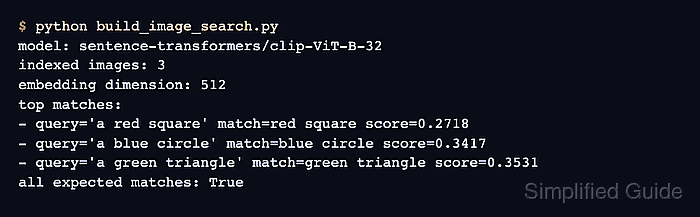
The sentence-transformers/clip-ViT-B-32 model accepts Pillow images and text strings through encode() and maps both inputs into the same vector space. Normalized image and query embeddings can therefore be ranked directly with model.similarity().
Three locally generated shapes keep the catalog deterministic and avoid depending on external image files. The final query must rank the red square first; the script exits with an error when another image wins, so a printed score alone cannot hide a failed search.
Steps to build image search with Sentence Transformers:
- Install the Sentence Transformers image extra in the active Python environment.
$ python -m pip install --upgrade "sentence-transformers[image]"
A project virtual environment isolates the image dependencies. A pinned PyTorch environment needs compatible torch and torchvision releases from the same CPU or CUDA wheel source.
Related: How to install Sentence Transformers with pip - Create image_search_build.py with the imports and image catalog.
- image_search_build.py
from pathlib import Path

from PIL import Image, ImageDraw
from sentence_transformers import SentenceTransformer


IMAGE_DIR = Path("demo-images")
CATALOG = [
    ("red-square.png", "red square", (220, 30, 30), "square"),
    ("blue-circle.png", "blue circle", (30, 80, 220), "circle"),
    ("green-triangle.png", "green triangle", (40, 155, 75), "triangle"),
]
- Append the demo-image builder below the catalog in image_search_build.py.
def create_demo_images():
    IMAGE_DIR.mkdir(exist_ok=True)

    for filename, _, color, shape in CATALOG:
        image = Image.new("RGB", (224, 224), "white")
        draw = ImageDraw.Draw(image)

        if shape == "square":
            draw.rectangle((46, 46, 178, 178), fill=color)
        elif shape == "circle":
            draw.ellipse((42, 42, 182, 182), fill=color)
        else:
            draw.polygon([(112, 34), (38, 188), (186, 188)], fill=color)

        image.save(IMAGE_DIR / filename)


create_demo_images()
The generated files provide a repeatable smoke-test catalog. Application code can replace this block with existing image paths while keeping the indexing and query sections unchanged.
- Append the CLIP image-index block below the demo-image builder in image_search_build.py.
model = SentenceTransformer("sentence-transformers/clip-ViT-B-32")
images = [
    Image.open(IMAGE_DIR / filename).convert("RGB")
    for filename, _, _, _ in CATALOG
]
image_embeddings = model.encode(images, normalize_embeddings=True)
The first model load downloads its weights. Normalization keeps each embedding at unit length before similarity ranking.
- Append the text-query ranking block below the image-index block in image_search_build.py.
query = "a red square"
query_embedding = model.encode([query], normalize_embeddings=True)
scores = model.similarity(query_embedding, image_embeddings)[0]
best_index = int(scores.argmax())
best_filename, best_label, _, _ = CATALOG[best_index]

print(f"query: {query}")
print(f"match: {best_label}")
print(f"file: {IMAGE_DIR / best_filename}")
print(f"score: {float(scores[best_index]):.4f}")

if best_label != "red square":
    raise SystemExit("expected the red square to rank first")
model.similarity() compares the text vector with every image vector. The highest score selects the catalog entry returned for the query.
- Run image_search_build.py to confirm that the text query ranks the red square first.
$ python image_search_build.py
query: a red square
match: red square
file: demo-images/red-square.png
score: 0.2718

Mohd Shakir Zakaria is a cloud architect with deep roots in software development and open-source advocacy. Certified in AWS, Red Hat, VMware, ITIL, and Linux, he specializes in designing and managing robust cloud and on-premises infrastructures.


