Embedding length affects vector database schema, memory use, and retrieval latency. Sentence Transformers can return shorter vectors from the same encode call, which helps when an embedding workflow needs smaller records without switching to a different model family.
Dimension truncation is most useful with Matryoshka embedding models, which are trained so the first part of the vector still carries ranking signal. The truncate_dim option on encode() returns only the requested prefix length; ordinary embedding models can still be sliced, but the lower-dimensional quality may drop more sharply.
Use one target dimension consistently across indexing, storage, and querying. A vector index created for 768 dimensions cannot accept 128-dimension query vectors without being rebuilt or recreated with the smaller dimension.
Steps to truncate Sentence Transformers embedding dimensions:
- Open a Python environment with Sentence Transformers and NumPy available.
Use the same environment that loads embeddings for the downstream search or retrieval workflow. Install or upgrade Sentence Transformers separately when the environment cannot import the package.
- Choose a Matryoshka model and a target dimension smaller than its full embedding size.
The example uses tomaarsen/mpnet-base-nli-matryoshka and truncates 768-dimension output to 128 dimensions. Use a dimension recommended for the selected model when production recall matters.
- Create a short script that encodes full and truncated embeddings.
- truncate_embeddings.py
from sentence_transformers import SentenceTransformer
import numpy as np

model = SentenceTransformer("tomaarsen/mpnet-base-nli-matryoshka")
sentences = [
    "A developer shortens embeddings for a vector database.",
    "An engineer reduces vector dimensions for semantic search storage.",
    "The invoice was paid by bank transfer yesterday.",
]

full_embeddings = model.encode(sentences, normalize_embeddings=True)
truncated_embeddings = model.encode(
    sentences,
    normalize_embeddings=True,
    truncate_dim=128,
)

print(f"full embedding shape: {full_embeddings.shape}")
print(f"truncated embedding shape: {truncated_embeddings.shape}")
print(f"related pair cosine, full: {np.dot(full_embeddings[0], full_embeddings[1]):.4f}")
print(f"related pair cosine, truncated: {np.dot(truncated_embeddings[0], truncated_embeddings[1]):.4f}")
print(f"unrelated pair cosine, truncated: {np.dot(truncated_embeddings[0], truncated_embeddings[2]):.4f}")
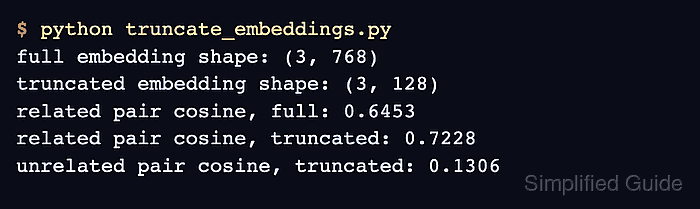
- Run the script and confirm the second array has the target dimension.
$ python truncate_embeddings.py
full embedding shape: (3, 768)
truncated embedding shape: (3, 128)
related pair cosine, full: 0.6453
related pair cosine, truncated: 0.7228
unrelated pair cosine, truncated: 0.1306
The exact cosine scores vary by model and sentences. The shape line is the dimension check; the related and unrelated scores confirm the truncated vectors still produce a usable semantic separation for this sample.
- Replace the full-size encode call in the embedding writer with the same truncate_dim value.
embeddings = model.encode(
    documents,
    normalize_embeddings=True,
    truncate_dim=128,
)
Rebuild any existing vector index or database collection that was created for a different dimension. Mixing 768-dimension stored vectors with 128-dimension query vectors causes shape errors or invalid similarity scores.
- Remove the temporary script after the application code uses the truncated encode call.
$ rm truncate_embeddings.py

Mohd Shakir Zakaria is a cloud architect with deep roots in software development and open-source advocacy. Certified in AWS, Red Hat, VMware, ITIL, and Linux, he specializes in designing and managing robust cloud and on-premises infrastructures.


