Retrieval models can treat a search query differently from the passages it searches. Prompt prefixes preserve that distinction before tokenization, so the text used to build an index and the text used to search it follow the roles expected during model training.
A SentenceTransformer instance stores reusable prefixes in a prompts dictionary. The encode_query() and encode_document() methods select the matching role, while encode() accepts prompt_name when an application needs a named prompt outside those role-specific methods.
Prompt wording belongs to the model contract rather than the application author's preference. The intfloat/e5-small-v2 model requires query: for queries and passage: for passages; another model may require different text or no prompt at all.
Steps to use Sentence Transformers embedding prompts:
- Create embedding_prompts.py with the E5 prompt mapping and retrieval text.
- embedding_prompts.py
from sentence_transformers import SentenceTransformer


model = SentenceTransformer(
    "intfloat/e5-small-v2",
    prompts={
        "query": "query: ",
        "document": "passage: ",
    },
)

query = "How do I reset a forgotten password?"
documents = [
    "Generate quarterly revenue charts from a CSV export.",
    "Reset a lost account password from the profile security page.",
    "Tune the database connection pool for a busy API server.",
]
The prompt key identifies the role used by Sentence Transformers; its value must reproduce the prefix specified by the model card.
- Append the role-specific and named-prompt embedding calls below the document list.
- embedding_prompts.py
query_embedding = model.encode_query(
    [query],
    normalize_embeddings=True,
    show_progress_bar=False,
)
document_embeddings = model.encode_document(
    documents,
    normalize_embeddings=True,
    show_progress_bar=False,
)
named_query_embedding = model.encode(
    [query],
    prompt_name="query",
    normalize_embeddings=True,
    show_progress_bar=False,
)
encode_query() selects the query prompt, encode_document() selects the document prompt, and prompt_name=“query” requests the same named query prefix through encode().
- Append the retrieval ranking and failure checks below the embedding calls.
- embedding_prompts.py
scores = model.similarity(query_embedding, document_embeddings)[0]
best_index = int(scores.argmax())
prompt_delta = float(abs(query_embedding - named_query_embedding).max())

assert query_embedding.shape[1] == document_embeddings.shape[1]
assert best_index == 1
assert prompt_delta < 1e-6

print(f"prompt keys: {', '.join(sorted(model.prompts))}")
print(f"query shape: {query_embedding.shape}")
print(f"document shape: {document_embeddings.shape}")
print(f"named prompt delta: {prompt_delta:.6f}")
print(f"top match: doc-{best_index + 1}")
print(f"score: {scores[best_index]:.3f}")
print(f"text: {documents[best_index]}")
The assertions stop the program when the vector dimensions differ, the password passage does not rank first, or the role method and named prompt produce different query embeddings.
- Run the completed prompt check from the project directory.
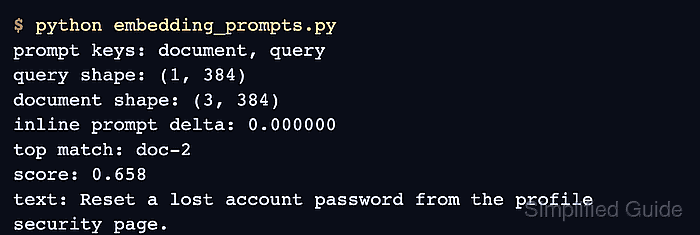
$ python embedding_prompts.py
prompt keys: document, query
query shape: (1, 384)
document shape: (3, 384)
named prompt delta: 0.000000
top match: doc-2
score: 0.895
text: Reset a lost account password from the profile security page.
The zero prompt delta confirms that encode_query() and prompt_name=“query” used the same prefix. The matching 384-column shapes and top-ranked password passage confirm that prompted query and document vectors work together in the retrieval path.

Mohd Shakir Zakaria is a cloud architect with deep roots in software development and open-source advocacy. Certified in AWS, Red Hat, VMware, ITIL, and Linux, he specializes in designing and managing robust cloud and on-premises infrastructures.


