Scraping an RSS feed with Scrapy keeps the crawl on a source that is already structured for repeated updates, which is useful for release notes, newsroom posts, and monitoring feeds that change more slowly than page templates. A feed-first crawl usually survives site redesigns with less selector maintenance than scraping the matching HTML pages directly.
Current Scrapy reads a direct RSS URL as XML in scrapy shell, and XMLFeedSpider can iterate each repeated item node while still using normal XPath selectors and feed export options. Namespace-prefixed fields such as content:encoded can stay explicit in the spider with namespaces = […], while shell probes can temporarily flatten prefixes with response.selector.remove_namespaces().
The feed URL still needs to return the raw XML body instead of an HTML landing page, login response, or redirect target, and Atom feeds use entry under a default namespace instead of RSS channel/item. Standalone feed checks are also safer outside an existing Scrapy project when neutral behavior matters, because project roots can add custom settings, middleware, and pipelines to later runs.
Steps to scrape an RSS feed with Scrapy using XMLFeedSpider:
- Check the feed in scrapy shell and confirm that channel/item returns the repeated entry titles.
$ scrapy shell --nolog "https://updates.example.net/rss.xml" -c '(type(response).__name__, response.xpath("//channel/item/title/text()").getall())'
('XmlResponse', ['Launch Update', 'Usage Tips'])
XmlResponse confirms that Scrapy is parsing XML instead of HTML, and an empty result usually means the URL returned an Atom feed, an HTML page, or a blocked response instead of the raw RSS document. Related: How to use Scrapy shell
- Remove namespaces in the shell only when richer fields are stored under prefixes such as content:encoded.
$ scrapy shell --nolog "https://updates.example.net/rss.xml" -c '(response.selector.remove_namespaces(), response.xpath("//channel/item/encoded/text()").getall())[-1]'
['<p>Full launch update body.</p>', '<p>Full usage tips body.</p>']
remove_namespaces() makes prefixed elements easier to probe in the shell, but keeping explicit namespace prefixes in the saved spider is safer when feeds mix multiple XML vocabularies.
- Save a standalone XMLFeedSpider file that iterates each item node and extracts the fields to export.
$ vi rss_feed_spider.py
- rss_feed_spider.py
from scrapy.spiders import XMLFeedSpider


class RssFeedSpider(XMLFeedSpider):
    name = "rss_feed"
    start_urls = ["https://updates.example.net/rss.xml"]
    iterator = "iternodes"
    itertag = "item"
    namespaces = [("content", "http://purl.org/rss/1.0/modules/content/")]

    def parse_node(self, response, node):
        yield {
            "title": node.xpath("title/text()").get(),
            "link": node.xpath("link/text()").get(),
            "pubDate": node.xpath("pubDate/text()").get(),
            "body_html": node.xpath("content:encoded/text()").get(),
        }
itertag = “item” matches RSS 2.0 entries, while an Atom feed would normally switch to entry and keep the feed namespace registered explicitly. Related: How to create a Scrapy spider
- Run the spider and overwrite the current export file with the parsed feed items.
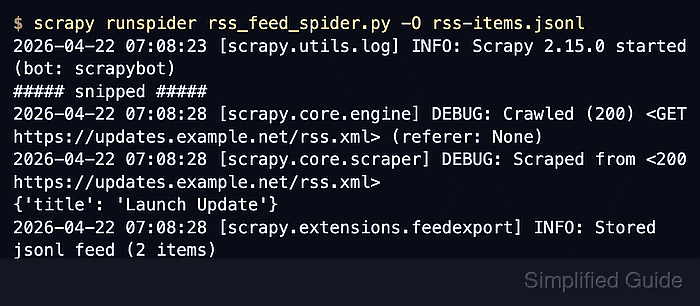
$ scrapy runspider rss_feed_spider.py -O rss-items.jsonl
2026-04-22 07:08:23 [scrapy.utils.log] INFO: Scrapy 2.15.0 started (bot: scrapybot)
##### snipped #####
2026-04-22 07:08:28 [scrapy.core.engine] DEBUG: Crawled (200) <GET https://updates.example.net/rss.xml> (referer: None)
2026-04-22 07:08:28 [scrapy.core.scraper] DEBUG: Scraped from <200 https://updates.example.net/rss.xml>
{'title': 'Launch Update', 'link': 'https://updates.example.net/news/launch-update.html', 'pubDate': 'Wed, 16 Apr 2026 09:00:00 +0000', 'body_html': '<p>Full launch update body.</p>'}
2026-04-22 07:08:28 [scrapy.extensions.feedexport] INFO: Stored jsonl feed (2 items) in: rss-items.jsonl
2026-04-22 07:08:28 [scrapy.core.engine] INFO: Spider closed (finished)
The .jsonl suffix selects JSON Lines export automatically, and -O replaces any existing rss-items.jsonl file instead of appending to it. Related: How to export a feed as JSON Lines in Scrapy
- Read the saved feed and confirm that each RSS entry became one exported item.
$ cat rss-items.jsonl
{"title": "Launch Update", "link": "https://updates.example.net/news/launch-update.html", "pubDate": "Wed, 16 Apr 2026 09:00:00 +0000", "body_html": "<p>Full launch update body.</p>"}
{"title": "Usage Tips", "link": "https://updates.example.net/news/usage-tips.html", "pubDate": "Tue, 15 Apr 2026 09:00:00 +0000", "body_html": "<p>Full usage tips body.</p>"}
One line per item keeps the export easy to diff, stream, or append in later runs without rebuilding a full JSON array. Paste a raw body_html fragment into the tool only when you need a plain-text review of the extracted entry body.
Tool: HTML Tag Stripper

Mohd Shakir Zakaria is a cloud architect with deep roots in software development and open-source advocacy. Certified in AWS, Red Hat, VMware, ITIL, and Linux, he specializes in designing and managing robust cloud and on-premises infrastructures.


