Scraping a GraphQL API with Scrapy pulls structured records from the same data layer that drives search results, catalog pages, and dashboards. That avoids brittle HTML selectors when the useful fields already arrive as JSON behind one GraphQL endpoint.
Current Scrapy releases can start API calls from async def start() and post a GraphQL payload with scrapy.http.JsonRequest. The request body usually includes a query document, an optional operationName, and a variables object, and the callback can read the parsed body with response.json().
Success checks still need to inspect the response body instead of trusting the HTTP status alone, because GraphQL servers can return an errors array even when the request finishes with HTTP 200. Authenticated endpoints may also require bearer tokens, CSRF headers, or session cookies, and current Scrapy docs still say to pass cookie state through Request.cookies rather than only setting a raw Cookie header.
Related: How to scrape a JSON API with Scrapy
Related: How to set request headers in Scrapy
Tool: GraphQL Formatter
Steps to scrape a GraphQL API with Scrapy:
- Create a new Scrapy project for the GraphQL crawl.
$ scrapy startproject graphql_scrape New Scrapy project 'graphql_scrape', using template directory '##### snipped #####', created in: /srv/graphql_scrape You can start your first spider with: cd graphql_scrape scrapy genspider example example.com - Change into the project directory.
$ cd graphql_scrape
- Generate a spider file for the GraphQL host.
$ scrapy genspider countries countries.trevorblades.com
Created spider 'countries' using template 'basic' in module:
  graphql_scrape.spiders.countries
- Replace the generated spider with a JsonRequest that posts the GraphQL operation and yields the returned fields.
- graphql_scrape/spiders/countries.py
import scrapy
from scrapy.exceptions import CloseSpider
from scrapy.http import JsonRequest


class CountriesSpider(scrapy.Spider):
    name = "countries"
    allowed_domains = ["countries.trevorblades.com"]
    url = "https://countries.trevorblades.com/"
    custom_settings = {
        "FEED_EXPORT_ENCODING": "utf-8",
    }

    async def start(self):
        query = """
query ContinentCountries($code: ID!) {
  continent(code: $code) {
    countries {
      code
      name
      capital
    }
  }
}
""".strip()

        body = {
            "operationName": "ContinentCountries",
            "query": query,
            "variables": {"code": "EU"},
        }

        yield JsonRequest(
            url=self.url,
            data=body,
            callback=self.parse,
        )

    def parse(self, response):
        body = response.json()
        if body.get("errors"):
            raise CloseSpider("GraphQL errors returned.")

        data = body.get("data") or {}
        continent = data.get("continent") or {}
        countries = continent.get("countries") or []
        if not countries:
            raise CloseSpider("No countries returned.")

        for row in countries:
            yield {
                "code": row.get("code"),
                "name": row.get("name"),
                "capital": row.get("capital"),
            }
JsonRequest sets the request body as JSON, adds JSON headers, and switches the method to POST automatically when data= is present. Replace the example endpoint, query, and variables with the live operation captured from the real application when the target schema differs.
- Run the spider and overwrite the current JSON export file.
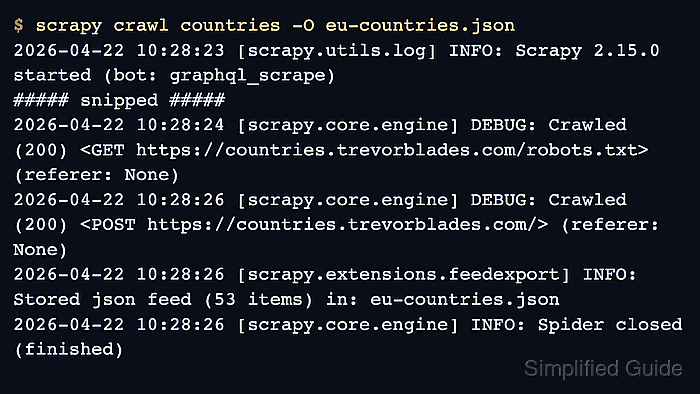
$ scrapy crawl countries -O eu-countries.json
2026-04-22 10:28:23 [scrapy.utils.log] INFO: Scrapy 2.15.0 started (bot: graphql_scrape)
##### snipped #####
2026-04-22 10:28:26 [scrapy.extensions.feedexport] INFO: Stored json feed (53 items) in: eu-countries.json
2026-04-22 10:28:26 [scrapy.core.engine] INFO: Spider closed (finished)
New Scrapy projects obey robots.txt by default, so the log can show a /robots.txt request before the GraphQL POST. -O replaces any existing output file with one complete JSON array.
- Count the exported items once before passing the file to another tool.
$ python3
>>> import json
>>> len(json.load(open("eu-countries.json")))
53
A numeric count confirms that the exported file closed as valid JSON instead of a truncated array.
- Review the exported records before expanding the spider into pagination or authentication logic.
$ python3 -m json.tool eu-countries.json
[
    {
        "code": "AD",
        "name": "Andorra",
        "capital": "Andorra la Vella"
    },
##### snipped #####
    {
        "code": "XK",
        "name": "Kosovo",
        "capital": "Pristina"
    }
]
If the body includes an errors array, update the spider to stop or log the failure before exporting partial data as if it were complete.

Mohd Shakir Zakaria is a cloud architect with deep roots in software development and open-source advocacy. Certified in AWS, Red Hat, VMware, ITIL, and Linux, he specializes in designing and managing robust cloud and on-premises infrastructures.


