Binary masks often contain several disconnected foreground regions that need separate identities before area, position, or shape measurements can be calculated. SciPy replaces each nonzero region with a positive integer through scipy.ndimage.label() while leaving background pixels as zero.
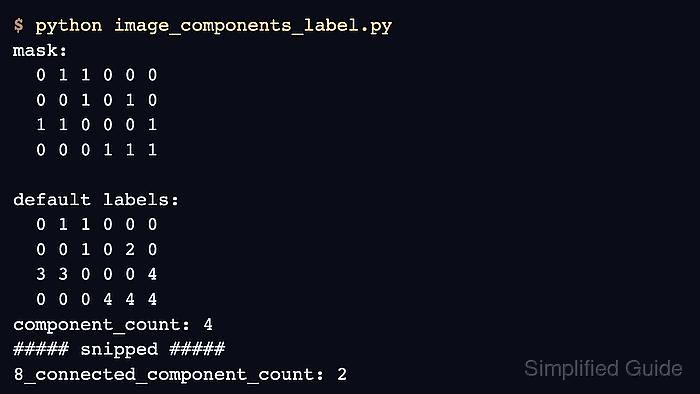
Connectivity determines which neighboring foreground pixels belong to the same region. The default two-dimensional structure uses edge adjacency, also called 4-connectivity, while generate_binary_structure(2, 2) includes diagonal adjacency for 8-connectivity.
The sample mask includes diagonal contacts so the two connectivity rules produce different results. Printing each label matrix beside its component count shows whether the chosen rule matches the image's definition of one object.
Steps to label image components with SciPy:
- Create image_components_label.py with the imports and Boolean mask.
- image_components_label.py
import numpy as np
from scipy import ndimage


mask = np.array(
    [
        [0, 1, 1, 0, 0, 0],
        [0, 0, 1, 0, 1, 0],
        [1, 1, 0, 0, 0, 1],
        [0, 0, 0, 1, 1, 1],
    ],
    dtype=bool,
)
ndimage.label() treats every nonzero value as foreground. A Boolean mask is appropriate when a threshold, rather than intensity magnitude, decides object membership.
- Append the default 4-connected labeling call to image_components_label.py.
labels_4, count_4 = ndimage.label(mask)
The default two-dimensional structure connects edge-touching pixels but leaves diagonal-only contacts separate.
- Append the 4-connected result display to image_components_label.py.
print("4-connected labels:")
print(labels_4)
print(f"4-connected component count: {count_4}")
- Append an 8-connected structure to image_components_label.py.
structure_8 = ndimage.generate_binary_structure(mask.ndim, 2)
The connectivity value can range from 1 to the array rank. For a two-dimensional mask, 2 includes every neighbor around the center pixel.
- Append the 8-connected labeling and result display to image_components_label.py.
labels_8, count_8 = ndimage.label(mask, structure=structure_8)

print("\n8-connected labels:")
print(labels_8)
print(f"8-connected component count: {count_8}")
- Run the completed script to confirm how diagonal connectivity changes the component labels.
$ python3 image_components_label.py
4-connected labels:
[[0 1 1 0 0 0]
 [0 0 1 0 2 0]
 [3 3 0 0 0 4]
 [0 0 0 4 4 4]]
4-connected component count: 4

8-connected labels:
[[0 1 1 0 0 0]
 [0 0 1 0 2 0]
 [1 1 0 0 0 2]
 [0 0 0 2 2 2]]
8-connected component count: 2

Mohd Shakir Zakaria is a cloud architect with deep roots in software development and open-source advocacy. Certified in AWS, Red Hat, VMware, ITIL, and Linux, he specializes in designing and managing robust cloud and on-premises infrastructures.


