Model artifacts often need to leave the Python training stack before they can be served by smaller runtimes or non-Python applications. Exporting a supported scikit-learn estimator to ONNX creates a binary model file that ONNX Runtime can load without reconstructing the original Python object.
The skl2onnx package converts core scikit-learn estimators and pipelines whose components have registered converters. A representative input gives the exported graph its input name, tensor type, and feature count, so its column order and numeric dtype must match the data supplied during inference.
A three-row prediction comparison tests the saved file through a separate ONNX Runtime session. A load failure or different class label prevents an unreadable or behaviorally different export from appearing successful.
Steps to export a scikit-learn model to ONNX:
- Install the scikit-learn converter and CPU runtime packages in the active Python environment.
$ python -m pip install --upgrade scikit-learn skl2onnx onnxruntime
skl2onnx performs the conversion, while onnxruntime loads the saved graph for the prediction comparison.
- Create export_iris_onnx.py with the imports and deterministic training section.
- export_iris_onnx.py
from pathlib import Path

import numpy as np
import onnxruntime as ort
from sklearn.datasets import load_iris
from sklearn.linear_model import LogisticRegression
from sklearn.model_selection import train_test_split
from skl2onnx import to_onnx

X, y = load_iris(return_X_y=True)
X = X.astype(np.float32)
X_train, X_test, y_train, _ = train_test_split(
    X,
    y,
    test_size=0.2,
    random_state=42,
    stratify=y,
)

model = LogisticRegression(max_iter=500)
model.fit(X_train, y_train)
The fixed split keeps the comparison repeatable, and converting the features to float32 establishes the dtype expected by the exported graph.
- Add the ONNX conversion section below the training section.
onnx_model = to_onnx(model, X_train[:1])
onnx_path = Path("iris-logreg.onnx")
onnx_path.write_bytes(onnx_model.SerializeToString())
The one-row sample defines a variable batch dimension with four float32 features. The feature count and column order must remain aligned with the data used to train the estimator.
skl2onnx cannot convert every estimator or custom pipeline component. A missing-converter error requires a supported estimator or a registered custom converter before export.
- Add the ONNX Runtime comparison section below the conversion section.
session = ort.InferenceSession(str(onnx_path), providers=["CPUExecutionProvider"])
input_name = session.get_inputs()[0].name
output_names = [output.name for output in session.get_outputs()]
onnx_outputs = session.run(None, {input_name: X_test[:3]})

sklearn_labels = model.predict(X_test[:3])
onnx_labels = onnx_outputs[0]

print(f"artifact: {onnx_path}")
print(f"input: {input_name}")
print(f"outputs: {output_names}")
print(f"sklearn_labels: {sklearn_labels.tolist()}")
print(f"onnx_labels: {onnx_labels.tolist()}")
print(f"labels_match: {bool(np.array_equal(sklearn_labels, onnx_labels))}")
An InferenceSession load failure stops the script before comparison, while labels_match remains false when the exported graph returns different class labels.
- Compare the assembled export_iris_onnx.py file with the complete source.
- export_iris_onnx.py
from pathlib import Path

import numpy as np
import onnxruntime as ort
from sklearn.datasets import load_iris
from sklearn.linear_model import LogisticRegression
from sklearn.model_selection import train_test_split
from skl2onnx import to_onnx

X, y = load_iris(return_X_y=True)
X = X.astype(np.float32)
X_train, X_test, y_train, _ = train_test_split(
    X,
    y,
    test_size=0.2,
    random_state=42,
    stratify=y,
)

model = LogisticRegression(max_iter=500)
model.fit(X_train, y_train)

onnx_model = to_onnx(model, X_train[:1])
onnx_path = Path("iris-logreg.onnx")
onnx_path.write_bytes(onnx_model.SerializeToString())

session = ort.InferenceSession(str(onnx_path), providers=["CPUExecutionProvider"])
input_name = session.get_inputs()[0].name
output_names = [output.name for output in session.get_outputs()]
onnx_outputs = session.run(None, {input_name: X_test[:3]})

sklearn_labels = model.predict(X_test[:3])
onnx_labels = onnx_outputs[0]

print(f"artifact: {onnx_path}")
print(f"input: {input_name}")
print(f"outputs: {output_names}")
print(f"sklearn_labels: {sklearn_labels.tolist()}")
print(f"onnx_labels: {onnx_labels.tolist()}")
print(f"labels_match: {bool(np.array_equal(sklearn_labels, onnx_labels))}")
- Verify the exported model with the completed script from the project directory.
$ python export_iris_onnx.py
artifact: iris-logreg.onnx
input: X
outputs: ['output_label', 'output_probability']
sklearn_labels: [0, 2, 1]
onnx_labels: [0, 2, 1]
labels_match: True
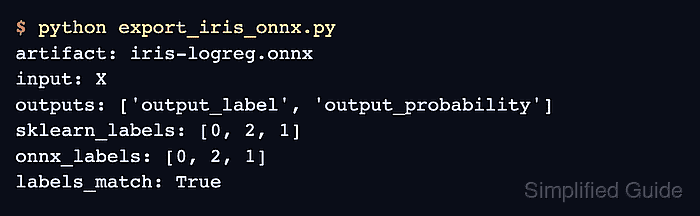
labels_match: True proves that ONNX Runtime loaded iris-logreg.onnx and reproduced the estimator's class labels for the same three rows.

Mohd Shakir Zakaria is a cloud architect with deep roots in software development and open-source advocacy. Certified in AWS, Red Hat, VMware, ITIL, and Linux, he specializes in designing and managing robust cloud and on-premises infrastructures.


