Rust projects on SUSE-family systems need the Rust compiler, Cargo, and a system linker before local crates can build. Installing rustup through zypper keeps the installer under the distribution package manager while the developer account manages the stable Rust toolchain.
The rustup package provides the toolchain manager, not the compiler by itself. The stable compiler, Cargo, rustfmt, and Clippy are downloaded into the user's ~/.rustup and ~/.cargo directories after rustup toolchain install stable runs.
Run the zypper package step with sudo, then run the rustup and Cargo steps as the user who will build Rust projects. openSUSE Tumbleweed provides an official rustup package; Leap or SUSE Linux Enterprise hosts that do not provide it in enabled repositories should use a supported organization repository or the upstream Rust installer instead of adding an experimental repository without review.
Steps to install the Rust toolchain on SUSE Linux:
- Open a terminal with sudo privileges.
- Refresh the enabled zypper repositories.
$ sudo zypper refresh
Repository 'openSUSE-Tumbleweed-Update' is up to date.
Repository 'Open H.264 Codec (openSUSE Tumbleweed)' is up to date.
Repository 'openSUSE-Tumbleweed-Oss' is up to date.
All repositories have been refreshed.
- Install rustup and GCC from the enabled repositories.
$ sudo zypper install --no-confirm rustup gcc
Loading repository data...
Reading installed packages...
Resolving package dependencies...

The following 29 NEW packages are going to be installed:
  alts binutils cpp cpp15 gcc gcc15 glibc-devel libalternatives1 libasan8 libatomic1 libctf-nobfd0 libctf0 libgomp1 libhwasan0 libisl23 libitm1 liblsan0 libmpc3 libmpfr6 libpkgconf7 libsframe2 libtsan2 libubsan1 libxcrypt-devel linux-glibc-devel pkgconf pkgconf-m4 pkgconf-pkg-config rustup

29 new packages to install.
##### snipped #####
(29/29) Installing: rustup-1.28.2~0-3.4.aarch64 [..done]
Running post-transaction scripts [...done]
GCC supplies the linker that rustc uses when Cargo builds native binaries. If zypper cannot find rustup, use a supported SUSE repository or the upstream Rust installer for that host instead of mixing unreviewed development repositories into a production system.
- Install the stable Rust toolchain for the current user.
$ rustup toolchain install stable
info: syncing channel updates for 'stable-aarch64-unknown-linux-gnu'
info: latest update on 2026-05-28, rust version 1.96.0 (ac68faa20 2026-05-25)
info: downloading component 'cargo'
info: downloading component 'clippy'
info: downloading component 'rust-docs'
info: downloading component 'rust-std'
info: downloading component 'rustc'
info: downloading component 'rustfmt'
info: installing component 'cargo'
info: installing component 'clippy'
info: installing component 'rust-docs'
info: installing component 'rust-std'
info: installing component 'rustc'
info: installing component 'rustfmt'

  stable-aarch64-unknown-linux-gnu installed - rustc 1.96.0 (ac68faa20 2026-05-25)

info: default toolchain set to 'stable-aarch64-unknown-linux-gnu'
info: self-update is disabled for this build of rustup
info: any updates to rustup will need to be fetched with your system package manager
x86_64 systems report stable-x86_64-unknown-linux-gnu instead of stable-aarch64-unknown-linux-gnu.
- Set the stable toolchain as the default.
$ rustup default stable
info: using existing install for 'stable-aarch64-unknown-linux-gnu'
info: default toolchain set to 'stable-aarch64-unknown-linux-gnu'

  stable-aarch64-unknown-linux-gnu unchanged - rustc 1.96.0 (ac68faa20 2026-05-25)
- Check the Rust compiler version.
$ rustc --version
rustc 1.96.0 (ac68faa20 2026-05-25)
- Check the Cargo version.
$ cargo --version
cargo 1.96.0 (30a34c682 2026-05-25)
- Create a sample Cargo project.
$ cargo new hello-rust Creating binary (application) `hello-rust` package note: see more `Cargo.toml` keys and their definitions at https://doc.rust-lang.org/cargo/reference/manifest.html - Run the sample project through Cargo.
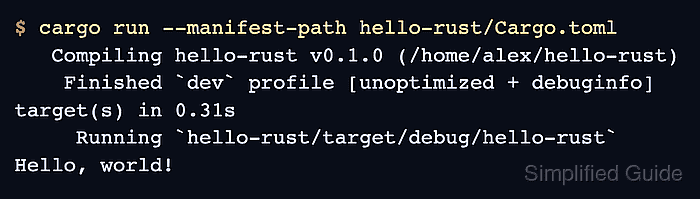
$ cargo run --manifest-path hello-rust/Cargo.toml Compiling hello-rust v0.1.0 (/home/alex/hello-rust) Finished `dev` profile [unoptimized + debuginfo] target(s) in 0.31s Running `hello-rust/target/debug/hello-rust` Hello, world! - Remove the sample project.
$ rm -r hello-rust
This removes only the throwaway verification project. It does not remove rustup, Cargo, or the installed Rust toolchain.

Mohd Shakir Zakaria is a cloud architect with deep roots in software development and open-source advocacy. Certified in AWS, Red Hat, VMware, ITIL, and Linux, he specializes in designing and managing robust cloud and on-premises infrastructures.


