Redmine can email assignees when assigned issues are overdue or due soon. Reminder emails help project leads nudge deadline owners from the existing issue data instead of manually checking every project issue list.
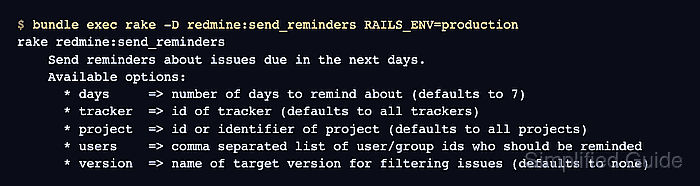
The built-in redmine:send_reminders rake task runs from the Redmine application root and uses the same outbound mail configuration as normal issue notifications. It filters active assigned issues by due date, then sends each matching assignee one email with the issues assigned to that user.
Confirm outbound email delivery before running reminders against a broad project or the whole instance. The task prints no success message when delivery works, so the mailbox, mail catcher, or mail-server log is the proof that reminders left Redmine.
Steps to send Redmine issue reminder emails:
- Open a shell on the Redmine host as the application user.
- Change to the Redmine application root.
$ cd /usr/src/redmine
Use the root directory for the running instance. Source installs often use /opt/redmine or /var/www/redmine, package installs may use /usr/share/redmine, and the official container image uses /usr/src/redmine.
- Send a test email to a known Redmine user.
$ bundle exec rake "redmine:email:test[admin]" RAILS_ENV=production
An email was sent to redmine-admin@example.net
Replace admin with a real login that should receive Redmine mail.
Related: How to test Redmine email notifications - Check the reminder task options.
$ bundle exec rake -D redmine:send_reminders RAILS_ENV=production rake redmine:send_reminders Send reminders about issues due in the next days. Available options: * days => number of days to remind about (defaults to 7) * tracker => id of tracker (defaults to all trackers) * project => id or identifier of project (defaults to all projects) * users => comma separated list of user/group ids who should be reminded * version => name of target version for filtering issues (defaults to none) - Confirm the reminder scope contains assigned active issues with due dates in the selected window.
Closed issues, unassigned issues, and issues outside the days window are skipped. Start with one project identifier or a short users list before running an instance-wide reminder.
Related: How to create a Redmine issue - Send reminders for one project.
$ bundle exec rake redmine:send_reminders days=7 project=operations RAILS_ENV=production
The task exits quietly on success. Add users=“5,12” to limit delivery to specific user or group IDs, or add tracker=1 and version=“June Release” when those filters match the issues that need reminders.
- Confirm that the mailbox or SMTP capture received the reminder email.
To: reminder.manager@example.org
Subject: 1 issue(s) due in the next 7 days
If no message arrives, check the issue assignee, due date, status, project filter, and /config/configuration.yml mail settings before widening the reminder scope.
Related: How to configure Redmine email delivery

Mohd Shakir Zakaria is a cloud architect with deep roots in software development and open-source advocacy. Certified in AWS, Red Hat, VMware, ITIL, and Linux, he specializes in designing and managing robust cloud and on-premises infrastructures.


