PyTorch provides tensors for numerical calculations and machine learning. Windows developers can install its torch package in a virtual environment so each project has its own Python packages.
The official CPU package runs tensor operations on the processor without a GPU driver or CUDA toolkit. It is enough for learning the tensor API and running CPU workloads; the separate vision and audio packages are unnecessary for basic tensor arithmetic.
Native Windows wheels must match the Python version and processor architecture. PyTorch provides an official CPU wheel for normal CPython 3.13 ARM64 on Windows 11 on ARM; a newer default Python or a free-threaded build may require a different wheel.
The Python install manager must be available before creating the environment. The commands select normal CPython 3.13 ARM64 rather than the latest default Python. PyTorch also needs the Microsoft Visual C++ v14 Redistributable for ARM64, available from Microsoft's ARM64 installer. That installer adds system runtime libraries and may require administrator approval. The project commands use an ordinary, non-administrator PowerShell session.
Steps to install PyTorch on Windows:
- Create a project folder named torch-demo in a writable location.
PS> mkdir torch-demo
- Enter the project folder.
PS> cd torch-demo
- Create a virtual environment with CPython 3.13 ARM64.
PS> pymanager exec -V:3.13-arm64 -m venv .venv
The explicit runtime tag avoids a newer default interpreter or an older py launcher choosing another Python installation. The install manager's exec command can download the selected runtime if it is missing.
- Activate the project's virtual environment.
PS> .\.venv\Scripts\Activate.ps1
If PowerShell reports that running scripts is disabled, the following policy change permits local scripts and requires signatures for downloaded scripts for this PowerShell process only. It expires when the session closes. An organizational policy may prevent the change; do not bypass that policy.
PS> Set-ExecutionPolicy -Scope Process -ExecutionPolicy RemoteSigned -Force
PS> .\.venv\Scripts\Activate.ps1
The two commands above apply only after that activation error. Successful activation normally adds (.venv) to the prompt.
- Confirm that pip belongs to the project environment.
PS> python -m pip --version
pip 26.2.2 from C:\Users\user\torch-demo\.venv\Lib\site-packages\pip (python 3.13)
The path must point inside torch-demo\.venv. The profile name and pip version can differ. If the module is missing, restore pip before installing packages.
- Install PyTorch 2.15.0 from the official CPU package index.
PS> python -m pip install torch==2.15.0 --index-url https://download.pytorch.org/whl/cpu
The PyTorch installation selector identifies the stable release, while the official CPU wheel index lists the native Windows ARM64 wheel. The native wheel for this environment is torch-2.15.0+cpu-cp313-cp313-win_arm64.whl. Pip may also build a pure-Python dependency wheel, such as MarkupSafe 2.1.5; that does not mean it is compiling PyTorch or requires a C++ compiler or Windows SDK.
- Check that Python imports torch from the same virtual environment.
PS> python -c "import sys, torch; print(sys.executable); print(torch.__file__)"
C:\Users\user\torch-demo\.venv\Lib\site-packages\torch\_subclasses\functional_tensor.py:377: UserWarning: Failed to initialize NumPy: No module named 'numpy' (Triggered internally at C:\a\pytorch\pytorch\torch\csrc\utils\tensor_numpy.cpp:82.)
  cpu = _conversion_method_template(device=torch.device("cpu"))
C:\Users\user\torch-demo\.venv\Scripts\python.exe
C:\Users\user\torch-demo\.venv\Lib\site-packages\torch\__init__.py
The last two paths must be inside the project's .venv directory, with Python under Scripts and torch under Lib\site-packages.
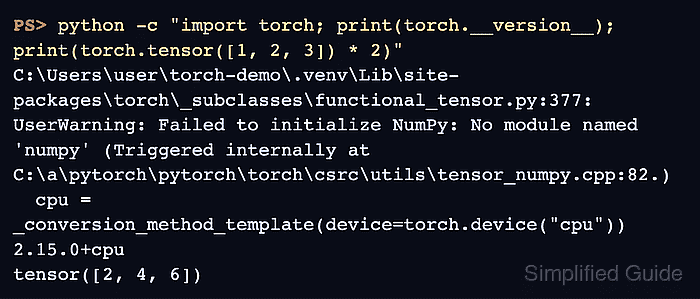
- Verify that PyTorch reports its CPU version and doubles a tensor.
PS> python -c "import torch; print(torch.__version__); print(torch.tensor([1, 2, 3]) * 2)"
C:\Users\user\torch-demo\.venv\Lib\site-packages\torch\_subclasses\functional_tensor.py:377: UserWarning: Failed to initialize NumPy: No module named 'numpy' (Triggered internally at C:\a\pytorch\pytorch\torch\csrc\utils\tensor_numpy.cpp:82.)
  cpu = _conversion_method_template(device=torch.device("cpu"))
2.15.0+cpu
tensor([2, 4, 6])
A working installation prints 2.15.0+cpu and tensor([2, 4, 6]). With NumPy absent, PyTorch can also emit a nonfatal Failed to initialize NumPy: No module named 'numpy' warning. Tensor arithmetic still works, but NumPy interoperability requires NumPy and is not established by this calculation.