Neural network layers must agree on the number of features passed between them. In PyTorch, a linear layer shape mismatch raises a mat1 and mat2 shapes cannot be multiplied error when the input's last dimension differs from the layer's expected feature count; matching those dimensions lets the forward pass run.
torch.nn.Linear transforms the last dimension and preserves the dimensions before it. For a two-dimensional input, rows represent batch items and columns represent features, so changing the batch size does not repair a feature-count mismatch. The layer stores its weights as output features by input features and transposes them for multiplication.
The correction depends on the model's intended input, rather than whichever shape happens to reach the layer. A wider input needs a wider layer only when all of those values belong to each sample. Changing a layer's input size initializes new parameters, so this repair is suitable before training; it does not preserve a trained layer's weights.
Steps to fix a linear layer shape mismatch in PyTorch:
- Create a file named linear_shape.py using your text editor, with your own model in place of the sample model.
- linear_shape.py
import torch
from torch import nn

model = nn.Sequential(
    nn.Conv2d(3, 8, 3),
    nn.Flatten(),
    nn.Linear(64, 10),
)
For a class-based model, import or define the class here and assign an instance to model. The file runs in a Python environment with PyTorch installed.
Related: How to install PyTorch with pip - Add the following lines at the end of linear_shape.py, using a batch of your own data in place of the random tensor.
- linear_shape.py
x = torch.randn(
    4, 3, 32, 32
)
print(x.shape)
print(model)
output = model(x)
The random tensor stands for four 32 by 32 images with three color channels. print(model) lists every layer with its in_features and out_features.
- Save linear_shape.py.
- Run the file to reproduce the shape-mismatch error.
$ python linear_shape.py
torch.Size([4, 3, 32, 32])
Sequential(
  (0): Conv2d(3, 8, kernel_size=(3, 3), stride=(1, 1))
  (1): Flatten(start_dim=1, end_dim=-1)
  (2): Linear(in_features=64, out_features=10, bias=True)
)
Traceback (most recent call last):
##### snipped #####
RuntimeError: addmm: mat1 and mat2 shapes cannot be multiplied (4x7200 and 64x10)
The error ends with the pairs (4x7200 and 64x10). The input shape printed first is the model's input, not the layer's, so the pairs show what actually reached the layer.
- Find the linear layer whose in_features and out_features match the second pair in the error.
The second pair, 64 and 10, matches item (2) in the printed model. The first pair shows four samples with 7200 features each, so 7200 is the width reaching that layer. For input that is not two-dimensional, the first number in that pair is not the batch size, but the second is still the width. A traceback line in your own forward() method can also point to the layer, while nn.Sequential shows only PyTorch internals.
- Change the 64 in nn.Linear(64, 10) to the width from your own error, here 7200.
The second value stays the same because the output count is not at fault. Here, 7200 is the eight output channels of 30 by 30 values that nn.Flatten joins for each image. A width you did not expect points to an earlier data or model-shape error, and changing the layer would hide that mistake. In a model class, this value sits in the __init__() method.
Related: How to create a custom nn.Module in PyTorch
Related: PyTorch Linear input, output, and weight shapes - Add the following lines at the end of linear_shape.py, changing 10 to your own output count.
- linear_shape.py
print(output.shape)
assert output.shape == (
    x.shape[0], 10
)
The assertion raises AssertionError if the output differs from the batch size and output count. Input with more than two dimensions keeps the extra ones, so add them to the expected shape in that case.
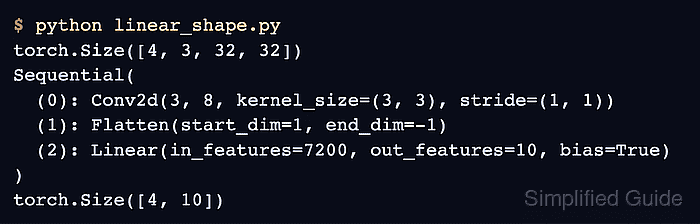
- Save linear_shape.py.
- Run the file again to confirm the same input now passes.
$ python linear_shape.py
torch.Size([4, 3, 32, 32])
Sequential(
  (0): Conv2d(3, 8, kernel_size=(3, 3), stride=(1, 1))
  (1): Flatten(start_dim=1, end_dim=-1)
  (2): Linear(in_features=7200, out_features=10, bias=True)
)
torch.Size([4, 10])
The same four input samples now produce ten output features each without the original exception.