Suppressing warning text and traceback noise is useful when a Python program acts as a small wrapper for another tool, writes machine-readable stdout, or runs under cron, CI, or another caller that only wants the deliberate result. Keeping the error stream quiet makes success output easier to consume without changing the program's exit status.
Current Python warning handling is separate from ordinary stderr writes and uncaught exception output. The warnings module decides whether a warning is shown, while uncaught exceptions are printed through sys.excepthook() to sys.stderr, so suppressing both behaviors takes more than PYTHONWARNINGS=ignore or python3 -W ignore. A short wrapper that combines warnings.catch_warnings() with contextlib.redirect_stderr() keeps the change local to one script run.
This pattern fits short-lived entry points and automation helpers rather than shared library code. redirect_stderr() changes the process-wide sys.stderr object for the duration of the context and does not affect subprocess output, so failures still need an explicit non-zero exit such as sys.exit(1) when the caller must detect them without seeing a traceback.
Steps to suppress warnings and error output in Python:
- Confirm the active Python interpreter before testing warning behavior that can vary across runtimes.
$ python3 --version
Python 3.14.4
Related: How to check Python version
- Create a dedicated working directory for the test scripts.
$ mkdir -p python-warning-error-suppress
$ cd python-warning-error-suppress
A dedicated local directory keeps the traceback paths short and makes it clear that the files are only for verification.
- Create a short script that prints a masked job identifier to stdout, emits a warning, writes directly to stderr, and raises an exception.
- noisy.py
import sys
import warnings

print("job_id=job-20260329-104500")
warnings.warn("optional profile 'batch-default' not found; using built-in defaults", UserWarning)
print("worker stderr: retry budget exhausted", file=sys.stderr)
raise RuntimeError("job processing failed")
- Run the noisy script once to confirm the default warning, stderr line, and traceback output.
$ python3 -u noisy.py
job_id=job-20260329-104500
noisy.py:5: UserWarning: optional profile 'batch-default' not found; using built-in defaults
  warnings.warn("optional profile 'batch-default' not found; using built-in defaults", UserWarning)
worker stderr: retry budget exhausted
Traceback (most recent call last):
  File "noisy.py", line 7, in <module>
    raise RuntimeError("job processing failed")
RuntimeError: job processing failed
-u keeps stdout and stderr unbuffered so the example shows the program output in emission order.
- Create a wrapper script that suppresses warnings inside a scoped context, redirects stderr to /dev/null, and exits with status 1 when an exception occurs.
- quiet.py
import os
import sys
import warnings
from contextlib import redirect_stderr

def run():
    print("job_id=job-20260329-104500")
    warnings.warn("optional profile 'batch-default' not found; using built-in defaults", UserWarning)
    print("worker stderr: retry budget exhausted", file=sys.stderr)
    raise RuntimeError("job processing failed")

with open(os.devnull, "w") as null, redirect_stderr(null), warnings.catch_warnings():
    warnings.simplefilter("ignore")
    try:
        run()
    except Exception:
        sys.exit(1)
warnings.catch_warnings() restores the previous warning filters after the block exits, while redirect_stderr() only changes the current process and not any subprocesses it launches.
PYTHONWARNINGS=ignore and python3 -W ignore only change warning filtering. They do not suppress other stderr writes or the traceback from an uncaught exception.
Suppressing diagnostics hides useful failure context, so this pattern belongs in controlled wrapper code where the caller already handles the non-zero exit path.
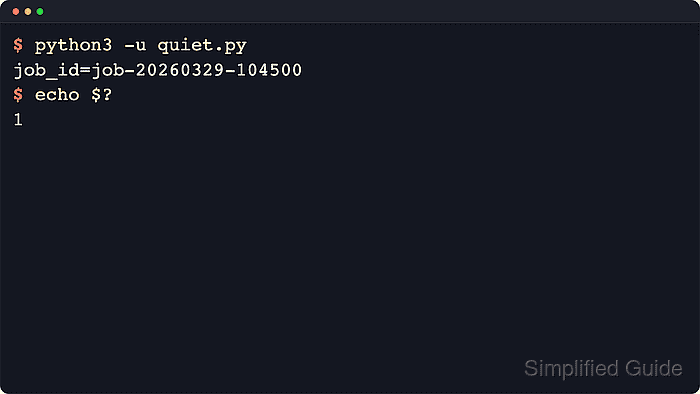
- Run the quiet script and confirm that only the intended stdout remains while the shell still sees a failure exit code.
$ python3 -u quiet.py
job_id=job-20260329-104500
$ echo $?
1
Use this structure when a caller must react to success or failure through the exit code while keeping warning text, tracebacks, and other stderr noise out of the captured output.

Mohd Shakir Zakaria is a cloud architect with deep roots in software development and open-source advocacy. Certified in AWS, Red Hat, VMware, ITIL, and Linux, he specializes in designing and managing robust cloud and on-premises infrastructures.


