A Python project can keep importing an unwanted dependency from a virtual environment even after the application code stops using it. Removing the package from the interpreter that actually owns it prevents stale modules, conflict tests, and clean reinstall checks from pointing at the wrong environment.
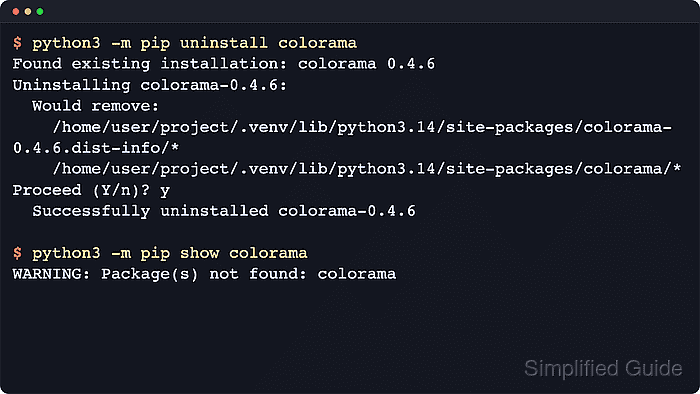
Run pip through the active interpreter, usually as python3 -m pip uninstall on POSIX shells or py -m pip uninstall on Windows. The command removes files recorded in the installed distribution metadata, so checking pip --version and pip show first confirms which environment will change and whether another package still declares a dependency on the target.
The removal affects only the current environment. Distro-managed Python packages may be protected by an externally managed interpreter policy, and legacy python setup.py install or python setup.py develop installs can leave files behind when pip lacks complete metadata. Use a project virtual environment for application dependencies, and use the platform package manager for packages installed by apt, dnf, brew, or similar tools.
Steps to remove a Python package with pip:
- Confirm which interpreter and pip installation will lose the package.
$ python3 -m pip --version
pip 26.1.2 from /srv/apps/example-inventory/.venv/lib/python3.14/site-packages/pip (python 3.14)
The path after from identifies the virtual environment or interpreter that the uninstall command will modify. Use py -m pip --version on Windows when the launcher is the normal entry point.
- Inspect the installed distribution metadata before removing anything.
$ python3 -m pip show colorama
Name: colorama
Version: 0.4.6
Summary: Cross-platform colored terminal text.
Home-page: https://github.com/tartley/colorama
Author:
Author-email: Jonathan Hartley <tartley@tartley.com>
License:
Location: /srv/apps/example-inventory/.venv/lib/python3.14/site-packages
Requires:
Required-by:
The Required-by field is the fastest warning that another installed package still depends on the target package.
- Remove the package from the same interpreter or virtual environment.
$ python3 -m pip uninstall colorama
Found existing installation: colorama 0.4.6
Uninstalling colorama-0.4.6:
  Would remove:
    /srv/apps/example-inventory/.venv/lib/python3.14/site-packages/colorama-0.4.6.dist-info/*
    /srv/apps/example-inventory/.venv/lib/python3.14/site-packages/colorama/*
Proceed (Y/n)? y
  Successfully uninstalled colorama-0.4.6
Use -y to skip the confirmation prompt in automation or other non-interactive shells.
If pip uninstall returns error: externally-managed-environment, switch to a project virtual environment or remove the distro-managed package with apt, dnf, brew, or the platform package manager instead of forcing the change into a system interpreter.
- Confirm that pip no longer reports the package in the same environment.
$ python3 -m pip show colorama
WARNING: Package(s) not found: colorama
This warning is the expected result after a successful uninstall from the current interpreter.
- Check the remaining environment for dependency breakage after the removal.
$ python3 -m pip check
No broken requirements found.
If pip check reports a missing or incompatible dependency, restore the package or reinstall the project's tested dependency set before continuing.

Mohd Shakir Zakaria is a cloud architect with deep roots in software development and open-source advocacy. Certified in AWS, Red Hat, VMware, ITIL, and Linux, he specializes in designing and managing robust cloud and on-premises infrastructures.


