Configuring an Alertmanager notification route sends matched alerts to the receiver that owns them, such as a database team webhook or paging integration. Route changes are useful when existing Prometheus alerts need to move from a default receiver to a team-specific path without changing the alert rule itself.
Alertmanager reads routing rules from the route tree in /etc/alertmanager/alertmanager.yml or the file named by the running --config.file flag. The root route catches every alert, while child routes match labels with matchers and inherit grouping or timing settings unless they override them.
Use staging or a non-paging receiver when testing route changes. A controlled API alert can prove the selected receiver, but normal production alerts should still originate from Prometheus alerting rules and the configured Prometheus-to-Alertmanager connection.
Steps to configure an Alertmanager notification route:
- Open the active Alertmanager configuration file.
$ sudoedit /etc/alertmanager/alertmanager.yml
Replace /etc/alertmanager/alertmanager.yml with the path from the Alertmanager --config.file startup flag when the service or container uses a different file.
- Add a default receiver and a child route for database-team alerts.
route:
  receiver: default-team
  group_by:
    - alertname
    - team
  group_wait: 30s
  group_interval: 5m
  repeat_interval: 4h
  routes:
    - receiver: database-team
      matchers:
        - 'team = "database"'
        - 'severity =~ "warning|critical"'
      group_by:
        - alertname
        - cluster

receivers:
  - name: default-team
    webhook_configs:
      - url: https://hooks.example.net/alertmanager/default
        send_resolved: true
  - name: database-team
    webhook_configs:
      - url: https://hooks.example.net/alertmanager/database
        send_resolved: true
Keep the whole matcher as one YAML string. The single quotes protect YAML parsing, while the double quotes inside the matcher keep values compatible with Alertmanager's UTF-8 matcher parser.
Replace the webhook URLs or the whole receiver blocks with the real receiver integration before applying the file. A route that points at a production paging receiver can notify people as soon as matching alerts arrive.
- Check the Alertmanager configuration syntax.
$ amtool check-config /etc/alertmanager/alertmanager.yml
Checking '/etc/alertmanager/alertmanager.yml'  SUCCESS
Found:
 - global config
 - route
 - 0 inhibit rules
 - 2 receivers
 - 0 templates
Add --enable-feature=utf8-strict-mode to the check before enabling UTF-8 strict mode on the Alertmanager server.
- Test the route with labels from a database alert.
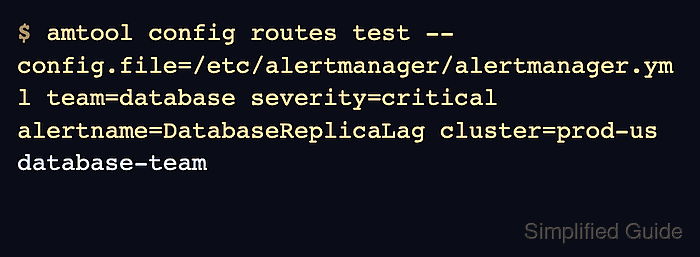
$ amtool config routes test --config.file=/etc/alertmanager/alertmanager.yml team=database severity=critical alertname=DatabaseReplicaLag cluster=prod-us
database-team
The output should be the child receiver name. If the command prints default-team, the alert labels did not match the child route.
- Reload Alertmanager to apply the saved route.
$ curl --silent --show-error --request POST --include http://alertmanager.example.org:9093/-/reload
HTTP/1.1 200 OK
Date: Sat, 20 Jun 2026 10:33:21 GMT
Content-Length: 0
Alertmanager can also reload after receiving SIGHUP when the HTTP endpoint is not reachable from the operator host.
- Create a temporary alert payload that matches the new route.
$ sudoedit /tmp/alertmanager-route-test.json
[
  {
    "labels": {
      "alertname": "DatabaseReplicaLag",
      "team": "database",
      "severity": "critical",
      "cluster": "prod-us"
    },
    "annotations": {
      "summary": "Database replica lag is above threshold"
    },
    "generatorURL": "https://prometheus.example.org/graph?g0.expr=replica_lag_seconds"
  }
]
Send a controlled alert only to a staging Alertmanager or to a receiver that will not page a production on-call rotation.
- Send the controlled alert to the Alertmanager API.
$ curl --silent --show-error --request POST --include \
  --header "Content-Type: application/json" \
  http://alertmanager.example.org:9093/api/v2/alerts \
  --data @/tmp/alertmanager-route-test.json
HTTP/1.1 200 OK
Date: Sat, 20 Jun 2026 10:33:21 GMT
Content-Length: 0
Prometheus should remain the normal client for production alerts. Direct API submission is only a route test for a controlled alert payload.
- Query the active alert and confirm the selected receiver.
$ curl --silent --show-error --get http://alertmanager.example.org:9093/api/v2/alerts \
  --data-urlencode 'filter=alertname="DatabaseReplicaLag"'
[{"annotations":{"summary":"Database replica lag is above threshold"},"receivers":[{"name":"database-team"}],"status":{"state":"active"},"labels":{"alertname":"DatabaseReplicaLag","cluster":"prod-us","severity":"critical","team":"database"}}]
The receivers array should list database-team and the status state should be active.
- Check the receiver after the route's group_wait interval.
$ cat webhook-events.jsonl
{"alerts":[{"labels":{"alertname":"DatabaseReplicaLag","cluster":"prod-us","severity":"critical","team":"database"},"status":"firing"}],"path":"/alertmanager/database","receiver":"database-team","status":"firing"}
For Slack, email, PagerDuty, or another integration, check the corresponding test channel, mailbox, incident, or delivery log instead of a webhook event file.
- Remove the temporary alert payload.
$ sudo rm /tmp/alertmanager-route-test.json
If the test alert payload omits endsAt, Alertmanager resolves it after the configured resolve_timeout when the alert is not refreshed.

Mohd Shakir Zakaria is a cloud architect with deep roots in software development and open-source advocacy. Certified in AWS, Red Hat, VMware, ITIL, and Linux, he specializes in designing and managing robust cloud and on-premises infrastructures.


