PostgreSQL queries that sort or hash more data than work_mem permits spill to temporary files. Raising the setting for the right workload can move those operations back into memory, reducing temp file I/O without changing the SQL text.
work_mem is a per-operation memory cap for internal Sort and Hash nodes, not a per-session total. One query can use several allocations, parallel workers can multiply them, and hash operations can use work_mem multiplied by hash_mem_multiplier. A spill usually appears in EXPLAIN (ANALYZE, BUFFERS) as Sort Method: external merge Disk: … or non-zero temp read and temp written buffers.
A higher value should be tested against a representative query before changing defaults. Apply broad settings only after estimating concurrent sessions, active Sort or Hash nodes, and available memory, then monitor pg_stat_database temp file counters to confirm disk spills fall without causing swap or out-of-memory pressure.
Steps to tune work_mem in PostgreSQL:
- Check the current work_mem default.
$ sudo -u postgres psql -Atc "SHOW work_mem;"
4MB
- Capture an EXPLAIN (ANALYZE, BUFFERS) plan for a slow query that spills to disk.
$ sudo -u postgres psql -d appdb -c "SET work_mem = '64kB'; EXPLAIN (ANALYZE, BUFFERS) SELECT * FROM orders ORDER BY total;"
SET
                                                       QUERY PLAN
------------------------------------------------------------------------------------------------------------------------
 Sort  (cost=17288.82..17538.82 rows=100000 width=32) (actual time=115.755..145.872 rows=100000.00 loops=1)
   Sort Key: total
   Sort Method: external merge  Disk: 4680kB
   Buffers: shared hit=805, temp read=1744 written=1873
   ->  Seq Scan on orders  (cost=0.00..1802.00 rows=100000 width=32) (actual time=0.009..10.715 rows=100000.00 loops=1)
         Buffers: shared hit=802
 Planning:
   Buffers: shared hit=88
 Planning Time: 0.314 ms
 Execution Time: 152.437 ms
(10 rows)
EXPLAIN (ANALYZE, BUFFERS) executes the statement. Use read-only test queries, a staging database, or an explicit rollback plan before analyzing write statements on production data.
- Set a higher work_mem value for a single session.
$ sudo -u postgres psql -d appdb -c "SET work_mem = '64MB'; SHOW work_mem;"
SET
 work_mem
----------
 64MB
(1 row)
Session tuning validates impact without changing instance defaults.
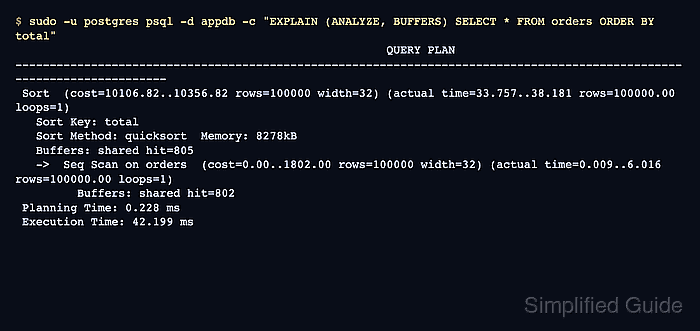
- Re-run the same EXPLAIN (ANALYZE, BUFFERS) to confirm sorts or hashes stay in memory.
$ sudo -u postgres psql -d appdb -c "SET work_mem = '64MB'; EXPLAIN (ANALYZE, BUFFERS) SELECT * FROM orders ORDER BY total;" SET QUERY PLAN ------------------------------------------------------------------------------------------------------------------------ Sort (cost=10106.82..10356.82 rows=100000 width=32) (actual time=80.192..105.927 rows=100000.00 loops=1) Sort Key: total Sort Method: quicksort Memory: 8278kB Buffers: shared hit=805 -> Seq Scan on orders (cost=0.00..1802.00 rows=100000 width=32) (actual time=0.013..15.192 rows=100000.00 loops=1) Buffers: shared hit=802 Planning: Buffers: shared hit=88 Planning Time: 0.473 ms Execution Time: 114.523 ms (10 rows) - Apply a conservative default with ALTER SYSTEM after consistent gains under expected concurrency.
$ sudo -u postgres psql -c "ALTER SYSTEM SET work_mem = '16MB';"
ALTER SYSTEM
work_mem applies per Sort or Hash node and can be allocated several times by one query. A global increase can create memory spikes when many sessions run sorting or hashing queries at the same time.
Use scoped defaults when only one workload needs the larger value: ALTER ROLE appuser SET work_mem = '64MB';
ALTER DATABASE appdb SET work_mem = '64MB'; - Reload the PostgreSQL configuration to activate the new default.
$ sudo -u postgres psql -Atc "SELECT pg_reload_conf();"
t
systemd based hosts can reload with sudo systemctl reload postgresql when a service unit is available.
Over-allocating work_mem can exhaust RAM and trigger severe swapping or an OOM kill during peak load.
- Verify the new default in a fresh session.
$ sudo -u postgres psql -Atc "SHOW work_mem;"
16MB
- Watch database temp file counters to confirm spill reduction after deployment.
$ sudo -u postgres psql -d appdb -c "SELECT datname, temp_files, pg_size_pretty(temp_bytes) AS temp_written, stats_reset FROM pg_stat_database WHERE datname = current_database();"
 datname | temp_files | temp_written | stats_reset
---------+------------+--------------+-------------
 appdb   |          1 | 4680 kB      |
(1 row)

Mohd Shakir Zakaria is a cloud architect with deep roots in software development and open-source advocacy. Certified in AWS, Red Hat, VMware, ITIL, and Linux, he specializes in designing and managing robust cloud and on-premises infrastructures.


